
Yes, a TV can be mounted vertically if the manufacturer allows it and you use a mount that supports portrait orientation. Some TVs overheat or have panel issues when turned sideways, so check your model’s manual first.
If it’s approved, mount into studs or masonry, keep the vents clear, and make sure the VESA pattern and weight rating match. Vertical mounting works best for digital signage, menus, and social video displays.

Credit: www.amazon.com
Vertical Tv Mounting Basics
Mounting a TV vertically is an option some users explore for unique spaces or specific uses. Understanding the basics helps you decide if vertical TV mounting suits your needs. This section covers key points to know before changing your TV’s orientation.
Vertical mounting changes the usual wide screen layout to a taller, portrait view. This affects how you watch content and how the TV fits in your room. It is important to know what works well and what challenges you might face.
Can Tvs Be Mounted Vertically?
Yes, many TVs can be mounted vertically. Most modern LED and LCD TVs support portrait mode. Check your TV manual or manufacturer website to confirm vertical mounting is safe. The mounting bracket must also allow rotation or be designed for vertical use.
Not all TVs handle vertical mounting the same way. Some models have vents or speakers that may be blocked or affected. Always verify these details before installation.
Benefits Of Vertical Mounting
Vertical mounting saves space in narrow rooms or tight corners. It is ideal for digital signage, social media displays, or art presentations. Portrait mode fits content like vertical videos or documents better than horizontal screens.
Vertical TVs can create a modern, stylish look in homes or offices. It allows creative ways to use your TV beyond traditional viewing setups.
Limitations To Consider
Vertical mounting can limit the viewing angle and picture quality for some content. Most TV shows and movies are made for horizontal screens. Vertical placement may cause black bars or stretched images.
Heat dissipation might be less effective if vents are blocked. Make sure the mount and location allow proper airflow. Some smart TV features or sensors may not work correctly in vertical mode.
Finally, secure mounting is critical. Use brackets rated for your TV size and weight to avoid accidents.
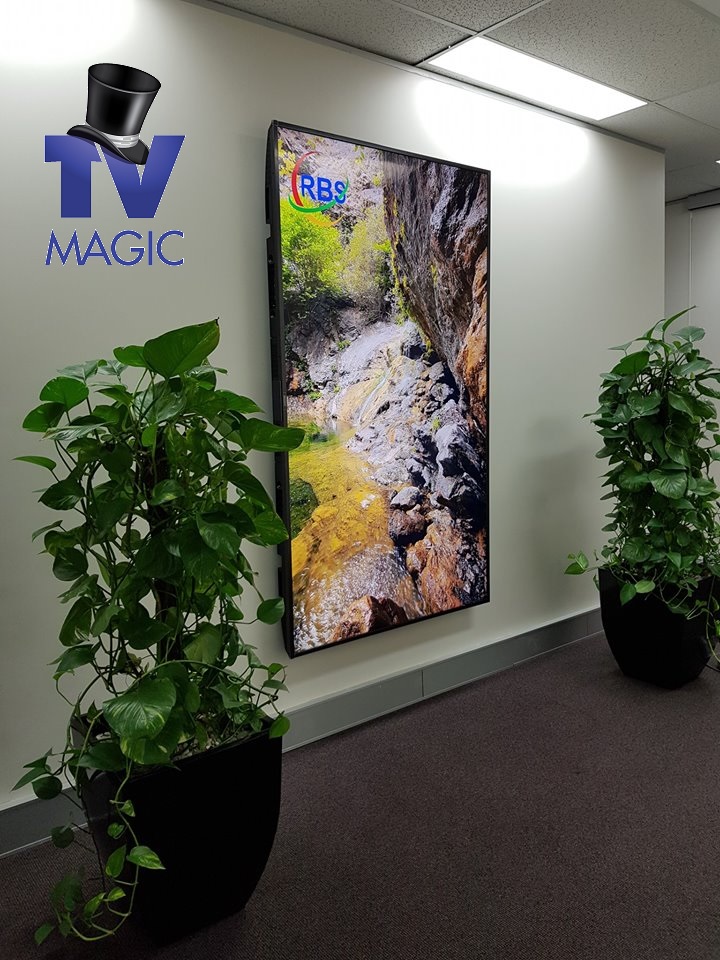
Credit: www.tvmagic.com.au
Tv Models And Vertical Mounting
Many TV owners wonder if their model supports vertical mounting. Not all TVs work well in portrait mode. Some models allow easy rotation without damage to the screen or software. Knowing which TVs support vertical orientation helps avoid problems.
This section covers popular TV brands and their vertical mounting options. It explains what to check before mounting your TV vertically.
Which Tvs Support Vertical Orientation?
Most TVs are designed for horizontal use. Few officially support vertical mounting. Look for TVs with a rotatable screen or VESA mount holes that fit portrait brackets. OLED and LED TVs usually handle vertical mounting better than LCDs.
Check the user manual or manufacturer website for vertical use instructions. Some smart TVs adjust the display automatically when rotated.
Samsung Frame Tv Vertical Options
Samsung Frame TVs offer unique vertical mounting features. They have customizable bezels and art modes that fit well in portrait mode. Samsung provides official mounts that support vertical installation.
The Frame TV can switch its display to portrait orientation through settings. This makes it ideal for showing art or photos vertically. Be sure to use the recommended mount for secure installation.
Other Brands And Compatibility
Brands like LG, Sony, and Vizio sometimes support vertical mounting. Their TVs often have VESA mounts compatible with portrait brackets. Check the product specifications or ask customer support for confirmation.
Third-party mounts can work if they match the VESA pattern. Avoid forcing a TV to mount vertically without support. Improper mounting can damage the TV or void warranties.
Mount Types For Vertical Setup
Mounting a TV vertically requires the right type of mount. Different mounts offer various features for a secure vertical setup. Choosing the correct mount ensures safety and the best viewing experience.
Standard Wall Mounts
Standard wall mounts support most TVs and fix them close to the wall. They hold the TV firmly but usually do not allow rotation. Many standard mounts can hold a TV in vertical position if the TV and mount are compatible.
Auto-rotating Mounts
Auto-rotating mounts allow the TV to switch between horizontal and vertical modes automatically. These mounts have motors or mechanisms that rotate the screen. They are ideal for users needing both portrait and landscape views.
Manual Rotation Mounts
Manual rotation mounts let you adjust the TV angle by hand. You can rotate the screen to vertical or horizontal positions easily. These mounts are simpler and often less expensive than auto-rotating types.
No-drill Pillar Mounts
No-drill pillar mounts attach TVs without making holes in the wall. They use pillars or stands for support. These mounts are perfect for renters or places where wall damage is not allowed. Many models support vertical mounting securely.
Installation Tips
Mounting a TV vertically requires careful planning to ensure safety and optimal viewing. Proper installation helps avoid damage and enhances the viewing experience. Follow these tips for a smooth setup.
Choosing The Right Mount
Select a mount designed for vertical installation. Some mounts support portrait mode better than others. Check the weight limit and compatibility with your TV model. A sturdy mount prevents wobbling and accidents.
Mounting Height Guidelines
Place the TV at eye level for comfortable viewing. Measure the center of the screen to match your seated eye height. Avoid mounting too high to reduce neck strain. Consider room size and seating arrangement for best results.
Securing The Tv Safely
Use proper anchors for your wall type, such as studs or masonry bolts. Tighten all screws firmly without overdoing it. Double-check the mount’s stability before hanging the TV. Safety straps add extra security against falls.
Adjusting Tv Settings
Adjusting TV settings is essential when mounting a television vertically. The default settings usually fit horizontal use. Changing these settings improves viewing quality and user experience. It helps the screen display content correctly and avoids distortion or cropping. Many modern TVs offer options to tweak orientation and aspect ratio. Understanding these adjustments ensures better picture performance in vertical mode.
Screen Orientation Adjustments
Most TVs allow changing screen orientation in settings. Look for options labeled “rotate,” “screen orientation,” or “display mode.” Select “portrait” or “vertical” to match the new mount position. This adjustment rotates the image 90 degrees. It prevents the picture from appearing sideways or upside down. Some TVs may require a software update to support this feature. Check your user manual or online support for specific instructions.
Picture And Aspect Ratio Tweaks
Vertical mounting changes the screen’s shape and size ratio. Adjusting the aspect ratio keeps images from stretching or squishing. Common ratios include 16:9 and 4:3, but vertical mode might need custom settings. Use the TV’s picture settings menu to experiment with width and height. Adjust brightness and contrast for the best viewing in vertical format. Proper tweaks avoid black bars or cropped edges on the screen.
Software Support For Vertical Mode
Not all TVs natively support vertical mounting. Some require additional software or apps for proper display. Smart TVs often have downloadable apps to enable vertical mode. Firmware updates can add this feature to older models. Check the manufacturer’s website for available software. Using supported software ensures smooth content display and prevents glitches. It also helps apps and streaming services adapt to vertical viewing.
Common Mistakes To Avoid
Mounting a TV vertically can be a smart choice for certain spaces and uses. Avoiding common mistakes ensures a safe and pleasant viewing experience. Many errors happen during installation, causing problems later. Pay attention to details like height, weight, and cables. These factors affect both safety and comfort.
Incorrect Mounting Height
Mounting your TV too high or too low strains your neck and eyes. The center of the screen should be at eye level when seated. Measure carefully before drilling holes. Adjusting height after mounting is hard and may damage walls.
Ignoring Tv Weight Limits
Each mount has a weight limit. Exceeding it risks the TV falling and breaking. Check the mount’s specifications and your TV’s weight before buying. Use strong anchors and screws suitable for your wall type. Safety comes first.
Poor Cable Management
Messy cables spoil the look and can cause accidents. Plan cable routes before mounting. Use cable clips or covers to keep wires tidy and hidden. Good cable management also helps with easy maintenance and prevents wear on cords.
Creative Uses For Vertical Tvs
Vertical TV mounting opens up many creative possibilities beyond traditional use. It changes how we interact with screens and content. Vertical orientation suits specific environments and needs. The unique shape lets you display certain media more naturally. Explore how vertical TVs enhance art, gaming, and social media viewing.
Digital Art Displays
Vertical TVs are perfect for showcasing digital art. Many artworks are designed in portrait mode. This orientation highlights details and colors better. Galleries and homes can use vertical screens to create a modern art display. It turns the TV into a digital canvas. You can easily change art pieces without physical frames. This setup adds style and a personal touch to any space.
Vertical Gaming Setups
Some games benefit from a vertical screen layout. Classic arcade games and puzzles often use tall screens. Vertical TVs provide a better field of view for these genres. Gamers can enjoy a new perspective and immersion. This setup can also save desk space. It creates a unique and focused gaming environment. Vertical mounting suits gaming rooms or compact spaces well.
Social Media And Content Viewing
Social media feeds and mobile videos usually fit vertical screens. Watching stories, reels, or TikTok videos feels natural on a vertical TV. This reduces black bars on the sides and maximizes screen use. Vertical TVs work well in public spaces like cafes or waiting rooms. They keep viewers engaged with easy-to-read content. This setup enhances the experience of modern digital content consumption.

Credit: www.computercablestore.com
Conclusion
Mounting a TV vertically is possible and can suit certain spaces well. Check your TV’s manual to ensure it supports vertical mounting. Some models may not display properly in portrait mode. Use a sturdy mount designed for vertical setup. Position the TV at a comfortable viewing height to avoid neck strain.
Vertical mounting works great for digital art or specific content. Plan your room layout carefully before installation. With the right preparation, vertical TV mounting can enhance your viewing experience.