
Are you tired of struggling with your Samsung TV remote? Finding the right remote can make all the difference in your viewing experience.
Whether you want simple control or advanced features, knowing the types of Samsung TV remotes available helps you pick the perfect one for your needs. You’ll discover the different remotes designed to make your TV time easier and more enjoyable.
Keep reading to find out which remote suits you best—and take full control of your Samsung TV today!

Standard Samsung Remotes
Standard Samsung remotes come with most Samsung TVs. They offer simple control for everyday use. These remotes focus on ease and basic functions. Perfect for users who want straightforward operation without extra features.
They have a familiar button layout and work well for most TV tasks. The design is user-friendly, making it easy to change channels, adjust volume, and access menus quickly. Standard remotes are reliable and do not require complex setup.
Basic Features
Standard Samsung remotes include all essential buttons. Volume, channel, power, and input selection are easy to find. A directional pad helps navigate the TV menu with ease. Some models have quick access buttons for apps like Netflix or YouTube.
These remotes use infrared signals to communicate with the TV. Battery life is good, often lasting many months. The remote’s size fits comfortably in most hands, making it easy to hold and use.
Compatibility
Standard Samsung remotes work with a wide range of Samsung TV models. They support most Samsung smart TVs, LED, and QLED series. Users do not need to worry about matching the remote to their TV.
Replacement is simple if the original remote is lost or damaged. Many stores and online shops sell compatible standard Samsung remotes. This makes it easy to find a suitable remote without hassle.
Smart Remotes
Samsung smart remotes bring new ease to controlling your TV. These remotes go beyond buttons. They offer features that make watching TV simple and fun.
Smart remotes connect to your TV through Bluetooth or Wi-Fi. This connection allows for smoother control and more options than old remotes. They often come with a sleek design that fits well in your hand.
Voice Control
Samsung smart remotes let you speak commands to your TV. You can change channels, search for shows, or adjust volume by voice. This feature works with Bixby, Samsung’s voice assistant. It understands simple words and phrases. Voice control makes it easy to use your TV without pressing many buttons.
Touchpad Functions
Many Samsung smart remotes include a touchpad area. This touchpad works like a mouse on a computer. You swipe to move the cursor on the screen. Tap to select items. This method is faster and more natural than pressing buttons. It helps you browse menus and apps smoothly.
Universal Remote Capabilities
Samsung smart remotes can control other devices too. They often act as universal remotes. This means you can operate your sound system, DVD player, and set-top box with one remote. It reduces clutter and makes managing devices easier. You only need one remote for most of your entertainment gear.
Bluetooth Remotes
Bluetooth remotes are a popular choice for Samsung TVs. They use Bluetooth technology to connect with your TV. This connection does not need direct line of sight. You can control the TV even if something blocks the remote.
These remotes offer more freedom and convenience. They often have voice control and smart features. Using a Bluetooth remote feels modern and easy.
Wireless Connectivity
Bluetooth remotes connect wirelessly to the TV. No cables or infrared signals are required. This means fewer interruptions in control. The remote pairs quickly and stays connected. It works well even through walls or furniture. You don’t have to point it directly at the TV.
Enhanced Range
Bluetooth remotes have a longer range than regular remotes. You can sit farther from the TV and still control it. This range usually reaches up to 30 feet. It allows more flexibility in room setup. You can move around without losing connection. This makes watching TV more comfortable and easy.
Solar-powered Remotes
Solar-powered remotes are a smart choice for Samsung TV users. They use sunlight or indoor light to charge. This reduces the need for batteries. These remotes help save energy and reduce waste.
Eco-friendly Design
These remotes have a built-in solar panel. It captures light and turns it into power. The design is simple and clean. No need for frequent battery changes. This makes them better for the environment. They help lower your carbon footprint. A small step towards a greener home.
Charging Options
Solar-powered remotes charge through natural or artificial light. Place them near a window or lamp to charge faster. They also have backup batteries for low light. This keeps the remote working all the time. No worries about the remote stopping suddenly. Charging is easy and hassle-free.
Game Controller Remotes
Game controller remotes offer a unique way to interact with Samsung TVs. They combine the functions of a traditional remote with gaming controls. This makes playing games on your TV easier and more enjoyable. These remotes have buttons and joysticks designed for gaming. They provide better control and a more immersive experience.
Gaming Features
Game controller remotes have special buttons for fast game actions. They include directional pads, triggers, and analog sticks. Some models support vibration feedback for realistic gameplay. They also feature shortcut keys to access game menus quickly. These remotes often have ergonomic designs for comfortable long sessions.
Compatibility With Samsung Tvs
Most game controller remotes work well with Samsung smart TVs. They connect via Bluetooth or USB for easy pairing. Compatibility depends on the TV model and software version. Samsung’s gaming remotes support popular gaming apps and services. Always check your TV’s compatibility before buying a game controller remote.
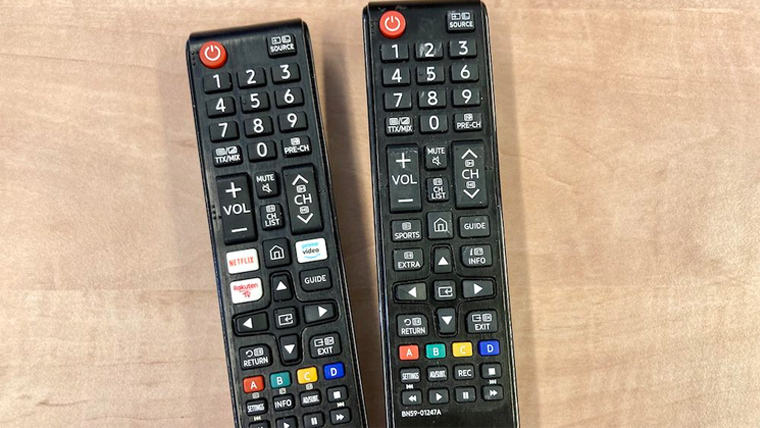
Replacement Remotes
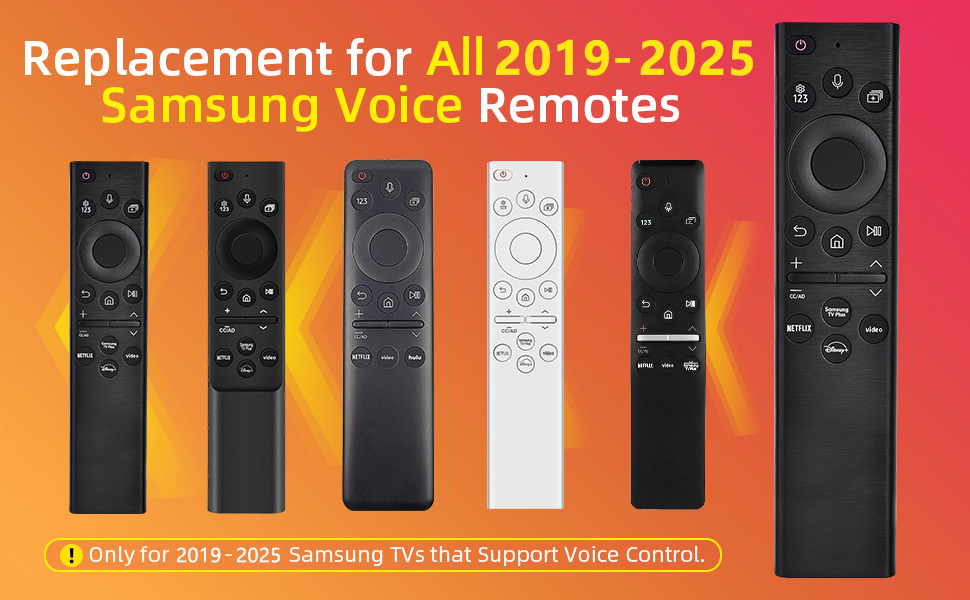
Replacement remotes are a practical solution for Samsung TV owners. These remotes help restore control without buying a new TV. They come in various types and qualities, fitting different needs and budgets. Choosing the right replacement remote can make your TV experience smooth again.
Aftermarket Options
Aftermarket remotes are made by companies other than Samsung. They often cost less than original remotes. These remotes may work with many Samsung TV models. Some offer extra features like universal control for multiple devices. They can be a simple fix for lost or broken remotes.
Quality varies in aftermarket remotes. Some match original Samsung remotes well. Others may feel cheap or not work perfectly. Check reviews and product details before buying. Make sure the remote supports your TV model.
Oem Vs Third-party
OEM remotes are made by Samsung. They guarantee full compatibility and original quality. These remotes look and work like the one that came with your TV. They usually cost more than other options.
Third-party remotes come from other brands. They can offer similar functions at a lower price. Some third-party remotes include extra features. But they may lack perfect compatibility or durability. Choose based on your budget and how much you need the exact match.
Frequently Asked Questions
What Are The Main Types Of Samsung Tv Remotes?
Samsung TV remotes come in standard, smart, and Bluetooth varieties. Each type offers different features for control and connectivity.
How Does A Samsung Smart Remote Differ From A Regular One?
A smart remote has voice control and touchpad functions. It lets you navigate apps and settings easily.
Can I Use A Universal Remote With My Samsung Tv?
Yes, many universal remotes support Samsung TVs. Just program the remote with the right code for your model.
What Features Do Bluetooth Samsung Remotes Offer?
Bluetooth remotes connect wirelessly without needing a direct line of sight. They often include voice commands and quick access buttons.
Are Samsung Tv Remotes Compatible Across Different Models?
Some remotes work with multiple Samsung models, especially within the same series. Check compatibility before buying to ensure proper function.
Conclusion
Samsung TV remotes come in different types to fit your needs. Some have smart features, while others keep it simple. Choosing the right remote makes using your TV easier and more fun. Understanding each type helps you pick one that works best.
Now, you can control your Samsung TV with confidence and ease. Enjoy watching your favorite shows without any hassle. Keep this guide handy when it’s time to replace or upgrade your remote. Simple, clear choices lead to better TV experiences.