
When it comes to setting up your TV, the right cable can make all the difference. You might think all TV cables are the same, but choosing the right one can improve your picture quality, sound, and overall viewing experience.
Whether you want crystal-clear HD or a simple connection, understanding the different types of TV cables will save you time and frustration. You’ll discover the key TV cables, what they do, and which one fits your needs best. Keep reading, and you’ll be able to pick the perfect cable for your setup like a pro.
Coaxial Cables
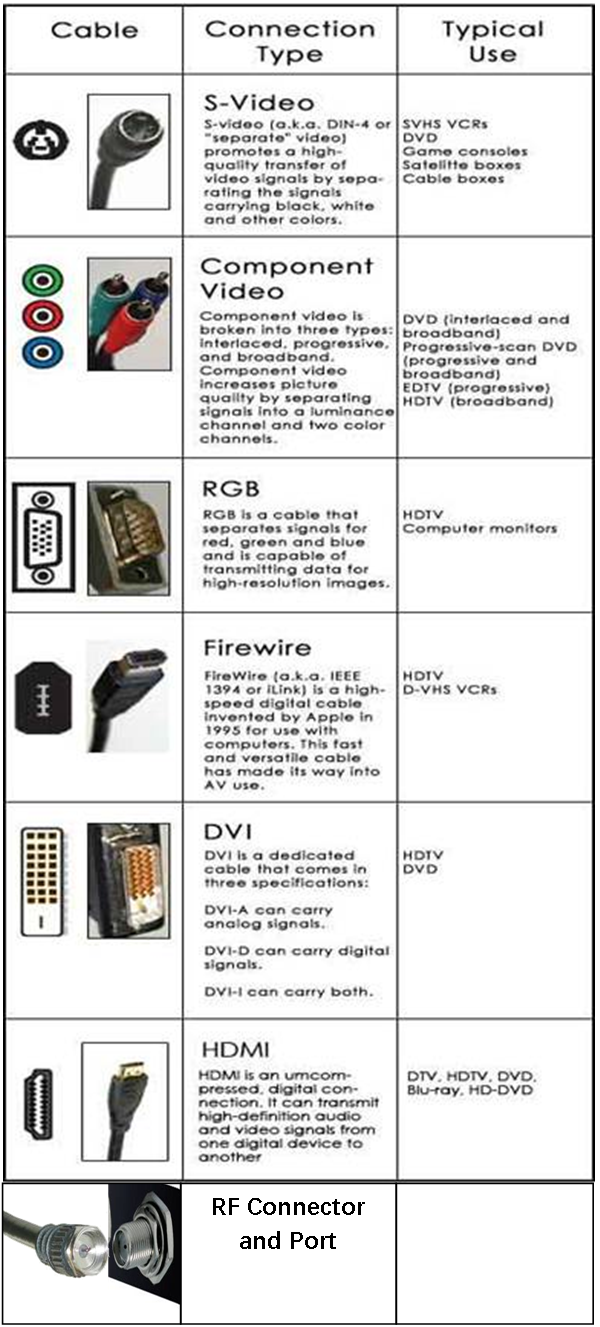
Coaxial cables are a popular type of TV cable known for their durability and reliable signal transmission. They have been used for decades in television setups and remain a common choice today. These cables carry radio frequency signals with minimal interference, making them suitable for various applications.
Construction And Features
Coaxial cables consist of a central copper conductor. This conductor is surrounded by an insulating layer. Around this layer, there is a metallic shield. The shield helps block external noise and interference. The entire cable is covered with a protective outer jacket. This design keeps the signal strong and clear over long distances.
Common Uses
These cables are often used for cable TV connections. They also link satellite dishes to receivers. Many home internet services rely on coaxial cables. They connect modems to the service provider’s network. Coaxial cables are used in CCTV camera systems too. Their ability to carry signals over long distances makes them versatile.
Advantages And Limitations
Coaxial cables offer strong resistance to interference. They provide good signal quality for TV and internet. These cables are easy to install and widely available. On the downside, they can be bulky and less flexible. Signal quality may drop over very long distances. Upgrading to newer cable types might be necessary for advanced systems.
Hdmi Cables
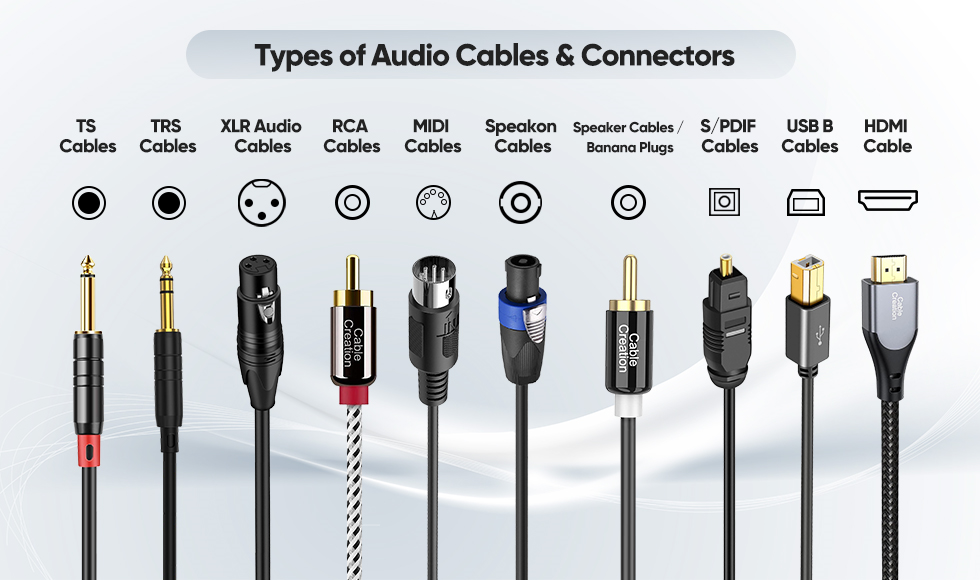
HDMI cables are the standard choice for connecting TVs to devices like Blu-ray players, gaming consoles, and streaming boxes. They carry both audio and video signals through a single cable. This makes setup simple and neat. HDMI supports high-definition video and clear sound, making it popular in homes worldwide.
Versions And Compatibility
HDMI cables come in different versions. Each version adds new features or improves speed. Common versions include 1.4, 2.0, and 2.1. Older cables may not support the latest video formats. Always check your device’s HDMI version to ensure compatibility. Most HDMI ports work with all versions but may limit some features.
Audio And Video Quality
HDMI cables deliver high-quality audio and video. They support resolutions from 720p to 8K and beyond. Audio formats like Dolby Atmos and DTS:X also work through HDMI. Good cables avoid signal loss and interference. This keeps picture sharp and sound clear without extra wires.
Usage Scenarios
Use HDMI cables for TVs, computers, and gaming consoles. They connect streaming devices like Roku or Apple TV easily. Home theater systems rely on HDMI for surround sound and video. HDMI also works with monitors and projectors. Its simple plug-and-play design fits most home setups.
Component Cables
Component cables are a popular choice for connecting TVs to various devices. They use three separate cables to carry video signals. This separation helps improve picture quality compared to older cables. Component cables do not carry audio signals, so you need separate cables for sound.
Color Coding And Signals
Component cables have three color-coded plugs: red, green, and blue. Each color carries a different video signal part. The green cable carries brightness and sync information. The blue and red cables carry color difference signals. This setup helps TVs show clearer images with accurate colors.
Picture Quality
Component cables provide better picture quality than composite cables. They support high-definition video up to 1080p. This means sharper images and richer colors. They reduce signal interference by separating video parts. This results in a cleaner and more detailed picture on your TV.
When To Use Component Cables
Use component cables if your TV or device does not support HDMI. They are useful for older HDTVs and DVD players. Component cables work well for watching HD content with better quality. They are not ideal for audio, so use separate cables for sound. Choose component cables to improve video quality without upgrading all devices.

Composite Cables
Composite cables are one of the oldest types of TV cables. They carry video and audio signals through a single cable. These cables have three connectors: yellow for video, red and white for audio. They are easy to use and were very popular before HDMI cables became common.
Signal Transmission
Composite cables send analog signals. The yellow cable carries the video signal in standard definition. The red and white cables carry the left and right audio channels. These signals can lose quality over long distances. Interference from other devices can also affect the signal. This can cause a blurry picture or static sound.
Devices That Use Composite
Older TVs often use composite cables. DVD players and VCRs connect with composite cables. Some video game consoles, like the PlayStation 2, use these cables. They also work with camcorders and other older video devices. Many newer devices do not support composite cables anymore.
Pros And Cons
Composite cables are simple and cheap. They are easy to connect and widely available. They work well with older devices. The quality is lower compared to modern cables. Composite does not support high definition video. Audio and video signals can degrade over distance. Newer cables like HDMI offer better quality and convenience.
Optical Audio Cables
Optical audio cables are a popular choice for connecting TVs to sound systems. They use light to send sound signals. This method helps keep the sound clear and free from interference. Many people choose optical cables for better audio experience.
How They Work
Optical audio cables transmit sound as pulses of light. The cable has a fiber optic core. This core carries light signals from the TV to speakers or soundbars. The light signals represent digital audio data. A small LED sends the light, and a sensor receives it at the other end.
Benefits For Sound Quality
Optical cables deliver clean and crisp audio. They do not pick up electrical noise from other devices. This results in clear sound without static or hum. Optical cables support surround sound formats like Dolby Digital. This adds depth and richness to movies and music.
Compatibility With Tvs
Most modern TVs have an optical audio output port. This makes it easy to connect with soundbars or home theater systems. Optical cables work well with many brands and models. They are a good choice for improving TV audio without complex setup.
Usb Cables For Tv
USB cables have become a popular choice for connecting devices to TVs. They offer a simple way to transfer data and power between gadgets. Many modern TVs include USB ports for easy access. These cables support various functions like playing media files or charging devices.
Types Of Usb Cables
There are several types of USB cables used with TVs. USB Type-A is the standard rectangular connector found on most TVs. USB Type-C is newer and reversible, making it easier to plug in. Micro-USB is smaller and often used for older devices. Each type serves different purposes depending on the device and TV model.
Connecting External Devices
USB cables let you connect external devices to your TV. Common devices include flash drives, external hard drives, and keyboards. You can watch videos, view photos, or listen to music stored on these devices. Some TVs also support connecting game controllers or webcams via USB.
Limitations
USB cables have limits when used with TVs. They may not support high-speed data transfer like HDMI cables. Not all USB ports provide enough power for some devices. Some TVs restrict the types of files you can play from USB drives. These factors affect how you can use USB cables with your TV.
Ethernet Cables
Ethernet cables are essential for connecting smart TVs to the internet. They provide a stable and fast wired connection. Unlike Wi-Fi, Ethernet offers less interruption and better speed. This makes streaming videos and online gaming smoother. Many smart TVs have an Ethernet port for direct cable connection. Using Ethernet cables can improve your viewing experience significantly.
Role In Smart Tvs
Smart TVs use Ethernet cables to access the internet. This allows streaming apps like Netflix and YouTube to work well. Ethernet connections reduce buffering and lag during streaming. They also help with software updates on your TV. A wired connection keeps your TV online even if Wi-Fi is weak.
Cable Categories
Ethernet cables come in different categories. Cat5e is common and supports speeds up to 1 Gbps. Cat6 cables offer higher speeds and less interference. Cat7 cables are used for very fast connections, up to 10 Gbps. Choose the cable category based on your internet speed and TV’s port.
Setup Tips
Keep the Ethernet cable away from power cords to avoid interference. Use the shortest cable length that fits your setup. Plug the cable firmly into the TV’s Ethernet port. Test the connection speed after setup to ensure good performance. Consider using cable clips to keep wires neat and secure.
Frequently Asked Questions
What Are The Common Types Of Tv Cables?
The common types include HDMI, coaxial, component, composite, and VGA cables. Each type carries different signals for video and audio.
Which Tv Cable Provides The Best Picture Quality?
HDMI cables offer the best picture and sound quality for modern TVs. They carry both digital video and audio signals in one cable.
Can I Use Coaxial Cable For High-definition Tv?
Yes, coaxial cables support HD signals but need a digital tuner or set-top box. They are common for cable and satellite TV connections.
What Is The Difference Between Component And Composite Cables?
Component cables split video into three parts for better quality. Composite cables carry video and audio in one signal, so quality is lower.
Do Vga Cables Work With Smart Tvs?
VGA cables can connect older devices to some smart TVs but only carry video. You need separate cables for audio with VGA.
Conclusion
Choosing the right TV cable makes a big difference in picture and sound quality. Each type of cable has its own use and benefits. Some work better for older TVs, while others fit modern devices. Understanding these options helps you connect your TV easily.
Keep your setup simple and clear. This way, you enjoy your favorite shows without trouble. Remember, good cables mean a better viewing experience every time.