
Yes, you can connect a TV antenna to a projector, but the projector needs a TV tuner because antennas don’t plug into projectors directly. The simplest method is using a digital OTA tuner box or a TV with an antenna input, then sending the video to the projector through HDMI.
Once the tuner scans and pulls in the channels, the projector just displays the picture like any other HDMI source.
Projector Inputs And Compatibility
Understanding projector inputs and compatibility is key before connecting a TV antenna. Projectors have specific ports that accept certain signals. Knowing these details helps you decide if a direct connection is possible.
Common Input Ports On Projectors
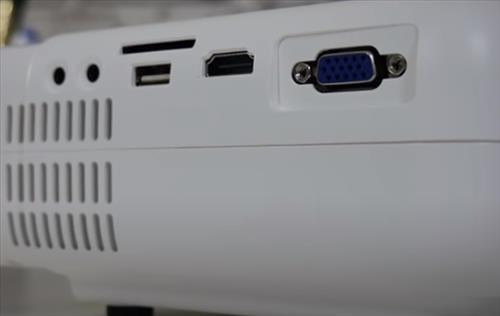
Projectors usually have HDMI ports. These support high-definition video and audio. Some models include VGA ports for older computers. USB ports appear on many projectors for media playback. A few projectors have RCA or composite inputs. These accept analog signals but are less common now.
Signal Types Supported By Projectors
Projectors mainly support digital signals like HDMI. Analog signals such as those from traditional TV antennas often require a converter. Most projectors do not have built-in tuners to decode antenna signals. This means the antenna’s signal must be processed by another device first. Understanding this avoids connection problems and helps set up your viewing correctly.
Types Of Tv Antennas
TV antennas come in different types, each serving a special purpose. Knowing the types helps you pick the right one for your setup. This choice affects your signal strength and picture quality.
Antennas vary mainly by where they are placed and the type of signals they catch. Understanding these differences makes connecting a TV antenna to a projector easier and more effective.
Indoor Vs Outdoor Antennas
Indoor antennas sit inside your home. They are small and easy to install. They work best near windows or open spaces. Indoor antennas are great for city areas with strong signals.
Outdoor antennas mount outside, often on roofs or walls. They catch signals from farther away. Outdoor antennas handle bad weather better and give stronger signals. These are ideal for rural or weak signal areas.
Digital And Analog Signals
TV signals come in two main types: digital and analog. Digital signals offer clearer pictures and sound. Most modern broadcasts use digital signals today.
Analog signals are older and less common now. They can have fuzzier images and sound. Some antennas work with both types, but digital antennas are best for new TVs and projectors.
Direct Connection Challenges
Connecting a TV antenna directly to a projector is not as simple as it sounds. Most projectors lack the necessary input and processing to handle antenna signals. This causes problems in receiving and displaying live TV channels.
Understanding these challenges helps explain why you cannot just plug an antenna into a projector and expect clear TV signals. The antenna signal requires specific handling that projectors are not built for.
Why Antennas Don’t Plug Straight In
TV antennas send out radio frequency (RF) signals. These signals are raw and unprocessed. Projectors do not have the RF tuners needed to decode these signals. Without a tuner, the projector cannot understand or show the TV content.
The antenna’s signal needs to be converted into a format the projector can use. Most projectors only accept HDMI or AV input. Antennas cannot output these signal types directly.
Signal Processing Needs
TV signals require decoding before display. This process is called signal processing. It involves tuning the frequency, demodulating the signal, and decoding the video and audio streams.
Antenna signals must pass through a TV tuner or a set-top box. These devices convert signals into HDMI or other digital formats. Projectors then receive these processed signals for display.
Using A Tv Tuner With A Projector
Using a TV tuner with a projector lets you watch live TV on a large screen. A projector alone cannot decode TV signals. A TV tuner acts as a bridge between your antenna and projector. It receives broadcast signals and converts them into video. This setup is perfect for watching free TV channels without cable.
What Is A Tv Tuner?
A TV tuner is a device that captures TV signals. It can be built into some projectors or come as a separate box. The tuner connects to a TV antenna to receive channels. It converts radio waves into video and audio. This lets your projector display live TV programs. Many tuners support both digital and analog signals.
Connecting Tuners To Projectors
First, connect your TV antenna to the tuner’s input port. Use a coaxial cable for the best connection. Then, link the tuner to your projector using HDMI or RCA cables. Power on both devices and select the input source on the projector. Tune the channels on the TV tuner and enjoy watching TV on a big screen. Some tuners also have remote controls for easy channel surfing.
Alternative Solutions
Connecting a TV antenna directly to a projector is not always simple or possible. Many projectors lack built-in tuners to decode antenna signals. Alternative solutions offer a practical way to watch antenna TV on a projector screen. These options use extra devices to receive and process antenna signals effectively.
Streaming Devices With Antenna Support
Some streaming devices include ports for antenna connection. They can decode over-the-air TV signals and stream content to the projector. These devices connect via HDMI or other inputs on the projector. They combine streaming apps and live TV channels in one device. This setup allows easy switching between internet streaming and antenna TV.
External Digital Tv Boxes
External digital TV boxes receive antenna signals and decode them for display. They work like traditional TV tuners but connect to projectors instead. These boxes have HDMI outputs compatible with most projectors. They offer simple channel navigation and recording features. Using an external box ensures clear picture quality from antenna broadcasts.
Credit: www.wirelesshack.org
Setting Up Your System
Setting up your system to connect a TV antenna to a projector involves a few clear steps. Each part must work well together. This ensures good picture quality and a smooth viewing experience. Follow the steps carefully to get the best results.
Connecting Antenna To Tuner Or Box
Start by connecting the TV antenna to a tuner or a digital TV box. Use a coaxial cable for this connection. Make sure the cable fits tightly in the antenna and tuner ports. This helps avoid signal loss or interference. The tuner or box will decode the antenna signal for the projector.
Linking Tuner Or Box To Projector
Next, connect the tuner or box to the projector. Use an HDMI cable for the best video and sound quality. Plug one end of the HDMI into the tuner or box. Plug the other end into the projector’s HDMI input. Turn on both devices and select the right input source on the projector.
Optimizing Signal Quality
Place the antenna in a high and open spot, near a window if possible. Avoid placing it near metal objects or electronic devices. Adjust the antenna direction slowly to find the strongest signal. Use the tuner’s signal strength meter if available. This improves picture clarity and reduces interruptions.
Troubleshooting Tips
Connecting a TV antenna to a projector can sometimes cause issues. These problems often stop you from enjoying clear, uninterrupted viewing. Below are simple tips to help fix common problems. Follow these steps to improve your experience and get the best results from your setup.
No Signal Issues
Check all cable connections between the antenna and projector. Loose or damaged cables often cause no signal problems. Make sure the antenna is in a good spot with a clear line of sight. Try moving the antenna higher or closer to a window. Also, verify the projector’s input source matches the antenna connection. Restart the projector to refresh its signal detection.
Poor Picture Quality
Weak signals often cause blurry or pixelated images. Adjust the antenna direction slowly to find the strongest signal. Avoid obstacles like walls or metal objects near the antenna. Check the cable for any damage or wear, as this can reduce quality. Lower the projector’s resolution to match the signal quality for smoother playback. Clean the projector lens regularly to keep the image sharp.
Compatibility Problems
Not all projectors support direct antenna connections. Confirm your projector has a built-in tuner or a compatible digital TV tuner box. Use an external tuner device if your projector lacks the right input. Match the signal type (analog or digital) from the antenna to the projector or tuner. Consult the projector’s manual for supported signal formats and connection types. Compatibility ensures your setup works smoothly without errors.

Credit: us.xgimi.com

Credit: myprojectors.com.au
Conclusion
Connecting a TV antenna to a projector is possible with the right setup. You need a tuner or a digital converter box. This device helps your projector receive TV signals clearly. Remember to check the input ports on your projector.
Good signal strength is important for clear picture quality. Simple tools can make your projector function like a TV. Enjoy watching your favorite channels on a bigger screen. This setup saves space and can be budget-friendly. Try it out and see how easy it can be.