
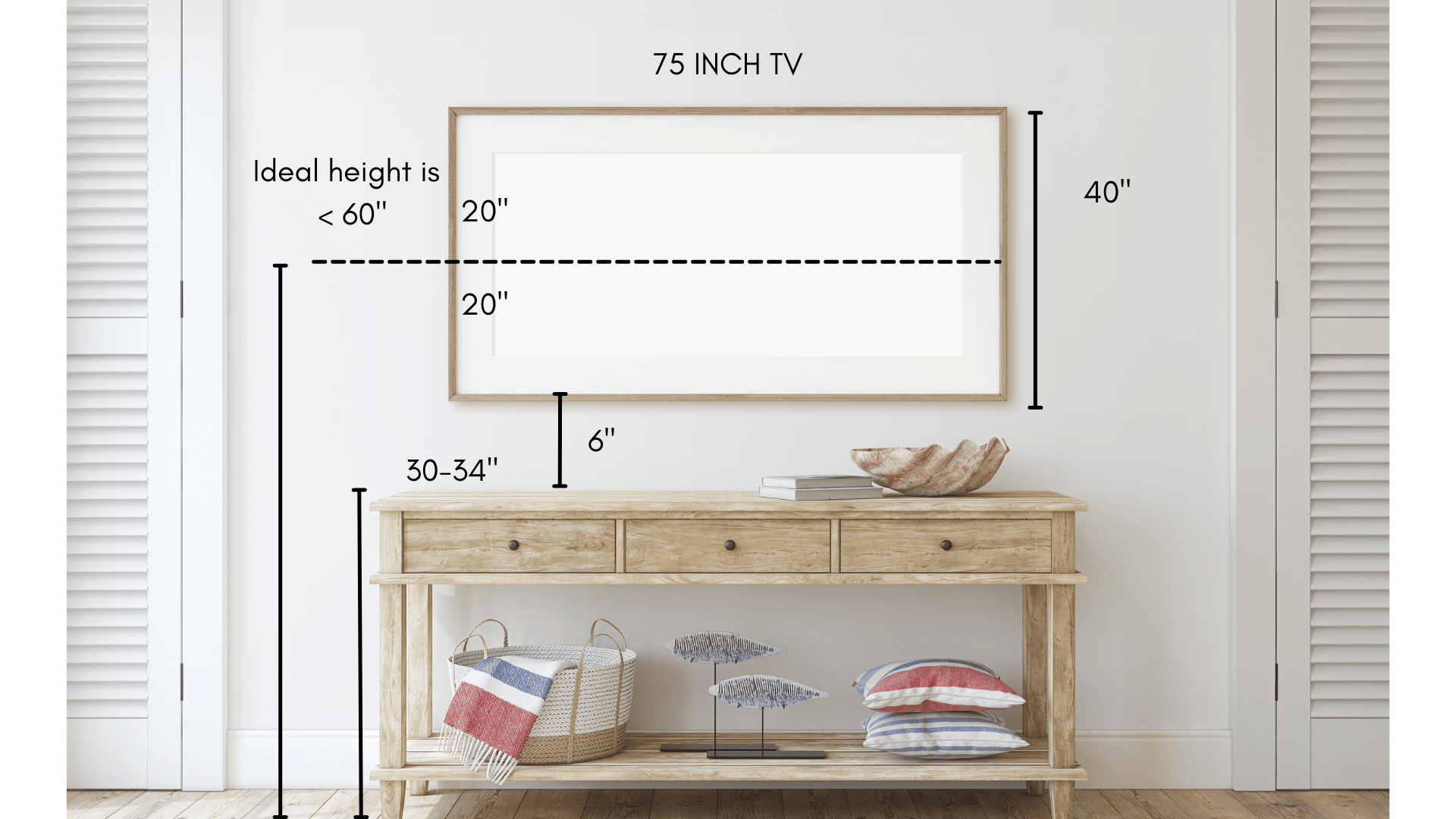
A 75-inch TV should be mounted so the center of the screen sits at about eye level when you’re seated, which is usually 40–45 inches from the floor. For most rooms, that means the bottom edge ends up around 24–30 inches high, depending on your sofa height and viewing distance. If you’re mounting above a fireplace or using a recliner, you may need it slightly higher, but try to keep your neck in a neutral position and tilt the TV down if needed.
Ideal Viewing Height
The ideal viewing height for a 75 inch TV is crucial for a comfortable and immersive experience. Mounting your TV at the right height reduces neck strain and eye fatigue. It also ensures the best picture quality without distortion. Setting the TV too high or too low can make watching unpleasant over time.
To find the perfect height, consider where your eyes naturally rest when you watch TV. This helps in aligning the screen with your line of sight. The goal is to keep your eyes level with the center of the screen for the best view.
Eye Level Alignment
Eye level alignment means the center of the TV screen should be at your eye height. This setup keeps your neck in a neutral position. It prevents discomfort during long viewing sessions. For most people seated on a couch, eye level is about 40 to 42 inches from the floor.
Measuring your eye height when sitting helps determine the TV’s center height. Place the center of the 75 inch TV at this height for clear and comfortable viewing. This reduces strain and improves your watching experience.
Seated Vs Standing Positions
Consider whether you watch TV mostly seated or standing. For seated viewing, the TV should be lower, close to your sitting eye level. This setup is common in living rooms and home theaters.
If you watch TV while standing, mount the TV higher. Standing eye level is usually around 60 to 65 inches from the floor. Adjust the TV height to match your main viewing position. This way, the screen stays comfortable to watch without tilting your head.
Measuring Mounting Height
Measuring the mounting height of a 75 inch TV is key for a great viewing experience. The right height reduces neck strain and improves picture clarity. It also fits well with your room’s layout and furniture. Focus on finding the TV’s center height and consider the screen size carefully. These steps help set the perfect mounting height.
Calculating Tv Center Height
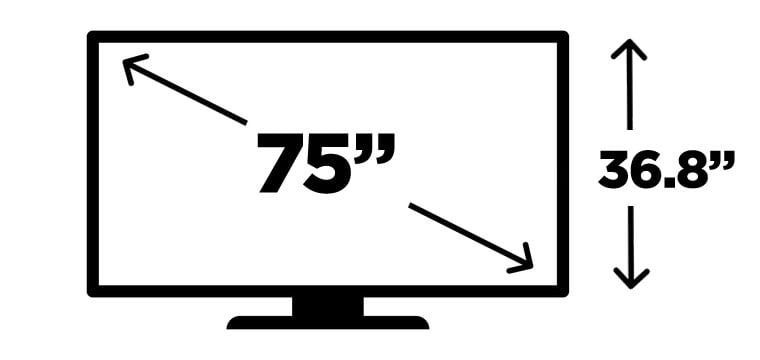
Start by finding the TV’s center point. Measure the total height of the TV. Divide this height by two to get the center. Mark this point on the wall where you want to mount the TV. The center of the TV should align with your eye level when seated. This usually ranges from 40 to 42 inches from the floor. Adjust based on your seating height for comfort.
Considering Screen Size
The screen size affects how high the TV should be mounted. Larger screens like 75 inch models need careful placement. The bigger the screen, the lower it should be mounted to keep the image clear. Mounting too high causes discomfort and poor viewing angles. Keep the TV center at eye level for the best experience. Also, think about the distance between your seating and the TV. This distance helps determine the ideal height and viewing angle.
Viewing Distance Guidelines
Choosing the right viewing distance for your 75 inch TV improves your watching experience. It helps reduce eye strain and makes images clear. Proper distance also ensures comfort during long viewing sessions.
Below, find guidelines to set the best distance between your TV and seating area. These tips help you enjoy every detail on screen without discomfort.
Optimal Distance For 75 Inch Tv
For a 75 inch TV, the ideal viewing distance ranges from 9 to 15 feet. Sitting closer than 9 feet can cause pixelation and eye strain. Beyond 15 feet, details may blur, reducing image impact.
Experts recommend about 1.5 to 2.5 times the diagonal screen size. This means your eyes should be roughly 9 to 15 feet away from the screen. Adjust distance based on room size and seating arrangement.
Impact On Picture Quality
Proper viewing distance enhances picture clarity and color accuracy. Sitting too close may reveal pixels and distort images. Too far reduces sharpness and fine detail visibility.
Maintaining the right distance allows your eyes to perceive the full resolution. Colors look richer and motion appears smoother. This balance is crucial for 4K and HDR content.
Credit: stampinfool.com
Room Layout Factors
The layout of your room plays a big role in deciding the best height for mounting a 75 inch TV. Every room has unique features that affect viewing comfort. Understanding these factors helps place the TV where everyone enjoys the best view.
Seating Arrangement
The position of sofas and chairs guides the TV height choice. Ideally, the center of the screen should align with the viewers’ eye level. For most people seated, this is about 42 inches from the floor. Consider the distance between seats and TV too. Closer seats might need a slightly lower mount to avoid neck strain. Angle the TV slightly downward if seats are lower than usual. This setup reduces glare and improves picture clarity.
Wall Space And Furniture
Wall size limits where you can place the TV. Large empty walls allow more flexibility. Smaller walls might require mounting the TV higher or lower. Check for furniture below the TV, like cabinets or consoles. Leave enough space between the TV and furniture for airflow. Avoid placing the TV too close to shelves or decor to prevent distractions. Also, consider power outlets and cable management when choosing the mounting height.
Mounting Styles And Types
Choosing the right mounting style and type is key for a 75 inch TV. It affects comfort, viewing angles, and room design. Various mounts offer different benefits and flexibility. Understanding these options helps decide the best fit for your space and needs.
Fixed Mounts
Fixed mounts hold the TV flat against the wall. They keep the screen steady without any movement. This style is best for rooms where viewers sit in one place. Fixed mounts are simple to install and usually cost less. They create a clean, modern look with minimal gap from the wall. Perfect for a 75 inch TV if you want a stable and sleek setup.
Tilting And Swiveling Options
Tilting mounts let you angle the TV up or down. This helps reduce glare and improves the viewing angle. Swiveling mounts allow the TV to turn left or right. They offer more flexibility for different seating positions. These mounts work well in rooms where viewers move around or sit off-center. Tilting and swiveling options add comfort for a large 75 inch screen. They may cost more but enhance the overall viewing experience.
Credit: www.hellotech.com
Ergonomics And Comfort
Ergonomics and comfort play a key role in deciding the best height for mounting a 75 inch TV. A well-placed TV reduces discomfort during long viewing sessions. It also helps maintain good posture and protects your eyes and neck.
Reducing Neck And Eye Strain
Mount the TV so the center is at eye level when seated. This position prevents the need to tilt your head up or down. Avoid mounting the TV too high, which causes neck pain. Keeping the screen at a comfortable height reduces eye strain. Maintain a proper viewing distance based on your TV size. For a 75 inch TV, sit about 9 to 12 feet away. This setup makes watching easier and more enjoyable.
Lighting And Glare Considerations
Choose a wall that avoids direct sunlight or strong indoor lights. Glare on the screen can cause eye discomfort and reduce picture quality. Use curtains or blinds to control natural light in the room. Position lights so they do not reflect off the screen. Matte screen finishes can also help reduce glare. Proper lighting improves comfort and keeps your viewing area pleasant.
Installation Tips
Proper installation ensures your 75 inch TV stays secure and looks great. Pay attention to details for a safe and neat setup. Follow these simple tips for a clean and sturdy mount.
Finding Studs And Anchors
Locate wall studs before mounting your TV. Use a stud finder for accuracy. Attach the mount to studs for strong support. Drywall anchors alone cannot hold heavy TVs. Mark stud positions clearly. Drill pilot holes to avoid wood splitting. Secure the mounting bracket firmly to the studs. This prevents the TV from falling or tilting.
Cable Management
Organize cables to keep your setup tidy. Use cable covers or raceways for a clean look. Hide wires behind the wall if possible. Secure cables with clips or ties. Avoid hanging cables loosely to reduce clutter. Label cables for easy identification. Proper cable management improves room aesthetics and safety.
Credit: www.reddit.com
Conclusion
Mounting a 75-inch TV at the right height improves comfort and viewing experience. Aim for the center of the screen to align with your eye level when seated. This reduces neck strain and offers a clear picture. Consider your seating distance and room layout for the best fit.
Taking time to measure ensures your TV looks great and feels natural to watch. A well-mounted TV makes movie nights and gaming sessions more enjoyable for everyone.