
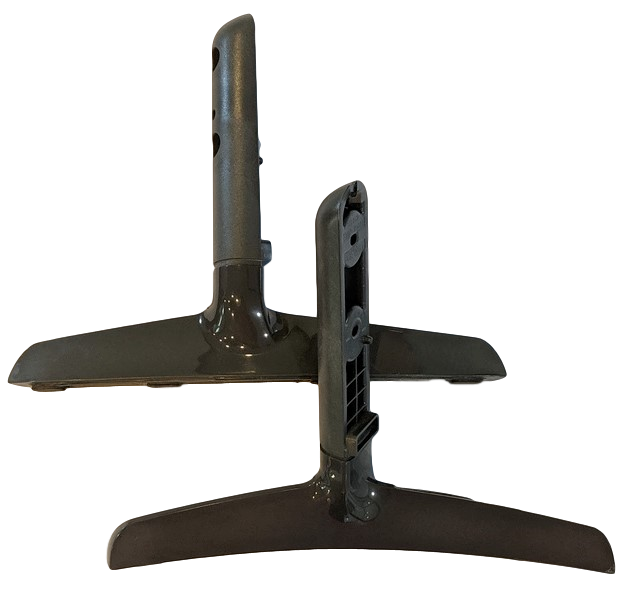
No, all LG TV stands aren’t the same because the stand design and mounting points change by model series and screen size. Some LG TVs use two wide feet, others use a center pedestal, and many have stand parts made only for that exact model. Even TVs with the same screen size can have different screw patterns or base widths. If you need a replacement, match the stand to your exact LG model number from the back label.
Lg Tv Stand Types
LG TVs come with different stand types designed for various needs and styles. Choosing the right stand matters for stability, look, and space use. Understanding the types helps find the best fit for your TV and room.
Original Bases
Original bases are the stands that come with LG TVs. They fit perfectly and match the TV’s design. These bases attach directly to the TV’s bottom. They offer good stability and keep the TV secure. However, original bases are often specific to each model and size.
Universal Stands
Universal stands fit many TV brands and models. They use standard mounting holes called VESA patterns on the TV’s back. This makes them flexible for different TVs. Universal stands vary in style and features. Some offer height adjustment, swivel, or cable management options. They work well if you want a replacement or a different look.
Tabletop Stands
Tabletop stands sit on flat surfaces like tables or media consoles. They replace the TV’s original legs or base. Tabletop stands keep the TV low and close to the surface. They are easy to install and move. These stands suit small to medium TVs and rooms with limited space.
Pedestal Stands
Pedestal stands are tall, standalone supports that rest on the floor. They lift the TV higher than tabletop stands. Pedestal stands often have a small footprint, saving floor space. Some models include shelves for media devices or speakers. These stands add a modern look and suit larger TVs or open spaces.
Vesa Mounting Patterns
VESA mounting patterns play a key role in TV stand compatibility. These patterns refer to the arrangement of screw holes on the back of a TV. Most modern TVs, including LG models, follow VESA standards for mounting.
Understanding VESA patterns helps when choosing a stand or wall mount. It ensures the stand fits securely and supports the TV properly. Not all LG TV stands are the same because they may fit different VESA patterns.
Standard Hole Measurements
The VESA pattern is measured in millimeters. It shows the horizontal and vertical distance between the holes. Common sizes include 100x100mm, 200x200mm, and up to 400x400mm or larger for big TVs.
Each LG TV model has a specific VESA pattern size. This measurement must match the stand or mount. Using the wrong size can cause instability or damage.
Compatibility Importance
Matching the VESA pattern is vital for safety and stability. A stand that fits correctly holds the TV firmly. It prevents wobbling and accidental falls.
Besides hole measurements, check the stand’s weight capacity. The stand must support your TV’s weight comfortably. Also, consider the stand’s design and features to meet your needs.
Fit And Compatibility
Choosing the right TV stand for your LG TV depends heavily on fit and compatibility. Not all stands fit every model perfectly. A stand must align with your TV’s design and size to ensure stability. Compatibility also includes the stand’s ability to support the TV’s weight. This section explains key aspects that affect fit and compatibility for LG TV stands.
Model-specific Stands
LG often designs stands specifically for each TV model. These stands match the exact size and mounting points of that model. Using a model-specific stand guarantees a perfect fit. It also maintains the TV’s balance and appearance. Non-specific stands might not align well or could cause wobbling. Always check your TV’s model number before buying a replacement stand.
Brand Differences
Each TV brand uses different stand designs and mounting methods. LG stands differ from other brands like Samsung or Sony. The shape, screw placement, and materials vary. This means stands from other brands usually will not fit LG TVs. Using a non-LG stand can risk stability and may void your warranty. Choose stands made or approved for LG to ensure proper fit and safety.
Weight Capacity
Every TV stand has a maximum weight it can hold safely. LG TVs come in various sizes and weights. Matching the stand’s weight capacity to your TV is critical. A stand with too low capacity can break or tip over. Always check the stand’s weight limit before purchase. Pick a stand that supports more than your TV’s actual weight for extra safety.

Credit: www.amazon.com
Features To Consider
Choosing the right TV stand is not just about style. It also depends on features that improve your viewing experience. These features help keep your setup neat and flexible. Focus on key aspects like height, movement, and cable organization.
Height Adjustment
Height adjustment lets you set the TV at eye level. This reduces neck and eye strain during long viewing. Some stands offer simple manual changes. Others use more advanced mechanisms for smooth height shifts. Adjustable stands fit better in different rooms and seating arrangements.
Swivel Options
Swivel options allow you to turn the TV left or right. This makes it easy to share the screen with people sitting in different spots. A swivel stand adds flexibility without moving the entire unit. Some stands offer limited swivel angles. Others allow a full 360-degree rotation.
Cable Management
Cable management keeps wires organized and hidden. This feature prevents tangles and clutter around the TV. Good cable management improves safety by reducing tripping hazards. It also makes cleaning easier and keeps your area looking tidy. Look for stands with built-in clips or channels for cables.
Choosing The Right Stand
Choosing the right stand for your LG TV is important for stability and style. Not all stands fit every TV model. Selecting the correct stand helps avoid damage and enhances your room’s look. Focus on key factors to find a perfect match.
Measuring Vesa Pattern
Check the VESA pattern on your TV’s back. This pattern is the distance between mounting holes. Measure horizontally and vertically in millimeters. Common patterns include 100×100 and 400×400. Matching this pattern ensures the stand fits securely.
Checking Weight Limits
Find your TV’s weight in the manual or online. Compare it with the stand’s weight capacity. Choose a stand rated to hold more than your TV’s weight. This prevents tipping and keeps your TV safe.
Matching Aesthetic Preferences
Select a stand that matches your room’s style. Consider color, material, and design. Some stands have sleek metal finishes. Others offer wood textures for a classic feel. The right look improves your space’s overall appeal.
Replacing Lg Tv Stands
Replacing LG TV stands can improve your TV’s look and fit your space better. Many people want to change their TV’s base for style or stability reasons. Not all LG TV stands are the same, so it is important to know what options you have.
Understanding how to replace the stand helps avoid damage to your TV and ensures safety. This section covers if you can swap stands, how to install universal bases, and what tools you need.
Can You Swap Stands?
Most LG TV stands are designed for specific models. You cannot always swap one stand for another from a different model. The mounting points and screw size may differ. Using the wrong stand can cause instability or damage.
Some LG TVs use the VESA mount system, which is a standard hole pattern on the back. If your TV has VESA holes, you have more options to change the stand. Non-VESA TVs need the exact replacement stand made for that model.
Installing Universal Bases
Universal TV stands fit many TVs by using the VESA mounting holes. These stands come with adjustable brackets to match different hole patterns. They often support a wide range of TV sizes and weights.
Installing a universal base involves attaching the bracket to the VESA holes on the back of the TV. Then, secure the stand to the bracket. These stands often offer extra features like height adjustment or swivel.
Tools Needed
Replacing or installing a TV stand requires simple tools. A screwdriver is usually enough to remove and attach screws. Some stands may need a wrench or Allen key, which often come with the stand.
Make sure to have a soft surface or blanket to lay the TV on. This prevents scratches during the process. Having a helper can make the job safer and easier.
Alternative Mounting Options
Alternative mounting options offer flexibility beyond standard TV stands. These options help you save space and improve viewing angles. They also allow your LG TV to fit better in different rooms and setups.
Wall Mounts
Wall mounts attach your LG TV directly to the wall. This saves floor space and creates a sleek look. Most LG TVs support VESA mounting patterns, making wall mounts easy to install. You can choose fixed, tilting, or full-motion mounts. Tilting mounts adjust the screen angle up or down. Full-motion mounts let you swivel and extend the TV away from the wall. Wall mounts keep your TV safe from pets and kids. They also reduce glare by allowing better positioning.
Floor Pedestal Stands
Floor pedestal stands hold your LG TV upright without a table. They work well in rooms without media consoles. These stands often include shelves for devices like gaming consoles or soundbars. Pedestal stands come in various heights and styles to suit your space. They offer stability and keep cables organized. This mounting option is ideal for open areas or rooms with limited furniture. Floor stands also make it easy to move your TV around.
Credit: tvpartstoday.com
Conclusion
Not all LG TV stands are the same. Many stands fit only specific models. Universal stands attach using VESA mounting holes. Check your TV’s VESA pattern before buying. Also, consider weight limits and size compatibility. Some stands offer extra features like swivel or height adjustment.
Choose a stand that matches your TV and style. This ensures safety and better viewing experience. Take time to find the right fit for your LG TV.