
Android TV boxes with external antennas usually get better Wi-Fi reception than models with internal antennas, especially in rooms far from the router or with thick walls. An external antenna can be positioned for a stronger signal and often holds speeds more steadily for streaming.
Internal antennas can still work fine for short distances, but they’re easier to block and more likely to buffer when the Wi-Fi signal is weak. If you stream 4K or use cloud gaming, an external antenna (or Ethernet) is usually the safer choice.

Credit: www.amazon.com
Antenna Types Explained
Antenna types in Android TV boxes affect signal quality and overall performance. Choosing the right antenna can improve streaming and reduce interruptions. Two common types are internal and external antennas. Each has unique features and benefits. Understanding these helps pick the best option for your needs.
Internal Antenna Features
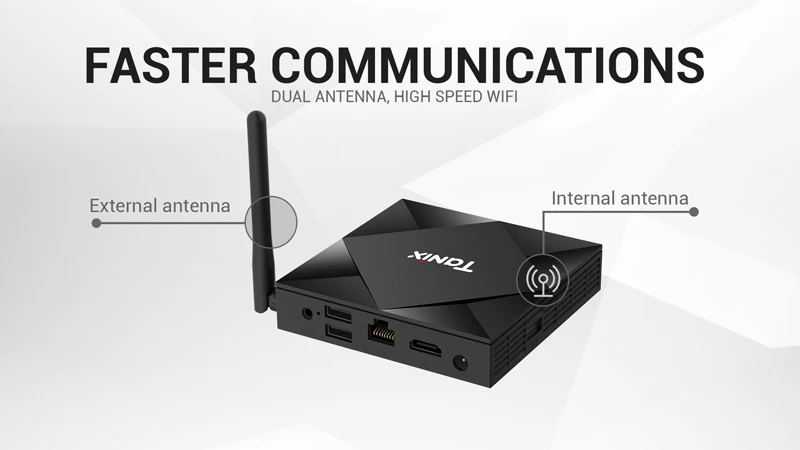
Internal antennas are built inside the TV box. They keep the design compact and sleek. No extra wires or parts are visible. This makes setup quick and easy. Internal antennas work best in areas with strong signals. They may struggle with weak or distant signals. These antennas are less adjustable since they are fixed inside. They offer convenience but sometimes limit signal strength.
External Antenna Features
External antennas connect outside the TV box. They often have longer range and better reception. You can move or adjust them for the best signal. External antennas come in many shapes and sizes. They work well in places with weak signals. These antennas need more space and extra cables. Setup might take longer but can boost signal quality. External antennas give more flexibility for stronger reception.
Credit: www.alibaba.com
Signal Strength Comparison
Signal strength plays a key role in the performance of Android TV boxes. It affects video quality and streaming smoothness. Choosing between an external or internal antenna depends largely on how well each handles signal strength. This section compares their signal strength in two main areas: range and coverage, and interference resistance.
Range And Coverage
External antennas usually provide better range. They can pick up signals from farther away. Their size and position outside the box help them catch more signals. Internal antennas are smaller and hidden inside the box. This limits their ability to reach distant signals.
External antennas often cover a larger area. They can connect to signals through walls and obstacles better. Internal antennas work well in small rooms or close to the router. But their coverage is often less than external ones.
Interference Resistance
External antennas handle interference better. Being outside the box helps them avoid some electronic noise. They also have stronger design options to reduce signal loss. Internal antennas sit near other electronic parts, which can cause interference.
Internal antennas may lose signal strength from nearby devices. This can cause slower speeds or buffering. External antennas usually stay clear of such interference. This leads to a more stable and stronger signal connection.
Installation And Setup
Setting up an Android TV box involves connecting it to your network for smooth streaming. The antenna type affects how simple this process is and where you can place the box. Understanding the differences in installation and setup can help you choose the right device.
Ease Of Installation
Internal antennas come built into the device. This makes setup faster and easier. Just plug in the power and connect to Wi-Fi or Ethernet. No extra parts are needed. External antennas require attaching a cable or connector. This adds a small step but usually is straightforward. Some external antennas have adjustable joints, which need careful handling during installation.
Placement Flexibility
Internal antennas limit placement because they rely on the box’s position. Placing the box behind furniture or inside a cabinet can reduce signal strength. External antennas offer more freedom. You can move or angle the antenna to find the best signal spot. This helps in rooms with weak Wi-Fi or many walls. The antenna can be placed higher or closer to windows for better reception.
Design And Portability
The design and portability of Android TV boxes affect user experience. Choosing between external and internal antennas changes how the device looks and moves. These factors are important for everyday use and setup.
Size And Aesthetics
Android TV boxes with internal antennas have a clean, compact design. They do not have extra parts sticking out. This makes them look neat and fit better in small spaces.
External antennas add bulk to the device. They can be tall or wide, making the box less sleek. This might distract from a simple, modern TV setup.
Impact On Device Mobility
Internal antennas make the device easy to move. No wires or parts can catch on objects. This helps when shifting the box between rooms or TVs.
External antennas can limit where you place the box. They might break or bend if handled roughly. Moving the device needs more care to avoid damage.
Cost And Value
The cost and value of Android TV boxes depend a lot on the type of antenna they use. Choosing between an external antenna and an internal one affects your budget and overall experience. Each option offers different benefits and price points. Understanding these can help you make the best choice for your needs.
Price Differences
Internal antennas usually come built-in with the TV box. This design keeps the price lower. You do not pay extra for separate parts or installation. External antennas cost more. They need additional hardware and sometimes special mounts. The higher price reflects better signal strength and range. For buyers on a tight budget, internal antennas save money upfront.
Long-term Benefits
External antennas offer stronger and more stable connections. This means fewer interruptions and better streaming quality. Over time, this can save frustration and data usage. Internal antennas may struggle in areas with weak signals. This might lead to poor picture quality and buffering. Spending more initially on an external antenna often pays off with better viewing over time.
User Scenarios
User scenarios help decide which antenna suits your Android TV box best. Different setups need different antenna types. Understanding these helps improve your viewing experience.
Best Use For Internal Antennas
Internal antennas work well in small rooms or apartments. They fit inside the TV box, so no extra space is needed. These antennas perform best when the signal is strong nearby.
They offer a clean look without wires or extra parts. Ideal for users who want simplicity and easy setup. Internal antennas suit places with few walls or interference.
Best Use For External Antennas
External antennas are perfect for large homes or buildings with many walls. They can be placed high or near windows to catch better signals. These antennas improve reception in weak signal areas.
They allow adjustments to find the strongest signal direction. Great for users needing more reliable and stable connections. External antennas help reduce buffering and improve picture quality.
Troubleshooting Tips
Troubleshooting antenna issues on Android TV boxes can improve your viewing experience. Signal problems affect picture quality and streaming speed. Both internal and external antennas have specific fixes. Small changes can boost signal strength and reduce interruptions.
Improving Internal Antenna Reception
Place the Android TV box near a window or open space. Walls and furniture block signals and reduce reception. Keep the box away from metal objects and other electronics. These cause interference and weaken signals. Restart the device to refresh the connection. Update the TV box software for better performance. Try adjusting the box’s position until the signal improves.
Optimizing External Antenna Performance
Check the antenna cable for any damage or loose connections. Replace damaged cables immediately. Position the external antenna as high as possible and away from obstructions. Point the antenna toward the nearest signal source or broadcast tower. Clean the antenna to remove dust or dirt. Use a signal amplifier if the signal is weak. Test different antenna locations to find the best reception spot.

Credit: garmade.com
Future Trends
The future of Android TV boxes shows clear changes in antenna design and performance. These changes will affect how users experience wireless signals and streaming quality. Understanding future trends helps buyers choose the right device today.
Antenna Technology Advances
New materials and designs will make antennas smaller and more powerful. Smart antennas will adjust to signal strength and direction. This means fewer drops and better picture quality. Antennas may also combine internal and external features for improved reception. Energy-efficient antennas will help save power in Android TV boxes. These advances aim to provide faster and more stable connections.
Impact On Android Tv Devices
Better antennas will enhance streaming without buffering or lag. Users will enjoy clearer sound and sharper images. Android TV boxes will become easier to set up with less need for external antennas. Devices will support more wireless standards, including 5G and Wi-Fi 6. This will improve compatibility with future networks and smart home devices. Overall, antenna improvements will create smoother and more reliable viewing experiences.
Conclusion
Choosing between external and internal antennas depends on your needs. External antennas usually offer better signal strength. They help reduce interruptions during streaming. Internal antennas look cleaner and fit better in small spaces. They work well where signals are strong.
Think about your room layout and signal quality. A strong signal means smoother video and sound. Test both types if possible before buying. This way, you get the best experience with your Android TV box.