
Choosing the right streaming device can transform how you enjoy your favorite shows and movies. If you’ve been torn between the Amazon Fire TV Stick and Chromecast, you’re not alone.
Both offer easy ways to bring endless entertainment to your TV, but which one truly fits your needs? You’ll discover the key differences that matter—like performance, ease of use, app options, and price—so you can make a confident choice. Stick with us, and by the end, you’ll know exactly which device will upgrade your viewing experience the most.
Ready to find your perfect match? Let’s dive in!
Device Design
The design of a streaming device plays a key role in user experience. It affects how easy the device is to set up and carry. Both Amazon Fire TV Stick and Chromecast offer unique design elements. These elements influence daily use and storage.
Physical Appearance
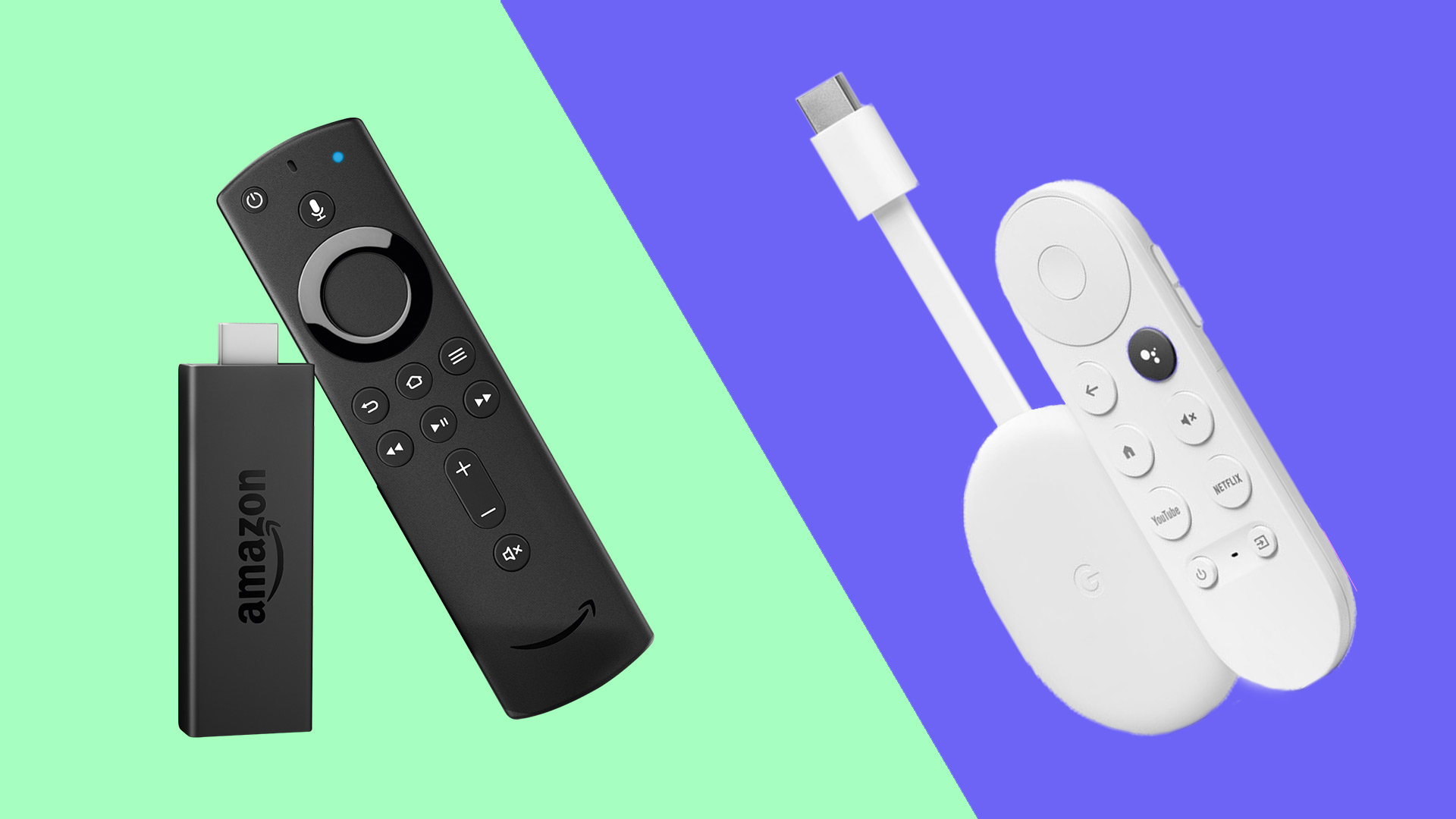
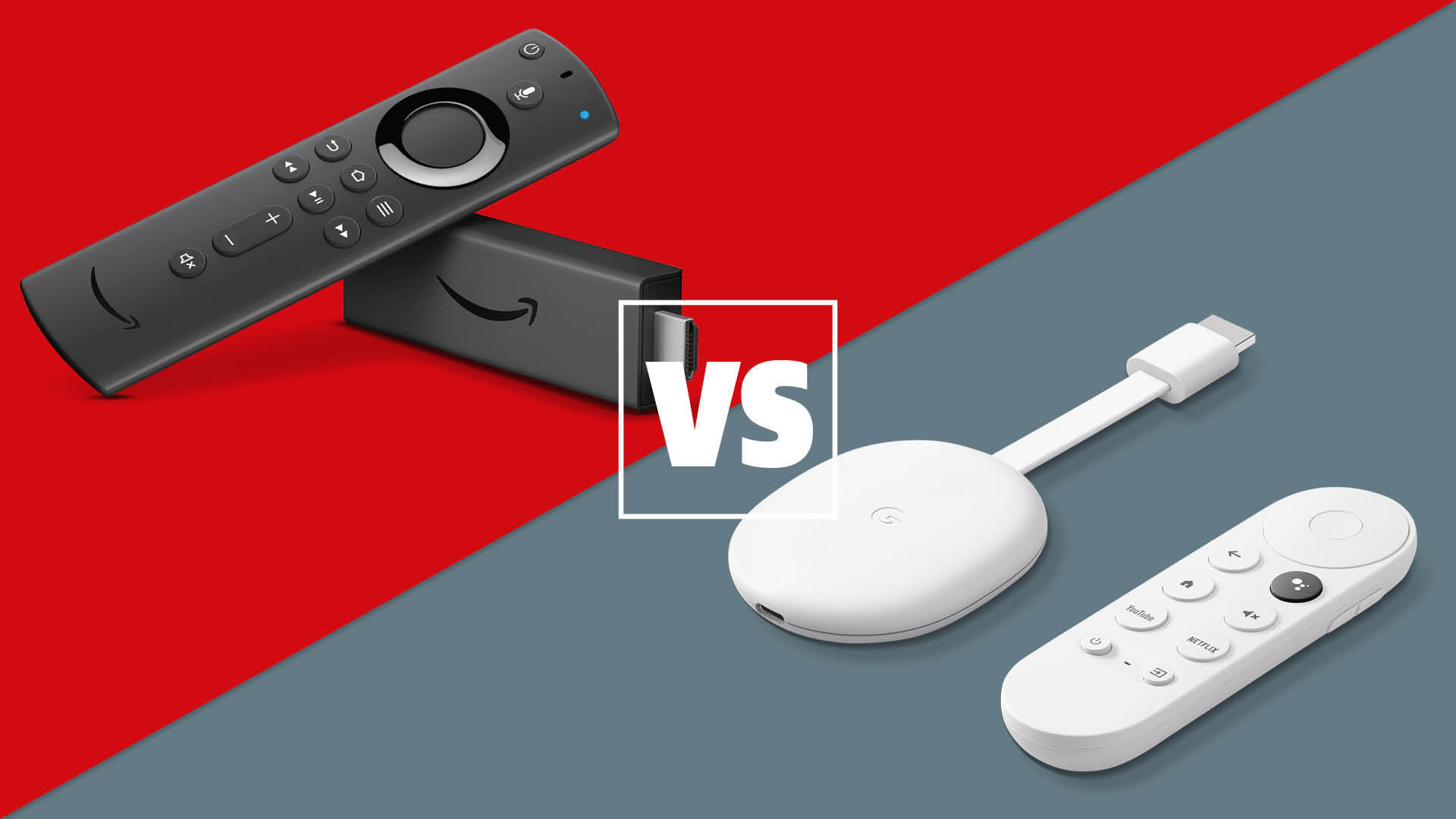
The Amazon Fire TV Stick looks like a small rectangular stick. It has a matte black finish with the Fire TV logo. The device connects to the TV’s HDMI port directly. Its size is compact but slightly larger than the Chromecast.
The Chromecast has a round, puck-like shape. It is sleek and smooth with a glossy finish. The Google logo sits on top. A short HDMI cable extends from the device for easy connection. Its minimalistic design blends well with most TV setups.
Portability
The Fire TV Stick is lightweight and easy to move. Its stick shape fits comfortably in pockets or bags. This makes it great for travel or sharing between TVs. The attached remote control adds convenience but is separate from the device.
The Chromecast is also very portable. Its small, round form fits easily in any bag or pocket. The built-in HDMI cable means fewer loose parts. Users can carry it quickly to any location with a TV. Both devices suit users who want streaming on the go.
User Interface
The user interface plays a crucial role in the streaming device experience. It determines how easily users find and enjoy their favorite content. Both Amazon Fire TV Stick and Chromecast offer distinct interfaces that suit different preferences. Understanding these differences helps users pick the right device.
Navigation Experience
Amazon Fire TV Stick uses a menu-based interface. It shows apps, settings, and content in a clear layout. Users navigate with a physical remote control. The remote has dedicated buttons for voice search and popular apps. This setup feels familiar to many users.
Chromecast relies on Google TV’s interface. Users control it mainly via the remote or mobile device. The interface highlights content recommendations from various apps. It focuses on content discovery and ease of use. The navigation is smooth but depends more on search and suggestions.
Customization Options
Fire TV Stick allows users to rearrange apps on the home screen. It supports multiple profiles for personalized content. Users can adjust display settings and enable features like Alexa voice commands. This flexibility enhances the overall user experience.
Chromecast with Google TV offers limited home screen customization. It organizes content by categories and sources automatically. Users can personalize watchlists and app preferences. However, deep customization of the interface layout is minimal.
Streaming Quality
Streaming quality is a key factor when choosing between Amazon Fire TV Stick and Chromecast. It affects how clear and smooth your videos appear on the screen. Both devices offer solid performance, but they differ in some technical details. Understanding these can help you pick the best option for your needs.
Video Resolution
Amazon Fire TV Stick supports up to 4K Ultra HD resolution on its latest models. This means you get sharp, detailed images with vibrant colors. Chromecast also offers 4K support, matching Fire TV Stick in clarity. Both devices handle HDR content, which enhances contrast and color range. For Full HD content, both perform smoothly without lag or buffering. The streaming quality depends also on your internet speed and TV capabilities.
Audio Performance
Amazon Fire TV Stick supports Dolby Atmos on selected models, providing immersive surround sound. Chromecast offers Dolby Digital Plus, ensuring clear and rich audio. Both devices work well with most sound systems and TVs. They deliver consistent audio without sync issues during playback. If you use a high-end audio setup, Fire TV Stick’s Dolby Atmos support might be a better choice.
Content Availability
Content availability is key for streaming devices. It determines what shows and movies you can watch. Both Amazon Fire TV Stick and Chromecast offer access to popular streaming platforms. Their content libraries and app support shape your viewing experience.
Choosing a device with wide content options ensures you find your favorite entertainment. This section compares the content availability of Fire TV Stick and Chromecast.
Supported Apps
Amazon Fire TV Stick supports thousands of apps from its own app store. These include Netflix, Hulu, Prime Video, Disney+, and many more. It also allows sideloading apps not officially listed.
Chromecast, especially with Google TV, supports a broad range of apps via the Google Play Store. You can find most major streaming apps like Netflix, YouTube, HBO Max, and others. Chromecast’s app selection is extensive and constantly growing.
Both devices cover the most popular streaming services. Fire TV Stick may have an edge with some niche apps. Chromecast benefits from Google’s large app ecosystem and frequent updates.
Content Ecosystem
Amazon Fire TV Stick integrates deeply with Amazon’s own content ecosystem. Prime members get seamless access to exclusive shows and movies. Alexa voice commands enhance content search within Amazon’s library.
Chromecast leverages Google’s ecosystem. It works well with YouTube, Google Play Movies, and Google TV’s content recommendations. Integration with Google Assistant makes content discovery easy.
Both devices let you cast or stream content from your phone or tablet. Chromecast was built for casting, offering smooth compatibility with Android devices. Fire TV Stick supports casting, but it is more app-focused.
Remote Control Features
The remote control plays a key role in how users interact with streaming devices. Both Amazon Fire TV Stick and Chromecast offer unique remote control features. These features impact ease of use and overall enjoyment. Understanding the differences helps users pick the right device for their needs.
Voice Assistant Integration
Amazon Fire TV Stick remote includes Alexa voice control. Users can search for shows, adjust volume, and control smart home devices. Voice commands work quickly and respond accurately.
Chromecast remote uses Google Assistant. It supports voice search, playing content, and answering questions. The assistant is well integrated with Google services.
Both remotes offer hands-free control. Alexa suits those who use Amazon services. Google Assistant fits users tied to Google apps.
Button Layout
The Fire TV Stick remote has a compact design with clearly labeled buttons. It includes dedicated buttons for home, back, menu, and playback control. The volume and power buttons control the TV directly.
Chromecast remote features a simple and clean layout. It has a circular navigation pad and fewer dedicated buttons. The remote focuses on easy navigation and voice activation.
Fire TV Stick remote offers more physical buttons for quick access. Chromecast remote prioritizes minimalism and a modern look. Button placement affects user comfort and speed.
Credit: www.techradar.com
Setup And Compatibility
Setting up a streaming device and ensuring it works with your other gadgets is important. Both Amazon Fire TV Stick and Chromecast offer easy setup and good compatibility. Understanding their differences helps you choose the right one for your needs.
Device Compatibility
Amazon Fire TV Stick works well with most TVs that have an HDMI port. It supports Android and iOS devices for app control. Some smart home devices like Alexa also connect smoothly with Fire TV.
Chromecast is compatible with many TVs with HDMI ports too. It works best with Android phones and Google Home devices. iPhones and iPads can cast content, but some features work better on Android.
Installation Process
Installing the Fire TV Stick is simple. Plug it into your TV’s HDMI port. Connect the power adapter and follow the on-screen instructions to connect to Wi-Fi.
Chromecast setup is also easy. Plug it into the TV’s HDMI port and power it. Use the Google Home app on your phone to connect it to Wi-Fi and your Google account.
Price And Value
Price and value play a big role in choosing between Amazon Fire TV Stick and Chromecast. Both devices offer great features, but their cost and extra expenses differ. Knowing these details helps pick the best option for your budget and needs.
Cost Comparison
The Amazon Fire TV Stick usually costs slightly more than Chromecast. Fire TV Stick prices start around $40, while Chromecast with Google TV is about $35. Both offer different versions with varied prices. The Fire TV Stick 4K is more expensive than the basic Chromecast. Prices change depending on sales and promotions. The small price gap shows both devices give good value for money.
Additional Expenses
Extra costs can affect the total price of either device. Both require a stable Wi-Fi connection and a TV with HDMI ports. Some streaming apps need subscriptions, which add to expenses. Fire TV Stick users may want to buy an Alexa Voice Remote separately for full control. Chromecast relies on casting from a phone or computer, so no extra remote is needed. Power adapters and cables come with both devices, so no extra cost there.
Credit: kdfoundation.org
Software Updates
Software updates play a key role in maintaining streaming devices. They improve performance, fix bugs, and add new features. Both Amazon Fire TV Stick and Chromecast receive updates, but their approach differs. Understanding these differences helps choose the right device for long-term use.
Update Frequency
Amazon Fire TV Stick gets regular updates, often monthly or bi-monthly. These updates keep the device running smoothly and secure. Amazon actively supports its devices with patches and improvements.
Chromecast updates come less often. Google releases updates mainly for major changes or security fixes. The update frequency depends on the device model and its software version.
Feature Enhancements
Fire TV Stick updates often include new apps, interface changes, and Alexa improvements. Amazon focuses on enhancing user experience with each update. These feature enhancements make the device more versatile.
Chromecast adds features more slowly. Updates mainly improve Google TV interface and integration. New features appear gradually, matching Google’s ecosystem growth and smart TV trends.
Market Changes
The streaming device market is evolving fast. Amazon Fire TV Stick and Google Chromecast remain popular choices. Yet, recent shifts show big changes ahead. These affect buyers and tech lovers alike. Understanding market changes helps choose the right device.
Chromecast Discontinuation
Google stopped making the Chromecast with Google TV. This model had a simple design and easy use. The main reason was to focus on newer products. Many smart TVs now include built-in streaming apps. This reduces the need for a basic Chromecast dongle. Google will still update old Chromecast devices for some time. This gives users a smooth transition period.
New Google Streaming Devices
Google introduced a new streaming box with stronger hardware. It offers faster performance and better picture quality. The new device supports more apps and features than before. It aims to compete with Amazon Fire TV Stick’s popular features. Google’s push shows a shift toward high-end streaming devices. Consumers gain more options with advanced tech and functions.

Credit: www.youtube.com
User Experience
The user experience defines how enjoyable and easy streaming devices feel to use daily. Both Amazon Fire TV Stick and Chromecast offer unique features that shape this experience. It affects navigation, app access, and how smoothly content plays. Understanding these differences helps decide which device fits best for personal entertainment needs.
Performance Reliability
Amazon Fire TV Stick delivers steady performance with quick app launches. It handles 4K streaming smoothly on supported models. Chromecast offers solid streaming but depends heavily on the casting device’s strength. Fire TV Stick’s remote adds convenience, reducing reliance on phones or tablets. Chromecast’s performance may vary with network quality and casting device power.
Customer Support
Amazon provides extensive customer support through online chat, phone, and forums. Users find troubleshooting guides and frequent software updates to fix issues. Chromecast support is mainly online via Google Help Center and community forums. Direct customer service can be less accessible for Chromecast users. Both brands release regular updates to improve device security and features.
Conclusion
Choosing between the Amazon Fire TV Stick and Chromecast depends on your needs. Both offer smooth streaming and wide app support. Fire TV Stick has a user-friendly interface and Alexa voice control. Chromecast integrates well with Google services and supports casting from many devices.
Price differences are minimal, so budget plays a small role. Consider which ecosystem fits your habits better. Either device can enhance your TV experience with ease. The decision boils down to personal preference and compatibility.