
TV stands aren’t truly universal, but many are designed to fit most TVs as long as the VESA pattern and weight match. The stand needs to support your TV’s screen size, handle the weight safely, and offer the right VESA hole spacing and screw depth.
Some TVs also have wide-set feet or special bases that won’t sit well on narrow stands, so top size and depth matter too. If the VESA range, weight rating, and base fit all line up, the stand will work across different brands.
Tv Stand Types
TV stands come in various types, each designed to suit different TV models and room setups. Understanding these types helps in choosing the right stand for your television. Some stands fit only specific TV bases, while others offer broad compatibility.
Below are the main TV stand types you will find on the market today.
Original Base Designs
Original base designs are made by TV manufacturers for specific models. These stands match the exact shape and size of the TV’s bottom. They often snap or screw directly into the TV. This design ensures a perfect fit but limits compatibility. You cannot use them with TVs from other brands or models.
Universal Vesa Mounts
Universal VESA mounts use standard mounting holes on the back of most TVs. These holes follow a global pattern called VESA. Universal stands with VESA mounts can hold many TV sizes and brands. They offer flexibility to switch TVs without changing the stand. This type is popular for wall mounts and floor stands.
Tabletop Stands
Tabletop stands sit directly on furniture like tables or cabinets. They come in different shapes and sizes. Some have fixed legs, while others use VESA mounts for better fit. Tabletop stands are easy to move and adjust. They work well for smaller TVs and rooms with limited space.
Pedestal And Floor Stands
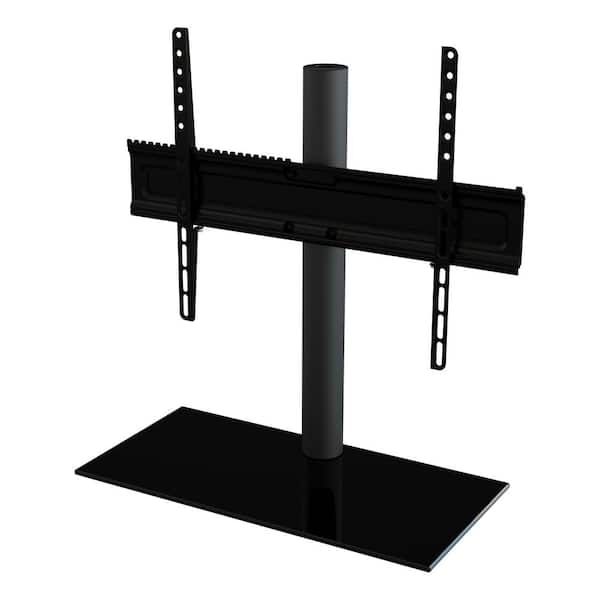
Pedestal and floor stands hold TVs above the floor. Pedestal stands usually have a wide base and a single support column. Floor stands often include shelves for devices or decorations. These stands often use VESA mounts for secure attachment. They are great for large TVs and open spaces.
Credit: www.homedepot.com
Vesa Mounting Standards
VESA Mounting Standards play a crucial role in TV stand compatibility. These standards set the size and placement of mounting holes on the back of TVs. They help manufacturers design stands and mounts that fit many TV models. Understanding VESA makes choosing a TV stand easier and safer.
Common Vesa Patterns
VESA patterns are measured in millimeters. They show the horizontal and vertical distance between mounting holes. Popular sizes include 100×100, 200×200, 400×400, and 600×400. Smaller TVs often have smaller patterns, while larger TVs use bigger patterns. Knowing common patterns helps find stands that fit most TVs.
Measuring Your Tv’s Vesa
Find the four mounting holes on your TV’s back. Measure the horizontal distance between holes in millimeters. Then measure the vertical distance between holes. These two numbers form your VESA pattern, like 200×200. Accurate measurement ensures you pick a stand or mount that fits perfectly.
Why Vesa Matters
VESA ensures your TV stand matches your TV’s mounting points. Without VESA compatibility, stands may not hold your TV securely. It also helps in finding universal stands that fit multiple TV brands. Using a VESA-compatible stand reduces risk of damage and improves stability.
Compatibility Factors
Compatibility plays a vital role in choosing the right TV stand. Not every stand fits every TV. Several factors affect how well a stand works with your television. Understanding these factors helps you pick a stable and secure stand.
Weight Capacity Limits
Each TV stand has a weight limit it can safely hold. Check the weight of your TV before buying a stand. Using a stand that cannot support your TV’s weight risks damage or accidents. Always choose a stand with a higher weight capacity than your TV’s actual weight.
Screen Size Considerations
Screen size affects how well a TV fits on a stand. Most stands list the range of screen sizes they support. A stand too small may not hold larger TVs securely. A stand too large might not look balanced with a small TV. Match the stand’s size recommendations to your TV’s screen size.
Mounting Hole Alignment
Many universal stands use VESA mounting holes to attach the TV. These holes have standard spacing patterns. Your TV must have matching VESA holes for the stand to fit properly. Measure your TV’s VESA pattern and compare it with the stand’s specifications. Proper alignment ensures a stable setup and easy installation.

Credit: www.amazon.com
Features Of Universal Stands
Universal TV stands come with features that fit many TV models. They focus on flexibility and ease of use. These stands work with different sizes and brands of TVs. Their design makes them practical for most homes. Key features include height adjustment, swivel and tilt functions, and cable management. These elements improve viewing comfort and keep your space tidy.
Height Adjustment Options
Many universal stands allow you to change the height. This helps place the TV at eye level. Adjusting height reduces neck and eye strain. It suits different seating arrangements and room sizes. Some stands offer several height settings. Others have smooth, easy-to-use mechanisms for quick changes.
Swivel And Tilt Functions
Swivel lets you turn the TV left or right. Tilt changes the angle up or down. These functions improve the viewing angle from different spots. They help avoid glare and reflections on the screen. You can adjust the TV for a better and more comfortable view. This feature adds versatility to any room setup.
Cable Management Solutions
Universal stands often include cable management features. These help hide and organize wires neatly. Good cable management prevents tangling and clutter. It also protects cables from damage. Some stands have built-in clips or channels to guide cables. This keeps your entertainment area clean and safe.
Choosing The Right Stand
Choosing the right TV stand is essential for safety and style. A proper stand supports your TV’s weight and fits its size. It also complements your room’s look. Picking the right stand avoids damage and keeps your space organized.
Matching Vesa And Weight Specs
Check your TV’s VESA pattern before buying a stand. VESA is the distance between mounting holes on the TV’s back. The stand must match this pattern exactly. Also, verify the stand can hold your TV’s weight. A mismatch risks the TV falling or tipping over.
Selecting Desired Features
Think about extra features you want in a stand. Some stands have shelves for devices like gaming consoles or DVD players. Cable management helps keep wires neat and hidden. Adjustable height or swivel options improve viewing comfort. Choose features that fit your needs and space.
Style And Aesthetic Choices
The TV stand should blend with your room’s decor. Materials like wood, metal, or glass create different looks. Pick a color that matches or contrasts your furniture. Size matters too; avoid stands that are too big or small for the room. A good style choice enhances your living space.
Replacing Tv Stands
Replacing a TV stand can refresh your room’s look and improve your TV’s stability. Many TVs come with original legs or bases that fit only that model. Changing these stands can be simple or require some steps depending on your TV type. Understanding the process helps you choose the best option for your space and TV size.
Removing Original Legs
Most TVs have legs attached with screws or clips. Start by laying the TV face down on a soft surface. Remove all screws holding the legs to avoid damage. Keep the screws safe; you might need them later. Some legs snap off easily without tools. Check your TV manual for specific instructions to avoid mistakes.
Installing Universal Bases
Universal bases fit many TV models using VESA mounting holes. These holes are standard on most modern TVs. Align the base with the holes on the back of your TV. Use the screws that come with the universal stand to secure it tightly. Double-check the stand’s weight limit to ensure safety. This option works well if you want a stable and stylish look.
Switching To Wall Mounts
Wall mounts free up floor space and give a clean appearance. Find a mount that matches your TV’s VESA pattern and weight. Attach the mount bracket to your TV using the proper screws. Secure the wall plate to a stud in the wall for strong support. Follow the instructions carefully for safe installation. This choice is perfect for modern, minimalistic rooms.
Common Questions
Many people ask about TV stands and their compatibility. Questions often focus on whether one stand fits all TVs or if special mounts are needed. This section answers common queries to help you choose the right stand for your TV. Clear answers make the buying process easier and less confusing.
Can Any Stand Fit Any Tv?
No, not every stand fits every TV. Each TV model has specific base sizes and shapes. Some stands attach directly to the TV’s legs. Others use a mounting system called VESA, which most modern TVs have. Check your TV’s size, weight, and mounting pattern before buying a stand. Stands made for VESA are more universal but still have size limits.
Are Wall Mounts Universal?
Wall mounts vary but many are universal in design. They use VESA mounting holes on the back of TVs. These holes follow a standard pattern across brands. Still, the mount must support your TV’s weight and size. Always confirm the mount’s VESA compatibility and weight limit. Using the wrong mount can be unsafe and damage your TV.
Dealing With Non-standard Tvs
Some TVs have unique bases or no standard mounting holes. These need custom stands or mounts made for that model. You may find third-party stands made specifically for unusual TVs. Another option is using a universal stand with adjustable arms or brackets. Measure your TV carefully and check product details before buying. This avoids fit problems and keeps your TV stable.
Conclusion
Not all TV stands fit every TV model or size. Universal stands work with many TVs by using standard VESA mounting holes. Always check your TV’s weight, size, and VESA pattern before buying a stand. Choosing the right stand keeps your TV safe and stable.
This helps you enjoy your viewing experience without worries. Take time to compare options and pick one that fits well. A good TV stand makes your space look neat and organized.