
Most modern TVs can be mounted, but not every TV is mount-ready. A TV can be wall mounted if it has a VESA mounting pattern (four screw holes on the back) and the mount supports its size and weight. Some older, ultra-thin, or specialty models don’t have VESA holes, and a few require a brand-specific bracket.
Also check the mounting area depth, screw size, and whether you need spacers for a recessed back. If there’s no VESA pattern, the safest option is a sturdy TV stand.
Tv Mounting Basics
Mounting a TV on the wall saves space and creates a clean look. Before starting, know some TV mounting basics. These basics help ensure your TV fits the mount and stays secure.
Most TVs can be mounted, but you must check the mounting system. This system uses a pattern of holes on the back of the TV. The pattern is called VESA, and it is a standard format for mounts and TVs.
What Is Vesa Pattern
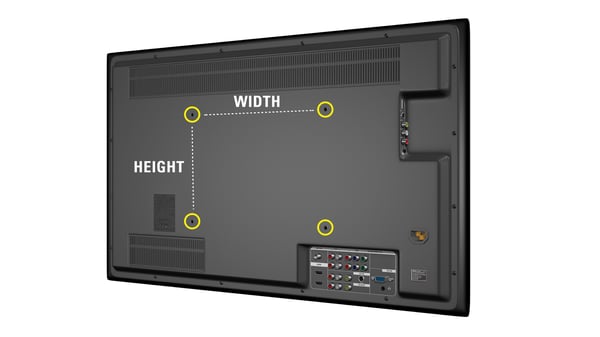
The VESA pattern is a set of mounting holes on the TV’s back. These holes form a square or rectangle shape. The size is measured in millimeters, like 200×200 or 400×400. This size shows the distance between holes horizontally and vertically. TV mounts match these sizes to fit the TV properly.
Locating Mounting Holes
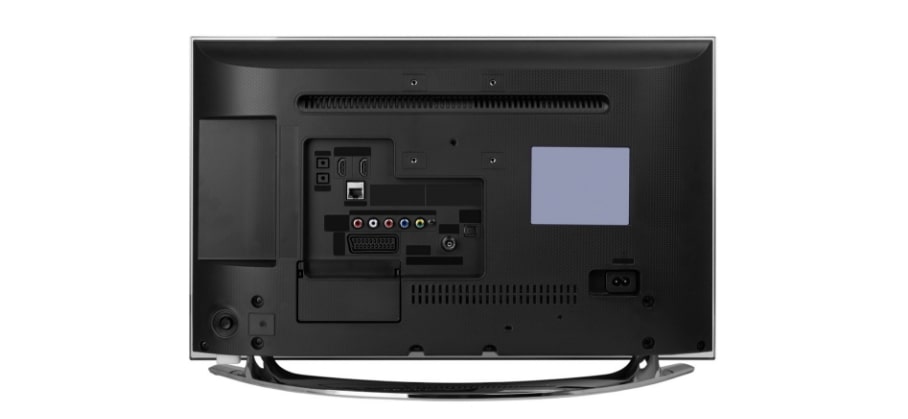
Look at the back of your TV to find the mounting holes. They are usually near the center. The holes may be covered by plastic covers you can remove. Use a ruler to measure the distance between holes. This helps to confirm the VESA size. Without matching holes, the mount will not fit securely.
Checking Tv Manual
The TV manual has important mounting information. Find the technical section for mounting details. The manual lists the VESA pattern size and weight limits. Follow these instructions to choose the right mount. Manuals also warn about special cases or unsupported TVs. Always read the manual before buying a mount.
Determining Tv Compatibility
Not every TV fits every wall mount. Checking compatibility is key to a safe and secure installation.
Start by identifying how your TV can attach to a mount. This involves measuring and researching specific details.
Measuring Mounting Hole Distance
Look at the back of your TV for mounting holes. These holes form a square or rectangle pattern.
Measure the distance between the holes horizontally and vertically. This measurement is called the VESA pattern.
Common VESA sizes include 100×100 mm, 200×200 mm, and larger for bigger TVs. Match your mount to this size.
Weight And Size Limits
Check your TV’s weight before choosing a mount. Each mount has a maximum weight limit.
Also, consider the TV size in inches. Mounts are designed to hold TVs within a certain size range.
Using a mount that is too small or weak can cause accidents or damage to your TV and wall.
Model Research Online
Search your TV model online to find its mounting specs. Manufacturer websites usually provide this information.
Look for the TV’s user manual or spec sheet. It often lists the VESA size and weight limits.
Reading reviews and forums can help confirm if others have successfully mounted the same TV model.
Types Of Tv Mounts
Choosing the right TV mount is key to a good viewing setup. Different mounts offer different benefits. Understanding the types helps you pick the best option for your space and TV.
Fixed Mounts
Fixed mounts hold the TV flat against the wall. They offer a sleek, low-profile look. This type does not allow movement or tilting. Fixed mounts work well if you watch TV from one spot. They are usually the most affordable option.
Tilting Mounts
Tilting mounts let you angle the TV up or down. This helps reduce glare from lights or windows. You can adjust the screen for better viewing comfort. Tilting mounts work well in rooms with bright light. They still keep the TV close to the wall.
Full-motion Mounts
Full-motion mounts, also called articulating mounts, offer the most flexibility. You can pull the TV away from the wall and swivel it side to side. Some models also tilt up and down. These mounts are great for rooms with multiple seating areas. They allow you to find the perfect viewing angle.
Wall Considerations
Mounting a TV on the wall requires careful wall considerations. The wall type affects the mounting method and stability. Knowing your wall’s material helps you choose the right tools and mounts. Proper preparation ensures your TV stays safe and secure.
Drywall Mounting Tips
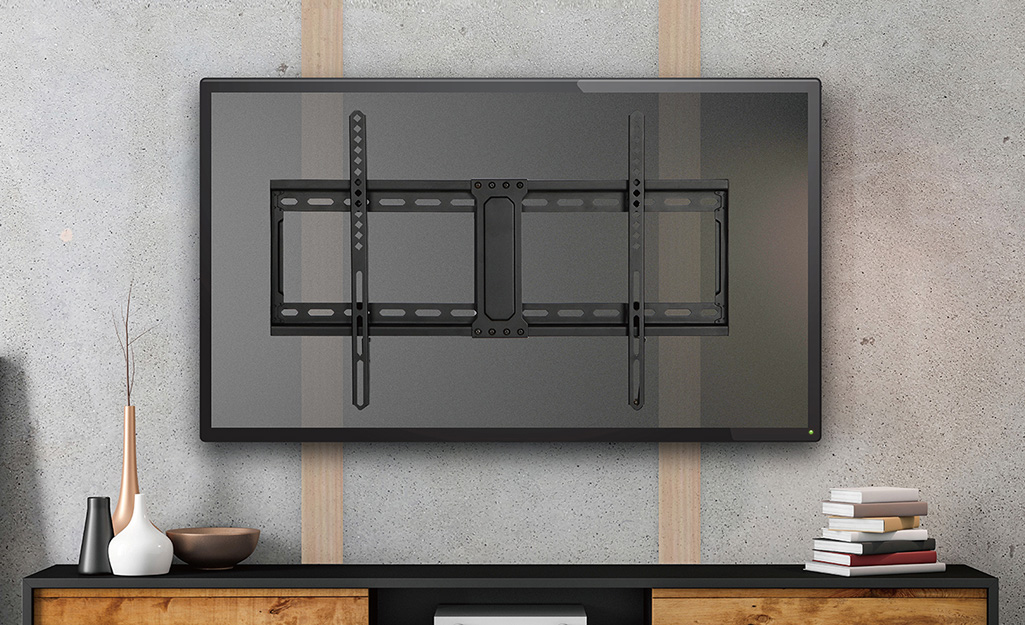
Drywall is common but weak alone. Always locate wooden studs behind the drywall. Use a stud finder to find the studs. Mount the TV bracket directly into the studs for strong support. Avoid using drywall anchors alone for heavy TVs. Use long screws designed for studs. Check the weight limit of the mount and wall studs. Spread the weight evenly across multiple studs if possible.
Mounting On Brick Or Concrete
Brick and concrete walls are very strong. Use a hammer drill to make holes for anchors. Choose heavy-duty masonry anchors or sleeve anchors. Insert anchors fully into the drilled holes for a tight fit. Secure the mounting bracket with bolts that fit the anchors. Double-check the anchors for stability before hanging the TV. Protect the wall surface by drilling carefully and cleaning dust away.
Using Studs Vs. No Studs
Studs provide the best support for TV mounts. Mounting directly on studs avoids damage and adds safety. When no studs are available, special anchors or mounting plates are necessary. Toggle bolts or molly bolts can help on drywall without studs. These anchors spread the weight over a larger area. Always check the weight rating of anchors without studs. Consider professional help for large or heavy TVs without stud support.
Matching Mount To Tv
Choosing the right mount for your TV is crucial for a secure and neat installation. Not every mount fits every TV. Matching your mount to your TV ensures stability and safety. It also makes your viewing experience better. This section guides you through key steps to find the perfect match.
Verifying Vesa Compatibility
VESA is a standard pattern of holes on the back of your TV. It helps mount manufacturers design compatible brackets. Check your TV’s back for a square or rectangular hole pattern. The size is measured in millimeters, for example, 200×200. You can also find this info in your TV manual or on the manufacturer’s website. Measuring the distance between holes confirms compatibility.
Checking Weight Capacity
Your mount must support your TV’s weight. Look for the maximum weight limit on the mount packaging or description. Compare this to your TV’s weight found in the manual or online. Using a mount with too low a capacity risks damage or accidents. Always choose a mount rated for more than your TV’s weight for extra safety.
Selecting Right Mount Size
Mount size depends on both TV size and VESA pattern. Small TVs need smaller mounts, while large TVs require bigger, stronger mounts. Check the mount’s size range to match your TV. Some mounts are fixed, others tilt or swivel. Pick one that fits your space and viewing needs. Proper size helps keep the TV stable and easy to adjust.
Credit: www.homedepot.com
Installation Tips
Mounting a TV on the wall enhances your room’s look and saves space. Proper installation ensures your TV stays secure and functions well. Follow these essential installation tips for a smooth mounting process.
Tools Needed
Gather all tools before starting. You will need a drill, a stud finder, a level, a screwdriver, and a tape measure. A pencil helps mark the wall. Having the right tools makes the job easier and safer.
Safety Precautions
Always find the wall studs to support the TV’s weight. Use a stud finder for accuracy. Avoid mounting on drywall alone. Wear safety goggles to protect your eyes. Keep the area clear of obstacles to prevent trips and falls.
Common Mistakes To Avoid
Do not mount the TV too high or too low. Check the mount’s weight limit and your TV’s weight. Avoid using incorrect screws or anchors. Measure twice before drilling. Make sure cables have enough length and space.
Special Cases
Some TVs don’t fit the usual mounting rules. These special cases need extra care and different solutions. Understanding these exceptions helps you mount almost any TV safely and correctly. Below are common special cases and how to handle them effectively.
Mounting Non-vesa Tvs
Not all TVs have VESA mounting holes. Older or budget models may lack this standard pattern. You can still mount these TVs, but it requires custom solutions. Some mounts use clamps or straps to hold the TV securely. Check the TV’s shape and size before choosing a non-VESA mount. Make sure the mount fits the TV’s edges firmly.
Using Adapter Plates
Adapter plates help connect TVs without standard holes to VESA mounts. These plates attach to the TV’s back with screws or brackets. They create the correct hole pattern for mounting. Adapter plates come in various sizes and styles. Choose one matching your TV and mount specifications. This option is simple and cost-effective for special TV models.
Mounting Large Or Heavy Tvs
Big or heavy TVs need strong mounts and wall support. Check the mount’s weight limit before buying. Use studs or reinforced walls to hold the TV safely. Some mounts have extra arms or braces for better support. Always follow the mount’s instructions and safety tips. Secure mounting prevents accidents and damage.
Credit: fantastichandyman.com.au
Credit: blog.sanus.com
Conclusion
Most TVs can be mounted if they have a VESA pattern. Check your TV’s back for mounting holes. Consult the manual or the manufacturer’s website to confirm compatibility. Remember to consider the TV’s weight and the mount’s capacity. Proper installation ensures safety and a clean look.
Wall mounting saves space and improves viewing angles. Take your time to measure and choose the right mount. This helps avoid damage and keeps your TV secure. Mounting any TV is simple with the right information.