
To mount a TV on the wall, pick a mount that matches your TV’s VESA pattern and weight, then bolt the wall plate into studs (or solid masonry) so it can’t pull out. Attach the mounting arms to the back of the TV, hang the TV onto the wall plate, and lock it in place with the safety screws.
Use a level, keep cables supported, and leave airflow space behind the TV. If you’re using a full-motion mount, double-check all bolts after a few days to prevent loosening.
Tools And Materials
Mounting your TV on the wall requires specific tools and materials. Having the right equipment makes the process easier and safer. This section explains what you need before starting your installation.
Essential Tools
A stud finder helps locate the wall studs to secure the mount safely. A power drill is needed to make holes for screws and anchors. Use a level to keep the TV straight and balanced on the wall. A measuring tape ensures precise placement and spacing. A pencil marks the drill spots on the wall. A socket wrench or screwdriver tightens bolts and screws. Safety glasses protect your eyes from dust and debris.
Choosing The Right Mount
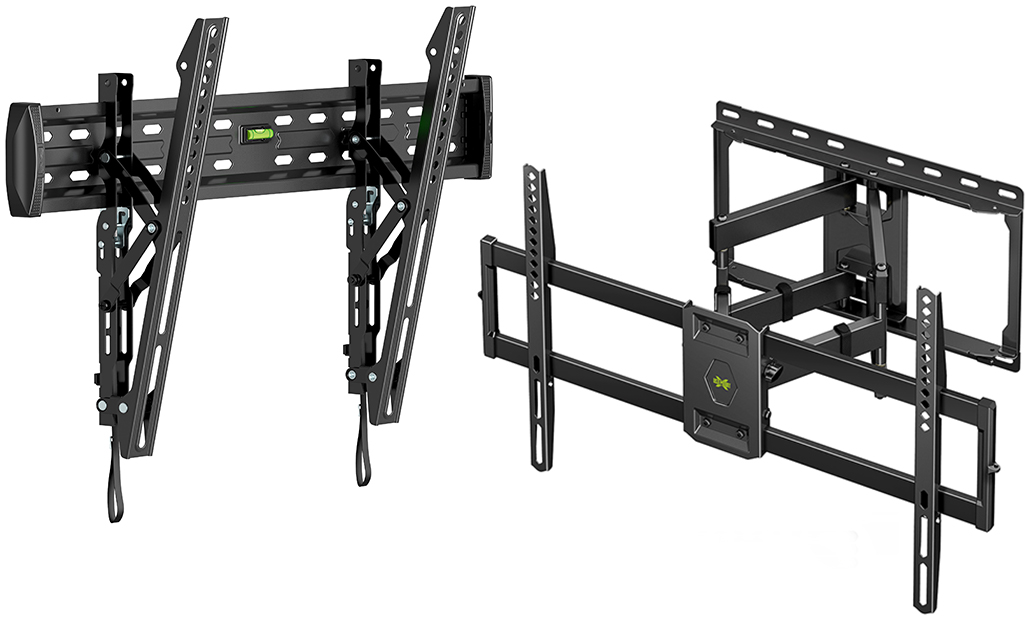
Select a mount that fits your TV size and weight. Check the mount’s weight capacity to avoid accidents. Fixed mounts keep the TV flat against the wall for a clean look. Tilting mounts allow you to angle the TV up or down. Full-motion mounts let you swivel and extend the TV for better viewing angles. Confirm the mount matches your TV’s VESA pattern for proper fit. Quality mounts provide sturdy support and durability over time.
Locating Wall Studs
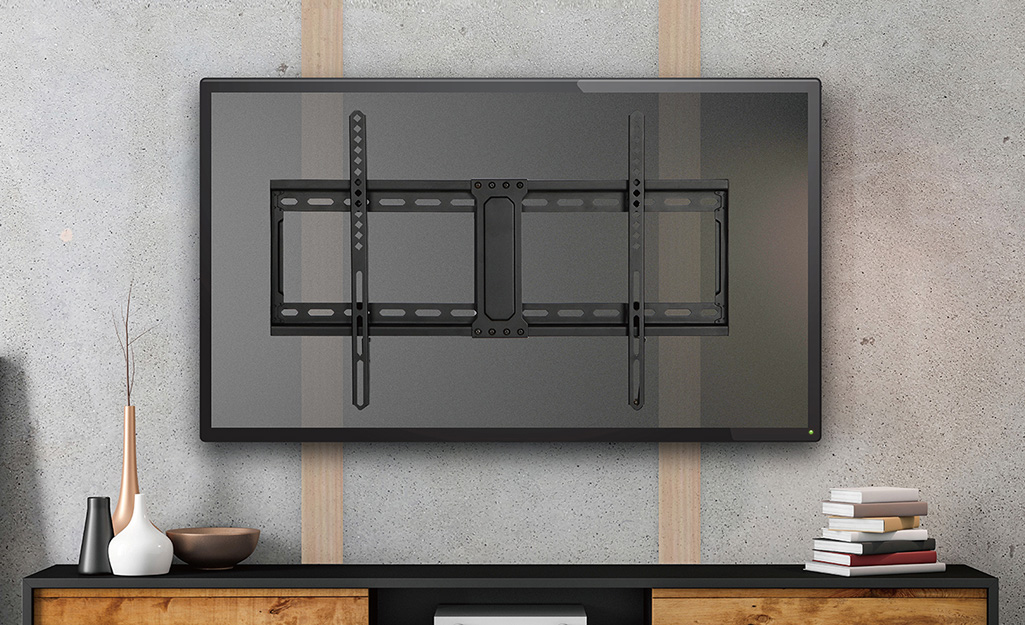
Locating wall studs is a crucial step before mounting your TV. Studs provide the necessary support to hold the TV’s weight safely. Attaching the mount directly to drywall can cause damage or accidents. Finding the right studs ensures a secure and stable installation.
Studs are usually spaced 16 or 24 inches apart. They run vertically inside the wall behind the drywall. Knowing their exact position helps you drill in the right spots. This prevents unnecessary holes and keeps your wall intact.
Using A Stud Finder
A stud finder is a simple tool that detects wooden studs behind drywall. Turn it on and slowly move it across the wall. The device will beep or light up when it finds a stud. Mark each spot where the stud finder signals.
Scan the wall twice to confirm the stud positions. Avoid electrical wires and pipes by using a stud finder with wire detection. This tool makes finding studs fast and accurate.
Marking Stud Positions
After locating studs, mark their positions with a pencil. Use a level to draw a straight horizontal line connecting the marks. This line guides you for mounting the TV bracket evenly.
Double-check the marks by measuring the distance between them. Studs are usually 16 or 24 inches apart from center to center. Clear and precise markings help you drill holes in the right places.
Choosing The Perfect Spot
Choosing the perfect spot to mount your TV is important for a good viewing experience. The right location can make watching more comfortable and enjoyable. It also helps avoid problems like neck strain or screen glare. Take your time to find the best place on your wall before starting the installation.
Optimal Viewing Height
The ideal height for your TV is at eye level when seated. This usually means the center of the screen should be about 42 inches from the floor. Mounting the TV too high or low can cause neck pain and discomfort. Keep the screen at a natural height to enjoy long viewing sessions without strain.
Measure the height of your couch or chairs first. Then mark the wall to match that height. This simple step ensures your TV will sit at the perfect level for watching.
Avoiding Glare
Glare can make your TV hard to see and ruin your picture quality. Avoid placing the TV opposite windows or bright lights. Sunlight reflecting off the screen causes glare and reduces visibility.
Try to mount the TV on a wall perpendicular to windows. Use curtains or blinds to control natural light in the room. Positioning the TV away from direct light sources keeps the picture clear and sharp.
Preparing The Tv
Preparing your TV for wall mounting is a key step. It ensures the TV is ready and safe to hang. This process involves fixing the mounting bracket securely and choosing the right screws. Proper preparation helps avoid damage and keeps your TV stable on the wall.
Take your time during this stage. It makes the installation easier and safer. The right mounting bracket and screws create a strong hold for your TV.
Attaching The Mounting Bracket
First, place the TV screen face down on a soft surface. This prevents scratches or damage. Find the mounting holes on the back of your TV. These holes are usually in a square or rectangular pattern.
Align the mounting bracket with these holes. Use the screws provided with the mount or the TV. Tighten the screws evenly but do not overtighten. The bracket should be firm but not damage the TV.
Selecting Correct Screws
Use screws that fit the mounting holes perfectly. Check your TV manual for the correct size and length. Too short screws may not hold well. Too long screws can damage the TV.
Use screws made of strong material like steel. Avoid using damaged or rusty screws. Proper screws keep the TV secure and prevent accidents.
Marking And Drilling
Marking and drilling are key steps in mounting your TV securely on the wall. Proper marking ensures the wall plate aligns perfectly with the studs. Drilling at the right points prevents damage and keeps the mount stable.
Take your time during this phase. Accuracy here makes the installation safe and long-lasting.
Positioning The Wall Plate
Hold the wall plate against the wall where you want the TV. Use a level to keep it straight. Mark the holes on the wall with a pencil. These marks show where you will drill. Double-check the marks are over the studs for strong support.
Make sure the plate sits at the right height for comfortable viewing. Avoid placing it too high or low.
Drilling Pilot Holes
Use a drill bit smaller than the screws to make pilot holes. These guide the screws and stop the wall from cracking. Drill slowly and straight into the marked points. Do not force the drill; let it work at its own pace.
Check the depth of each hole to match the screw length. Clean any dust from the holes before you insert the screws.
Credit: www.homedepot.com
Mounting The Bracket
Mounting the bracket is the key step to secure your TV on the wall. It holds the TV firmly and keeps it safe. This step needs care and accuracy to avoid any damage or accidents. Before attaching the TV, the bracket must be properly fixed to the wall. Use the right tools and follow instructions carefully.
Securing With Lag Bolts
Lag bolts provide strong support for the bracket. First, drill pilot holes into the wall studs. This prevents the wood from splitting. Insert lag bolts through the bracket holes into the pilot holes. Tighten them using a socket wrench or drill. Make sure the bolts are snug but do not over-tighten. Properly secured lag bolts keep the bracket steady and safe.
Ensuring Level Alignment
Level alignment is important for a balanced TV setup. Use a spirit level on the bracket after securing it. Adjust the bracket until the bubble is centered. Mark the level position before tightening all bolts fully. Double-check the level again after tightening. A level bracket prevents the TV from tilting and improves viewing comfort.
Hanging The Tv
Hanging the TV on the wall is a key step in mounting your screen safely and securely. This process involves carefully lifting the TV and locking it onto the wall mount. Proper handling prevents damage to the TV and keeps it stable for daily use.
Lifting Safely With Help
Always ask someone to help you lift the TV. Most TVs are heavy and awkward to carry alone. Two people can hold the TV steady and avoid dropping it. Lift with your legs, not your back, to prevent injury. Move slowly to keep the TV balanced and avoid hitting the wall or mount.
Locking The Tv In Place
Once the TV is aligned with the wall bracket, secure it firmly. Most mounts have hooks or screws that hold the TV tight against the wall. Check that all locking mechanisms are fully engaged before letting go. Give the TV a gentle shake to ensure it will not fall or shift. Proper locking keeps the TV stable and safe for everyday use.
Safety Checks
Safety checks are crucial before and after mounting your TV on the wall. They ensure your TV stays secure and prevents accidents. Taking time for these checks protects your device and everyone around it.
Verifying Stability
Check the wall mount’s grip on the wall studs. Give the mount a firm shake to test its hold. The mount should feel solid without any movement. Use a level to confirm the TV is straight. A tilted TV can strain the mount and cause damage.
Using Safety Screws
Safety screws lock the TV onto the mounting bracket. They stop the TV from slipping or falling forward. Always use the screws provided with your mount. Tighten them firmly but avoid over-tightening. Double-check all screws after installation to keep the TV secure.
Troubleshooting Tips
Mounting a TV on the wall can sometimes bring unexpected challenges. Troubleshooting tips help solve common problems fast. These simple fixes make your TV setup smooth and safe.
Dealing With Uneven Walls
Uneven walls make mounting tricky. Use a wall level tool to check the surface. If the wall is uneven, install a mounting board first. Secure the board to the studs, then attach the mount. This creates a flat, strong surface. Avoid gaps between mount and wall to keep the TV stable.
Adjusting Viewing Angle
Finding the perfect angle improves your viewing comfort. Use a mount with tilt or swivel features. Adjust the TV to reduce glare from windows or lights. Keep the screen at eye level when seated. Small angle changes can reduce neck strain and improve picture quality.

Credit: inmyownstyle.com
Mounting Without Studs
Mounting a TV without studs can seem tricky. Most walls rely on studs for strong support. Without studs, extra care is needed to ensure safety. The right tools and methods help avoid damage to your wall and TV. This section explains safe ways to mount your TV when studs are not available.
Using Anchors
Anchors provide extra support for mounting without studs. Choose heavy-duty anchors made for drywall or plaster. Plastic anchors work for small TVs but metal anchors are better for heavier sets. First, drill holes at the marked points on your wall. Insert anchors firmly into the holes. Then, screw the mount into the anchors to secure it tightly. Check that anchors hold well before hanging your TV. This method spreads the weight and reduces the risk of wall damage.
Alternative Mounting Solutions
Alternative methods avoid direct wall damage or provide extra support. One option is using a mounting rail system attached to the ceiling or floor. These rails can hold heavy TVs safely without relying on studs. Another choice is a freestanding TV mount or stand that fits against the wall. These stands are easy to move and require no drilling. Using furniture like media cabinets with built-in mounts also works well. These solutions keep your TV secure and protect your walls.
Conclusion
Mounting your TV on the wall can save space and improve your viewing experience. Take your time to measure and find the studs carefully. Use the right tools and follow instructions step by step. Ask for help when lifting the TV to avoid accidents.
Once done, enjoy a neat and comfortable setup in your room. Wall mounting is a practical way to enhance your living space with a clean look.