
Have you ever turned on your TV, only to be greeted by strange lines, flickering, or a completely black screen? These annoying problems can ruin your favorite shows and leave you frustrated.
Understanding the types of TV screen problems can help you spot issues early and decide if a simple fix is possible or if it’s time to call a professional. You’ll discover the most common screen problems, why they happen, and what you can do to get your TV back to perfect picture quality.
Keep reading to save yourself time, money, and stress!

Common Screen Issues
TV screens can have several common problems that affect viewing quality. These issues can be annoying and sometimes hard to fix. Understanding these problems helps in identifying the right solution quickly.
Dead Pixels
Dead pixels are tiny spots on the screen that do not light up. They appear as black or colored dots. These pixels stay fixed and do not change with the image. Dead pixels can distract from the picture, especially on large screens.
Screen Flickering
Screen flickering means the image blinks or flashes repeatedly. This can happen due to loose cables or software glitches. Flickering may also signal a hardware problem inside the TV. It makes watching uncomfortable and can cause eye strain.
Color Distortion
Color distortion occurs when colors look wrong or faded. The image may have a strange tint or uneven color patches. This issue often results from damaged display panels or incorrect settings. It reduces the overall picture quality noticeably.
Image Retention
Image retention happens when a ghost image stays on the screen. This leftover image appears after the original picture changes. It happens mostly with OLED and plasma TVs. Prolonged image retention can cause permanent screen damage.
Physical Screen Damage
Physical screen damage is a common issue many TV owners face. It can affect how well your TV works and how clear the picture looks. These problems happen from accidents, spills, or long use. They can make watching TV less enjoyable or even stop it from working.
Cracks And Scratches
Cracks appear when the screen gets hit hard. They look like spider webs or lines on the screen. Scratches are smaller marks that make the picture blurry. Both cracks and scratches can block parts of the image. They also can grow worse over time. Avoid touching the screen to prevent damage.
Water Damage Effects
Water can cause big problems for TV screens. It may enter through cracks or openings. This can create spots or streaks on the screen. Sometimes, the screen flickers or stops working. Dry the screen quickly if it gets wet. Water damage often needs professional repair.
Burn-in Problems
Burn-in happens when a static image stays too long. It leaves a ghost picture on the screen. This problem is common with OLED TVs. Burn-in makes parts of the screen look faded or stuck. Avoid leaving the same image on your TV for hours. Use screen savers to protect your screen.
Signal And Display Errors
Signal and display errors are common problems affecting TV screens. These issues disrupt your viewing experience and can be confusing to fix. Understanding these errors helps identify the cause quickly. It also guides you to proper solutions without wasting time or money.
No Signal Displayed
This problem happens when the TV cannot receive any input from the source device. The screen shows a “No Signal” message or stays blank. Causes include loose cables, wrong input selection, or faulty devices. Check all connections and the input setting on your TV. Restarting the source device can also help restore the signal.
Lines On Screen
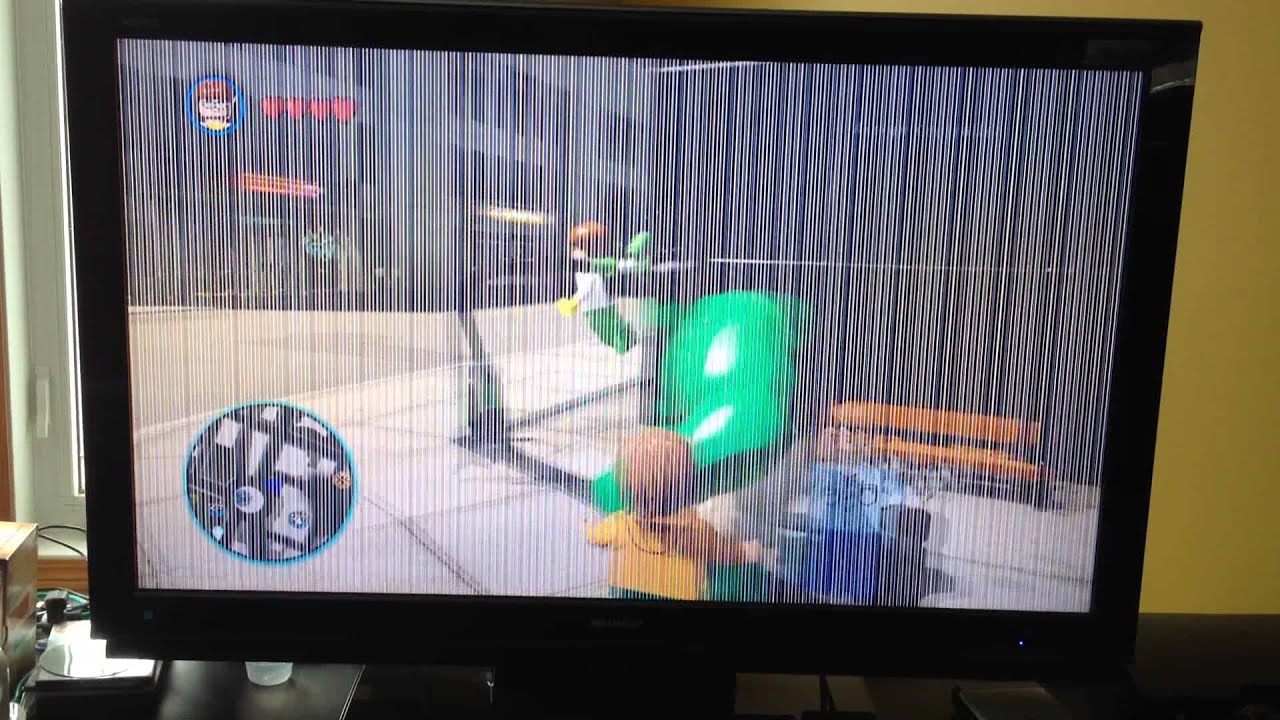
Lines on the screen appear as vertical or horizontal stripes. These lines can be thin or thick and affect the picture quality. They may result from damaged cables, loose connections, or internal screen faults. Gently adjusting cables or reconnecting them might fix the issue. Persistent lines often require professional repair or screen replacement.
Screen Freezing
Screen freezing means the image stops moving and stays still. This interrupts live shows, movies, or games. Causes include software glitches, overheating, or signal loss. Restart your TV to clear minor software issues. Ensure good ventilation to prevent overheating. If freezing continues, check your signal source or update the TV’s firmware.
Backlight And Brightness Issues
Backlight and brightness issues are common problems in TV screens. These issues affect how clear and bright the image looks. They can make watching TV frustrating and reduce picture quality. Understanding these problems helps you spot them easily and decide what to do next.
Dim Screen
A dim screen shows a picture that is too dark. This can happen because of a faulty backlight or power issues. Watching dark scenes becomes hard, and colors lose their vibrancy. Sometimes, adjusting the brightness settings does not fix the problem.
Uneven Brightness
Uneven brightness means parts of the screen look brighter or darker than others. This creates a patchy or blotchy picture. The problem often happens due to backlight wear or damage. It can distract viewers and spoil the viewing experience.
Backlight Bleeding
Backlight bleeding occurs when light leaks around the edges of the screen. This causes bright spots or halos in dark scenes. The effect is most visible in low-light or black backgrounds. It happens because the screen layers do not fit perfectly.
Causes Of Screen Problems
Screen problems in TVs happen for many reasons. Understanding these causes helps fix issues faster. Some problems come from hardware faults. Others arise from software errors. The environment around the TV also affects the screen. Each cause shows different symptoms and needs different solutions.
Hardware Failures
Hardware failures cause most screen problems. Parts inside the TV can break or wear out. Common issues include broken pixels, faulty cables, and damaged circuit boards. Power surges and drops can harm internal components. Loose connections also lead to flickering or no display. Hardware issues often need professional repair or part replacement.
Software Glitches
Software glitches affect the TV’s display too. Bugs in the operating system or apps can cause the screen to freeze or show wrong colors. Updates sometimes introduce new errors. Restarting the TV or resetting it to factory settings can fix these glitches. Keeping software updated helps prevent many screen problems.
Environmental Factors
The TV’s environment influences screen health. Too much heat or cold can damage parts. Dust and dirt block vents, causing overheating. Strong sunlight can cause glare and fade the screen over time. Humidity may lead to corrosion inside the TV. Placing the TV in a clean, cool spot helps avoid these issues.
Troubleshooting Tips
TV screen problems can be frustrating. Many issues have simple solutions. Knowing basic troubleshooting tips saves time and money. This section helps you fix common problems quickly. Follow easy steps before calling a technician.
Basic Fixes
Start by turning off the TV and unplugging it. Wait for a minute, then plug it back in and turn it on. This resets the TV and may clear errors.
Check all cable connections. Loose or damaged cables often cause screen issues. Secure HDMI, power, and antenna cables firmly.
Adjust the brightness and contrast settings. Sometimes, poor picture quality results from incorrect settings. Use the remote to find the menu and change these values.
Clean the screen gently with a soft, dry cloth. Dust and smudges can affect display clarity.
Try connecting a different device to the TV. This helps find out if the problem is with the TV or the source device.
When To Seek Professional Help
Screen flickering or strange lines that do not go away need expert help. Internal parts might be damaged.
If the TV does not turn on at all, it could be a power or hardware issue. Professionals can diagnose this safely.
Persistent color problems or black spots on the screen also require a technician. These issues often mean broken pixels or panel damage.
Avoid opening the TV yourself. Internal components carry high voltage and delicate parts.
Contact a professional if basic fixes do not solve the problem. They have tools and skills to fix complex issues.
Frequently Asked Questions
What Are The Most Common Types Of Tv Screen Problems?
Common TV screen problems include dead pixels, flickering, color distortion, and lines on the screen. These issues affect picture quality and viewing experience. Knowing them helps in quick diagnosis and repair.
Why Does My Tv Screen Flicker Randomly?
Screen flickering often happens due to loose cables, outdated software, or hardware faults. It can also result from electrical interference or a failing backlight. Checking connections and updates usually helps.
How To Fix Dead Pixels On A Tv Screen?
Dead pixels are tiny spots that stay black or fixed in color. Gently massaging the screen or using pixel-fixing software can sometimes restore them. Persistent dead pixels may need professional repair.
What Causes Color Distortion On Tv Screens?
Color distortion may result from incorrect settings, loose connections, or hardware damage. It causes colors to look faded, off, or mixed up. Adjusting settings or checking cables can fix it.
Can Lines On A Tv Screen Be Repaired Easily?
Lines on the screen can come from damaged cables, screen cracks, or hardware failure. Simple cable checks may fix the issue, but screen damage often needs professional help. Early diagnosis saves costs.
Conclusion
TV screen problems can affect your viewing experience a lot. Knowing common issues helps you spot them fast. Some problems need simple fixes, while others need expert help. Regular care can keep your TV working well longer. Always check your screen for unusual spots, colors, or lines.
Acting early saves money and stress. Stay aware and enjoy clear, bright TV pictures every time.