
When setting up your TV, the last thing you want is to get confused by all the different types of TV plugs. You might think all plugs are the same, but using the wrong one can lead to poor picture quality or even damage to your device.
Understanding the types of TV plugs can save you time, money, and frustration. You’ll discover the most common TV plugs, how to identify them, and which one is best for your setup. Keep reading to make sure your TV experience is smooth and hassle-free.
Common Tv Plug Types
TV plugs connect your television to different devices. Each plug type transfers video and audio signals in a unique way. Knowing common TV plug types helps you choose the right connection for your setup.
Some plugs carry both video and audio, while others only carry video. The quality of the signal varies with each type. Understanding these plugs makes setting up your TV easier.
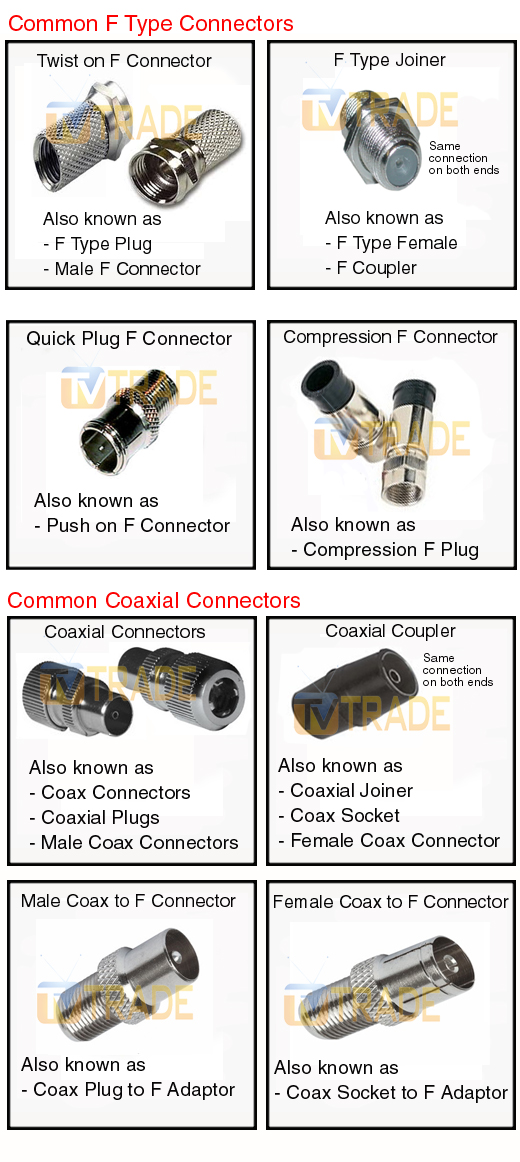
Coaxial Connectors
Coaxial connectors are round with a single pin in the center. They carry cable TV and antenna signals. Coax cables are durable and easy to connect. They deliver analog and digital signals but offer lower video quality than newer plugs.
Hdmi Connectors
HDMI plugs are flat and wide. They carry high-definition video and audio together. HDMI is the most common plug for modern TVs. It supports high-quality digital signals for clear pictures and sound.
Component Video Plugs
Component video plugs use three separate cables. Each cable carries a different part of the video signal. They provide better picture quality than composite plugs. Audio is carried separately using other cables.
Composite Video Plugs
Composite plugs have a single yellow connector for video. Audio uses red and white plugs. These plugs carry lower-quality video compared to component or HDMI. They are common in older devices like DVD players.
Scart Connectors
SCART plugs are large and rectangular with many pins. They carry video and audio signals in Europe. SCART supports both standard and RGB video signals. It was popular before HDMI became widespread.
Dvi Connectors
DVI plugs are mostly used for computer monitors but work with TVs too. They carry high-quality digital video but no audio. You need separate cables for sound when using DVI. They offer clear and sharp video signals.
Vga Connectors
VGA plugs have 15 pins arranged in three rows. They carry analog video signals only. VGA is common in older computers and some TVs. The picture quality is lower than digital plugs like HDMI or DVI.
Specialized Tv Plug Variants
Specialized TV plug variants improve how you connect devices and enjoy media. These plugs go beyond the usual HDMI or AV cables. They offer better sound, faster data, and more options for your TV setup.
These plugs help connect advanced devices and enhance your viewing experience. They support digital audio, internet access, and high-quality video. Knowing these plug types makes choosing and using your TV easier.
Optical Audio Connectors
Optical audio connectors use light to send sound signals. They provide clear, digital audio without interference. Many TVs have these ports to connect soundbars or home theater systems. Optical cables keep audio quality high over longer distances.
Usb Ports For Tv
USB ports let you connect flash drives, keyboards, and other gadgets. You can play videos and music directly from USB storage. Some TVs also allow firmware updates through USB. This port adds flexibility to your TV functions.
Ethernet Ports On Tv
Ethernet ports connect your TV to the internet using a cable. This gives a stable and fast connection for streaming shows and movies. Wired internet is often more reliable than Wi-Fi. Many smart TVs include this port for better online access.
Displayport Connections
DisplayPort is a digital video and audio interface found on some TVs. It supports high resolutions and refresh rates. DisplayPort is common in computers but is growing in TV models too. It offers another option for connecting devices with excellent quality.
Plug Compatibility And Usage
Understanding plug compatibility is key to connecting your TV correctly. Different TVs and devices use various plug types. Using the right plug ensures clear picture and sound. It also protects your equipment from damage. Knowing how to match plugs with devices helps avoid frustration.
Matching Tv Plugs With Devices
Check the TV’s input ports before buying a plug or cable. Common TV plugs include HDMI, RCA, and VGA. Each device may require a specific plug type. Match the plug to the device’s port for proper connection. This step prevents connection errors and poor signal quality.
Adapters And Converters
Adapters help connect plugs that do not match. They change the plug shape but do not convert signals. Converters change one signal type to another. Use converters when connecting old devices to new TVs. Choose the right adapter or converter for your setup.
Common Issues And Solutions
Loose connections cause poor picture or no sound. Ensure plugs fit firmly into the ports. Wrong plug types may not fit or work properly. Use adapters or converters for incompatible plugs. Check cables for damage and replace if needed. Clean ports to remove dust and improve contact.
Choosing The Right Tv Plug
Choosing the right TV plug is important for a smooth viewing experience. It affects how well your TV connects to power and other devices. Different plugs suit different needs and setups. Picking the right one saves time and avoids technical problems later.
Signal Quality Considerations
Good signal quality ensures clear images and sound. Some plugs carry signals better than others. For example, HDMI plugs offer high-definition video and audio. Avoid plugs that reduce picture or sound quality. Check the plug type that matches your TV’s input.
Ease Of Installation
Simple plugs save effort and time. Choose plugs that fit easily into your TV and devices. Some plugs come with clear instructions or snap-in designs. This reduces mistakes during setup. A plug that is hard to install can cause frustration and damage.
Future-proofing Your Setup
Technology changes fast. Select plugs that support new features and devices. HDMI 2.1 plugs, for example, handle higher resolutions and refresh rates. Using modern plugs means less need to upgrade soon. Think about what devices you may add in the future.

Frequently Asked Questions
What Are The Common Types Of Tv Plugs Used Worldwide?
Common TV plugs include HDMI, RCA, SCART, VGA, and Component cables. Each type connects different devices to TVs.
How Does An Hdmi Plug Differ From Rca Plugs?
HDMI carries high-definition video and audio in one cable. RCA plugs separate video and audio signals.
Which Tv Plug Is Best For High-quality Video?
HDMI plugs provide the best video and audio quality for modern TVs. They support HD and 4K resolutions.
Can I Use Scart Plugs With All Tvs?
SCART plugs are mostly used in Europe and work with older TVs. Newer TVs might not support SCART without adapters.
Why Do Some Tvs Use Vga Plugs Instead Of Hdmi?
VGA plugs are for older TVs or computers and only carry video. HDMI is newer and carries video and audio together.
Conclusion
Choosing the right TV plug matters for your device’s performance. Different plugs serve different functions and fit various TV models. Knowing these types helps you connect your TV easily and safely. Always check your TV’s plug type before buying cables or accessories.
This small step saves time and avoids frustration. Keep this guide handy for quick reference. Enjoy your TV with the right connections every time. Simple, clear, and effective.