
Choosing the right TV can be confusing, especially when you hear about different operating systems. But understanding the types of TV operating systems can make your decision easier and improve how you enjoy your favorite shows and apps.
Whether you want smooth streaming, easy navigation, or access to tons of apps, knowing what each system offers helps you get the best experience. Keep reading to discover which TV operating system fits your needs perfectly and how it can change the way you watch.
Smart Tv Platforms
Smart TV platforms control how users interact with their televisions. They provide access to apps, streaming services, and settings. Choosing the right platform affects your TV experience. Each platform offers unique features and ease of use. Here are some popular smart TV platforms.
Android Tv
Android TV uses Google’s Android system. It offers a clean interface and many apps. Google Assistant is built-in for voice commands. The platform supports Chromecast for easy casting. It works well with Google services and devices.
Roku Tv
Roku TV is known for its simple design. It offers a large selection of streaming channels. The remote includes quick access buttons for popular apps. Roku’s platform is easy to navigate for beginners. It focuses on streaming content without extra features.
Webos
webOS comes from LG and uses a card-based interface. It allows quick switching between apps and sources. The Magic Remote supports voice and gesture control. webOS has a smart recommendation system for shows. It is fast and easy to use.
Tizen Os
Tizen OS is Samsung’s smart TV platform. It offers a smooth and bright interface. The platform supports many apps and services. Voice control and smart home integration are included. Tizen OS delivers good performance on Samsung TVs.

Proprietary Systems
Proprietary TV operating systems are made by TV manufacturers. These systems are designed to work only on their own brand of TVs. They offer unique features and a smooth user experience. These systems control how apps run and how users interact with the TV.
Samsung Tizen
Samsung uses Tizen as its main TV operating system. Tizen is fast and easy to use. It supports many popular apps and streaming services. The interface is simple, with big icons and clear menus. Samsung updates Tizen regularly to add new features and fix bugs.
Lg Webos
LG’s webOS is known for its clean and user-friendly design. It uses a simple bar at the bottom of the screen to access apps and settings. webOS supports voice control and smart home integration. The system is built to make navigation quick and smooth.
Sony Linux-based Os
Sony TVs run on a Linux-based operating system. It is stable and secure. This OS supports Google’s Android TV platform, giving access to many apps. Sony customizes the system to improve performance on their devices. It also allows easy connection to other smart devices.
Open Source Options
Open source TV operating systems offer flexibility and customization. They allow users and developers to modify the software freely. These options often provide a wide range of apps and features. Open source systems can run on many devices. They are popular among tech enthusiasts and developers.
Android Open Source Project
The Android Open Source Project (AOSP) is the base of many TV systems. It provides a free, customizable platform for smart TVs. Manufacturers can build their own versions of Android using AOSP. This system supports apps from the Google Play Store and other sources. Users enjoy a familiar interface and easy access to content. It also receives regular updates from the developer community.
Kodi
Kodi is a free, open source media player software. It runs on many operating systems, including TV platforms. Kodi lets users play videos, music, and view pictures in one place. It supports add-ons that extend its features for streaming and customization. The interface is simple and easy to navigate. Kodi is popular for building custom media centers.
Streaming Device Os
Streaming device operating systems power many smart TVs and media players. They provide a simple way to access movies, shows, apps, and games. These systems focus on smooth streaming and easy navigation. Many brands use their own OS to offer unique features and better user experiences.
Amazon Fire Tv
Amazon Fire TV OS is built on Android but customized by Amazon. It offers quick access to Amazon Prime Video and other popular apps. The interface is simple and easy to use. Voice control with Alexa makes searching faster. It supports 4K streaming and many apps from the Amazon Appstore.
Apple Tvos
Apple tvOS is exclusive to Apple TV devices. It has a clean design and works well with other Apple products. The App Store on tvOS offers many apps and games. Siri voice control helps find content quickly. It supports high-quality video and audio formats for a great experience.
Google Chromecast
Chromecast OS is a lightweight system focused on casting content from phones or tablets. It does not have a traditional menu like other OS. Instead, it streams apps directly from other devices. Google Assistant works with Chromecast for easy voice commands. It supports popular streaming apps and 4K resolution on newer models.
Comparison Factors
Choosing the right TV operating system depends on several key factors. These factors help users decide which system fits their needs best. Understanding these elements makes selecting easier and more informed.
User Interface
The user interface shows how easy the system is to use. A clean and simple design helps users find what they want fast. Some systems offer customizable menus and quick access to apps. The better the interface, the more enjoyable the experience.
App Availability
App availability means how many apps and services the system supports. More apps give users more options for streaming and entertainment. Popular systems often have large app stores. This ensures users can watch their favorite shows without issues.
Voice Control
Voice control lets users operate the TV with their voice. It makes searching and controlling easier, especially with smart assistants. Some systems support multiple languages and commands. Good voice control saves time and adds convenience.
Performance
Performance measures how fast and smooth the system runs. A fast system loads apps quickly and switches screens without lag. Good performance improves overall user satisfaction. It is important for a smooth viewing experience.
Future Trends
The future of TV operating systems promises exciting changes. These changes will make TVs smarter and easier to use. New features will improve how people watch and interact with content.
Technology advances fast. TV OS developers work hard to keep up with user needs. They focus on adding intelligent functions and better connections. Personalization will also play a big role in future systems.
Ai Integration
Artificial Intelligence will help TVs understand users better. AI can suggest shows based on watching habits. It also improves voice commands for easier control. Smart assistants will become more accurate and helpful. AI will make content discovery faster and more fun.
Enhanced Connectivity
Future TV OS will connect with more devices. Smart home gadgets will link smoothly to TVs. Streaming will be faster with less buffering. TVs will sync with phones and tablets easily. This creates a unified experience across all screens.
Customization
Users will personalize their TV screens more than before. They can adjust layouts and app arrangements. Custom settings will save time and improve comfort. TV OS will learn preferences to suggest settings. Personal control will make watching more enjoyable.

Frequently Asked Questions
What Are The Most Common Tv Operating Systems?
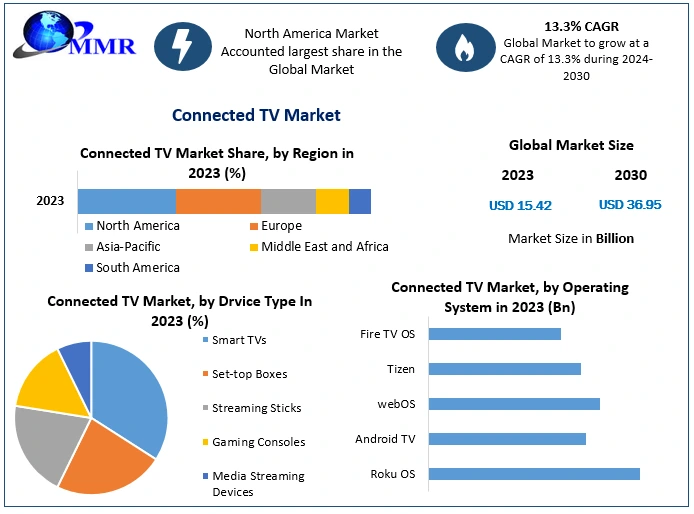
Popular TV operating systems include Android TV, Tizen, webOS, Roku TV, and Fire TV. Each offers unique features and app choices. They help smart TVs run apps and connect to the internet.
How Does Android Tv Differ From Other Tv Os?
Android TV uses Google services and supports many apps from the Play Store. It offers a familiar interface for Android users. Other systems may have fewer apps or different layouts.
Can I Install Apps On All Tv Operating Systems?
Most smart TV OS allow app installation, but the selection varies by system. Android TV and Roku TV have large app stores. Some OS might limit app choices or pre-install apps.
Which Tv Os Is Best For Streaming Movies And Shows?
Android TV, Roku TV, and Fire TV are top choices for streaming. They support popular apps like Netflix, Hulu, and Amazon Prime. Their user-friendly interfaces make streaming easy.
Are Tv Operating Systems Updated Regularly?
Yes, most TV OS get updates to fix bugs and add features. Updates improve security and app compatibility. Some older TVs may stop receiving updates after a few years.
Conclusion
Choosing the right TV operating system can improve your viewing experience. Each system offers unique features and easy navigation. Consider what apps and services matter most to you. Some systems work better with certain brands and devices. Simple use and regular updates keep your TV running smoothly.
Understanding these types helps you pick the best fit. Enjoy clearer menus, faster responses, and more content options. Your TV can do more than just show channels. Explore these systems to find what suits your needs best.