
When you watch your favorite TV show or news broadcast, have you ever wondered how the visuals grab your attention so quickly? The answer lies in TV graphics.
These are the images, animations, and text that pop up on your screen, making the content clearer, more exciting, and easier to follow. Understanding the different types of TV graphics can help you appreciate what goes on behind the scenes and even inspire you if you want to create your own.
Ready to discover how these powerful visuals work and why they matter to your viewing experience? Let’s dive in.

Static Graphics
Static graphics are simple images used in TV broadcasts. They do not move or change during the show. These graphics help viewers understand the content better. They also make the screen look more professional and organized.
Static graphics can be logos, text boxes, or banners. They stay on the screen for a while without any animation. These graphics are easy to create and use.
Logos And Watermarks
Logos and watermarks show the channel’s or show’s brand. They usually appear in a corner of the screen. This helps viewers know what channel they are watching. Logos remain visible throughout the program without distracting the viewer.
Watermarks protect the content from being copied. They are semi-transparent and blend with the background. Both logos and watermarks build brand recognition and trust.
Lower Thirds
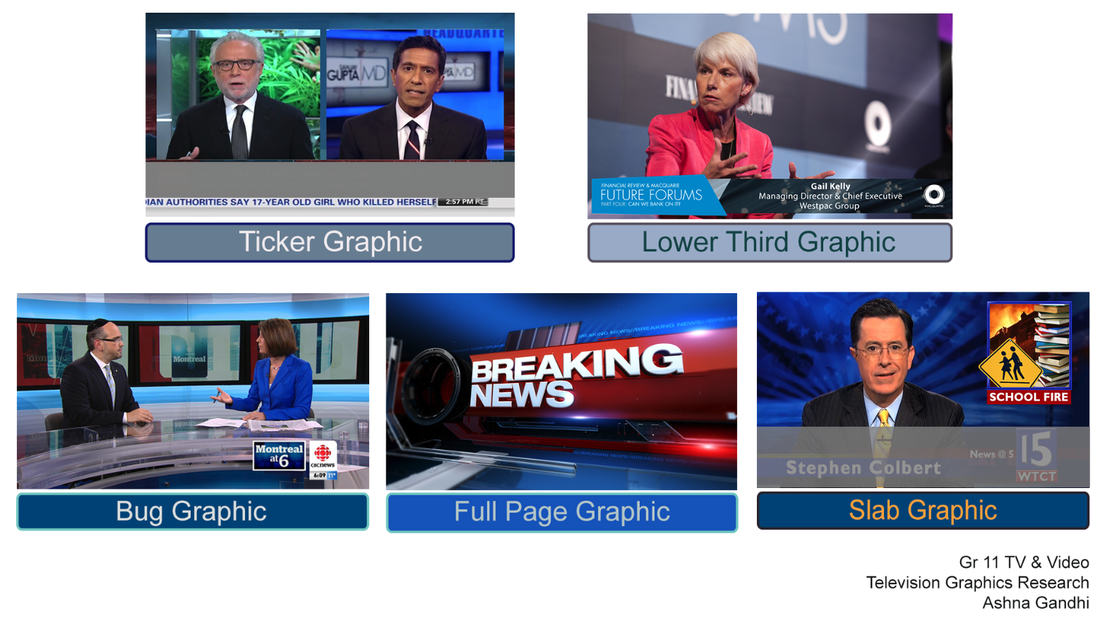
Lower thirds are text boxes at the bottom of the screen. They give extra information about what is on air. For example, a person’s name, location, or topic can appear here. Lower thirds help viewers follow the story without interrupting the video.
These graphics do not move but change when needed. They keep the screen clean and easy to read. Lower thirds are common in news and talk shows.
Ticker Tapes
Ticker tapes show a line of text that scrolls at the bottom of the screen. They display news headlines, stock prices, or sports scores. The text moves slowly from right to left or left to right.
Even though the text moves, ticker tapes are still considered static graphics. They provide real-time information without covering the main video. This helps viewers stay informed while watching the program.
Motion Graphics
Motion graphics bring life to TV screens by adding moving visuals and animations. They make content more dynamic and keep viewers interested. Motion graphics mix art and technology to create engaging storytelling elements. These visuals help explain ideas clearly and attract attention quickly.
Animated Intros
Animated intros start a TV show or segment with energy. They set the mood and give viewers a quick preview. Bright colors and smooth movements grab attention fast. Intros often include logos or main themes. They help build a show’s identity and make it memorable.
Transitions
Transitions connect different scenes or segments smoothly. They avoid sudden jumps that can confuse viewers. Motion graphic transitions use effects like fades, wipes, or slides. These effects guide the eye and keep the flow natural. Good transitions make the watching experience pleasant and clear.
Kinetic Typography
Kinetic typography uses moving text to express ideas. Words can change size, color, or position to show emotion or importance. This technique makes messages easier to remember. It works well with voiceovers or music for stronger impact. Kinetic typography adds flair and helps explain content fast.
3d Graphics
3D graphics bring depth and realism to television visuals. They create a sense of space and volume on the screen. This type of graphic is widely used in modern TV shows and broadcasts. It makes the viewing experience more engaging and dynamic. 3D graphics combine art and technology to catch the viewer’s eye.
Virtual Sets
Virtual sets are digital environments used in TV studios. They replace physical backdrops with computer-generated scenes. These sets can change quickly to fit different show themes. Virtual sets save money and space in studios. They allow creative freedom without building real structures.
Augmented Reality Elements
Augmented reality (AR) adds digital objects to live video. These elements interact with real-world footage. AR graphics can show weather maps, stats, or animations. They help explain information clearly and attractively. AR makes broadcasts more informative and fun to watch.
3d Logos
3D logos give brands a modern and polished look. They stand out with depth and light effects. These logos often appear in show intros or transitions. They help viewers remember the channel or program. 3D logos are a simple way to boost brand identity.
Interactive Graphics
Interactive graphics make TV viewing more fun and engaging. They invite viewers to take part in the show or event. These graphics change based on viewer input or live data. This helps keep the audience interested and connected.
TV shows use interactive graphics to create a two-way experience. This section explores some popular types of interactive graphics on TV.
Live Polls
Live polls let viewers share their opinions in real time. Viewers vote using their phones or remote controls. The results appear instantly on the screen. This creates excitement and makes viewers feel involved.
Polls work well during game shows, talent contests, and news programs. They help hosts understand audience views quickly. Live polls keep the conversation dynamic and fresh.
Social Media Feeds
Social media feeds show live posts from Twitter, Instagram, or Facebook. Viewers see comments and reactions from other fans. This adds a social layer to the broadcast. It also encourages viewers to join online talks.
Feeds update automatically and show the latest messages. They help create a community around the show. Social media feeds make TV content feel current and relevant.
Touchscreen Interfaces
Touchscreen interfaces allow users to control graphics on the screen. Presenters or viewers can tap, swipe, or zoom images. This makes exploring information easy and interactive. Touchscreens work well in weather reports and sports analysis.
They offer a hands-on way to understand complex data. Touchscreen graphics make the viewing experience more personal. They also add a modern and tech-savvy look to the broadcast.
Infographics
Infographics play a key role in TV graphics. They help explain complex information quickly. Viewers can see data clearly through visuals. Infographics make content more interesting and easier to follow. They often combine text, images, and symbols to tell a story.
Different types of infographics serve different purposes. They can highlight trends, compare data, or show locations. Each type uses visuals to make the message clear and simple.
Data Visualization
Data visualization turns raw numbers into pictures. This helps viewers understand patterns and changes fast. Colors and shapes guide the eyes to key points. It reduces confusion and keeps viewers engaged. TV shows use data visualization to explain stats or results.
Charts And Graphs
Charts and graphs display numbers in a structured way. Bar charts, pie charts, and line graphs are common types. They show relationships and comparisons clearly. These graphics make numbers less boring and easier to grasp. TV news often uses them to show polls or sports scores.
Maps
Maps present information linked to locations. They show weather, election results, or event spots. Viewers can quickly see where things happen. Maps often use colors or icons to highlight key areas. This makes geographical data simple and visual.
Sports Graphics
Sports graphics make watching sports more exciting and clear. They show key information fast. Fans can follow the action easily. Broadcasters use these graphics to explain the game better. They help viewers understand scores, players, and key moments.
Scoreboards
Scoreboards show the current score of the match. They also display the time left in the game. This helps fans keep track of the progress. Scoreboards update in real time. They can show team names and fouls. This makes the game more engaging to watch.
Player Stats
Player stats give details about individual players. They show points scored, assists, and other key numbers. Stats help fans see who is playing well. They appear on the screen during breaks or pauses. This adds depth to the game and keeps fans informed.
Replay Overlays
Replay overlays highlight important moments in the game. They often include slow motion or zoom effects. These graphics point out key plays or fouls. Replay overlays help viewers understand what happened. They add excitement and clarity to the broadcast.
News Graphics
News graphics help viewers understand stories quickly and clearly. They show important information in a visual way. These graphics keep the audience informed and engaged during live broadcasts.
Breaking News Banners
Breaking news banners appear at the top or bottom of the screen. They alert viewers about urgent news. These banners often use bold colors to catch attention fast. Text is short and direct, making it easy to read in seconds.
Weather Maps
Weather maps display current weather conditions and forecasts. They use colors and symbols to show rain, sun, and temperature. These maps help viewers plan their day. Animated maps show weather changes in real time.
Ticker Updates
Ticker updates run across the screen’s bottom edge. They provide continuous news headlines or stock prices. The text moves slowly, so viewers can read without distraction. Tickers keep viewers informed without interrupting the main story.

Frequently Asked Questions
What Are The Common Types Of Tv Graphics Used?
TV graphics include lower thirds, full-screen graphics, bugs, and tickers. Each type helps share information clearly and quickly. They make shows more engaging and easier to follow.
How Do Lower Thirds Improve Tv Broadcasts?
Lower thirds display names or info at the bottom of the screen. They help viewers identify speakers or topics fast. This keeps the audience informed without interrupting the show.
Why Are Bugs Important In Tv Graphics?
Bugs are small logos shown on the screen corner. They help viewers know the channel or program instantly. Bugs build brand identity and keep the broadcast looking professional.
What Role Do Tickers Play In Tv Graphics?
Tickers show scrolling text, like news or sports updates. They provide live information without stopping the main program. Tickers keep viewers updated with the latest news and scores.
How Do Full-screen Graphics Enhance Tv Shows?
Full-screen graphics cover the entire screen with images or text. They highlight important news or create dramatic effects. These graphics capture attention and improve the visual experience.
Conclusion
TV graphics come in many types, each serving a special role. They help viewers understand shows better and keep screens lively. From lower thirds to full-screen graphics, each adds value. Knowing these types makes watching TV more fun and clear.
Try to notice different graphics next time you watch. They make programs easier to follow and more interesting. Good graphics support storytelling and keep viewers engaged. Understanding them helps appreciate TV production more deeply.