
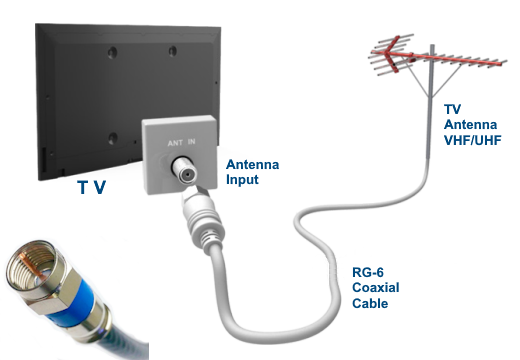
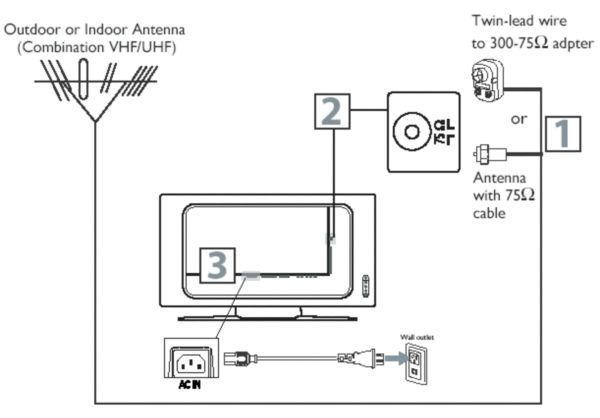
To connect a TV to an antenna, screw the antenna’s coax cable into the ANT/CABLE IN port on the back of the TV and tighten it finger-snug. Place the antenna near a window or as high as possible, then go to your TV settings and select Antenna/Air as the input source.
Run a channel scan so the TV can find local stations, then you can watch them using the channel buttons like normal.
Choosing The Right Antenna
Choosing the right antenna is key to getting clear TV signals. The right antenna helps you receive more channels without interruptions. It depends on your location, the type of TV, and where you place the antenna.
Understanding the differences between antennas helps you pick the best one for your needs. Consider the antenna type, direction, and signal range before buying.
Indoor Vs Outdoor Antennas
Indoor antennas are small and easy to install inside your home. They work best if you live near broadcast towers. These antennas are less affected by weather but may have weaker signals.
Outdoor antennas are larger and placed on rooftops or outside walls. They catch stronger signals and work better for long distances. Outdoor antennas need more effort to install but give better reception.
Directional Vs Omnidirectional
Directional antennas focus on signals from one direction. They offer stronger signals but need to be pointed correctly. Use them if broadcast towers are in a single direction.
Omnidirectional antennas receive signals from all directions. They are easier to install and move. These antennas are good if towers are spread around you.
Signal Range And Strength
Check the signal range before choosing an antenna. Short-range antennas work for cities or areas close to towers. Long-range antennas suit rural or distant locations.
Signal strength affects picture quality. Strong signals give clear images and sound. Weak signals cause pixelation and loss of channels. Choose an antenna with good range and strength for your area.
Credit: columbiaisa.50webs.com
Preparing Your Tv And Antenna
Preparing your TV and antenna is the first step for a clear TV signal. This preparation makes the connection process smooth and fast. It helps avoid confusion and ensures all parts fit well together. Follow these simple steps to get ready.
Locating The Antenna Input
Look at the back or side of your TV. Find a small round port labeled “ANT IN” or “Antenna.” This is where the antenna cable plugs in. If the TV has multiple ports, check the TV manual for the exact location. Clear space around this port to reach it easily.
Gathering Necessary Tools
Get tools ready before starting. You might need a coaxial cable, a screwdriver, and maybe an adapter. Have the antenna and its mounting hardware at hand. Keep everything close to avoid stopping in the middle. This saves time and effort.
Checking Cable Types
Check the cable type that connects your antenna to the TV. Most antennas use coaxial cables with F-type connectors. Make sure the cable matches the TV input. Using wrong cables can cause poor signal or no connection. Replace old or damaged cables for better quality.
Connecting The Antenna To The Tv
Connecting the antenna to the TV is a simple step that brings free channels right into your living room. This process requires just a few basic tools and a bit of care. Follow these easy instructions to set up your antenna properly and enjoy clear TV signals.
Attaching The Coaxial Cable
Locate the coaxial cable from your antenna. Find the coaxial input on the back of your TV. Screw the cable connector onto the TV input. Turn the connector clockwise until it feels tight. Avoid over-tightening to prevent damage. This secure connection ensures a good signal.
Securing The Connection
Check the cable connection for any looseness. Gently pull the cable to test its hold. Use a cable clip or tape to fasten the cable in place. Keep the cable away from sharp edges or heavy objects. A stable connection avoids signal interruptions and interference.
Using An Amplifier If Needed
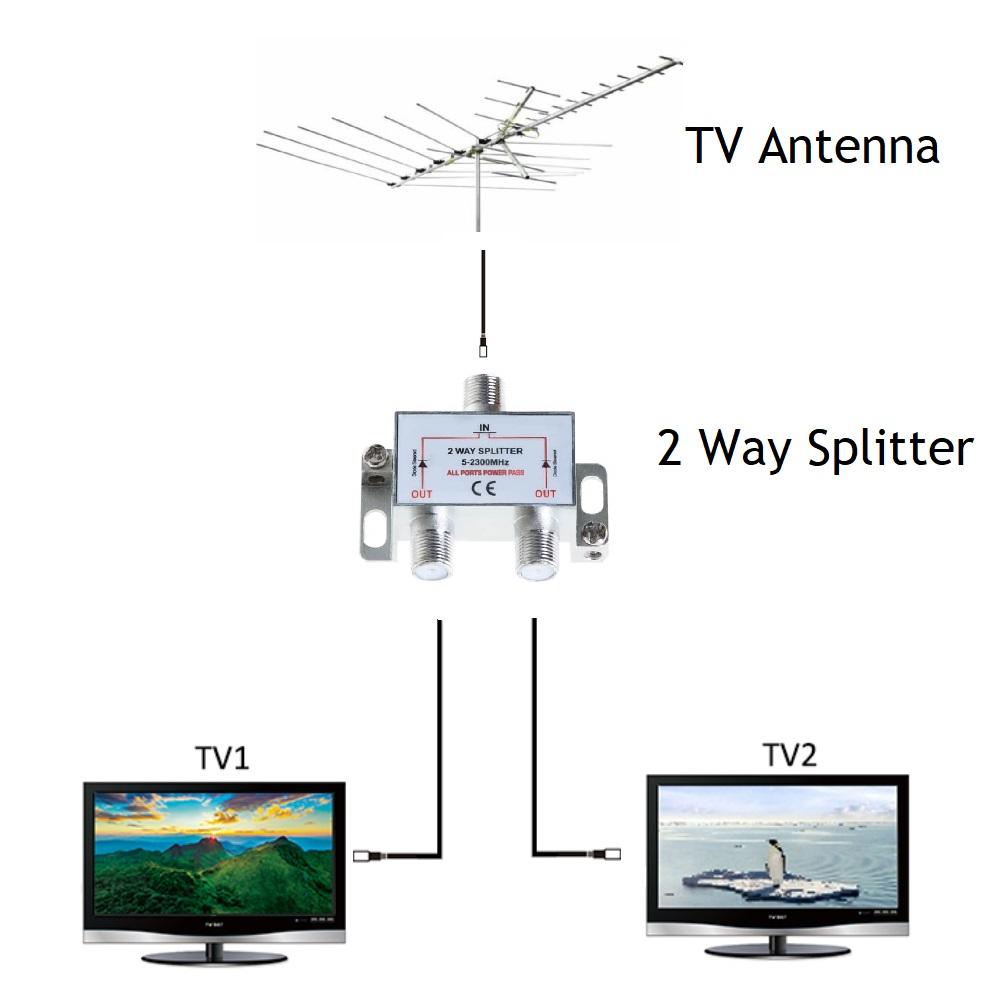
Some antennas need an amplifier to boost weak signals. Connect the amplifier between the antenna and the TV. Plug in the amplifier’s power supply. Adjust the amplifier’s settings based on signal strength. This step can improve picture quality in areas with poor reception.
Credit: satmaximum.com
Setting Up The Tv For Antenna Signals
Setting up your TV to receive antenna signals is a simple process. It allows you to watch local channels without cable or streaming. The key steps include adjusting the TV settings to recognize the antenna input and searching for available channels. Follow these steps carefully to enjoy free broadcasts on your TV.
Accessing The Tv Menu
First, turn on your TV. Use the remote control to open the main menu. Look for a button labeled “Menu,” “Settings,” or “Setup.” Press it to enter the TV settings. This menu lets you change the input source and scan for channels.
Selecting Antenna As The Input
Inside the menu, find the input source option. It may be called “Input,” “Source,” or “TV Signal.” Select “Antenna” or “Air” instead of “Cable” or “HDMI.” This tells the TV to look for signals from your antenna, not from cable or other devices.
Scanning For Channels
Next, find the channel scan or auto-tune option. This will search for all channels your antenna can pick up. Choose “Scan,” “Auto Scan,” or “Auto Program.” Wait for the process to finish. The TV will save the channels it finds. You can now watch free TV using your antenna.
Optimizing Signal Reception
Getting a clear TV signal from an antenna depends on good reception. Optimizing signal reception helps you watch channels without interruptions. Small changes can make a big difference in picture quality and sound.
Adjusting Antenna Position
Move your antenna slowly to find the best spot. Place it near a window or high on a wall. Point the antenna toward the nearest broadcast tower. Try different angles until the picture becomes clear. Avoid placing the antenna inside cabinets or behind large objects.
Reducing Interference
Keep the antenna away from electronic devices like routers or microwaves. These devices can block or weaken signals. Use shielded cables to connect the antenna to your TV. Check for thick walls or metal objects that may block signals. Clear space around the antenna to reduce signal noise.
Using Signal Boosters
A signal booster can help if the signal is weak. It increases the strength of the antenna signal. Connect the booster between the antenna and the TV. Choose a booster that matches your antenna type. Use boosters carefully to avoid signal overload and distortion.
Troubleshooting Common Issues
Troubleshooting common issues helps keep your antenna TV setup working well. Problems can stop your TV from showing channels clearly. Fixing these issues is often simple and quick.
No Signal Detected
Check the antenna cable connection to the TV. Make sure it is tight and secure. Try unplugging and plugging the cable back in. Ensure the TV is set to the correct input or antenna mode. Move the antenna to a higher place or near a window. Sometimes, weather or buildings block the signal. Scan for channels again on your TV menu to refresh the signal list.
Poor Picture Quality
Adjust the antenna position slowly for better reception. Avoid metal objects or walls near the antenna. Use a signal amplifier if you live far from broadcast towers. Check the cable for damage or wear and replace if needed. Clean the antenna connection points to remove dust or rust. Lower picture quality often comes from weak signals or interference.
Missing Channels
Rescan channels on your TV after moving the antenna. Some channels may need a stronger signal or different antenna type. Check if the channel is available in your area using online tools. Use an outdoor antenna for better reach if indoors does not work. Make sure your TV tuner supports the broadcast format. Missing channels often mean weak signals or outdated equipment.
Credit: www.philips.sa
Conclusion
Connecting your TV to an antenna is simple and saves money. Just follow the steps carefully. Choose the right antenna for your area. Connect the antenna cable to your TV’s input. Scan for channels using your TV’s menu. Enjoy free access to local broadcasts and shows.
This setup gives you clear picture quality without extra fees. Try adjusting the antenna for better signal if needed. Watching TV this way is easy and cost-effective. You can stay updated with news, sports, and entertainment effortlessly. Start now and enjoy your favorite channels for free.