
Sometimes, but only if the stand is wide and strong enough for the 65-inch TV’s feet or base. Many 65-inch TVs have wide-set legs, so a 55-inch stand may be too narrow and the feet could hang off the edges, which is unsafe. If the TV has a center pedestal base, it may fit even on a smaller stand, as long as the stand supports the weight and depth.
The safest move is to measure the TV’s leg-to-leg distance and compare it to the stand’s usable top width.
Tv And Stand Measurements
Choosing the right TV stand for your television requires careful measurement. A 65-inch TV might not fit well on a stand designed for a 55-inch TV. Understanding both TV and stand dimensions helps avoid stability issues and improves room aesthetics.
Accurate measurements ensure your TV sits securely and looks balanced. This section explains how to measure your TV and stand correctly.
Measuring Tv Width Vs Diagonal
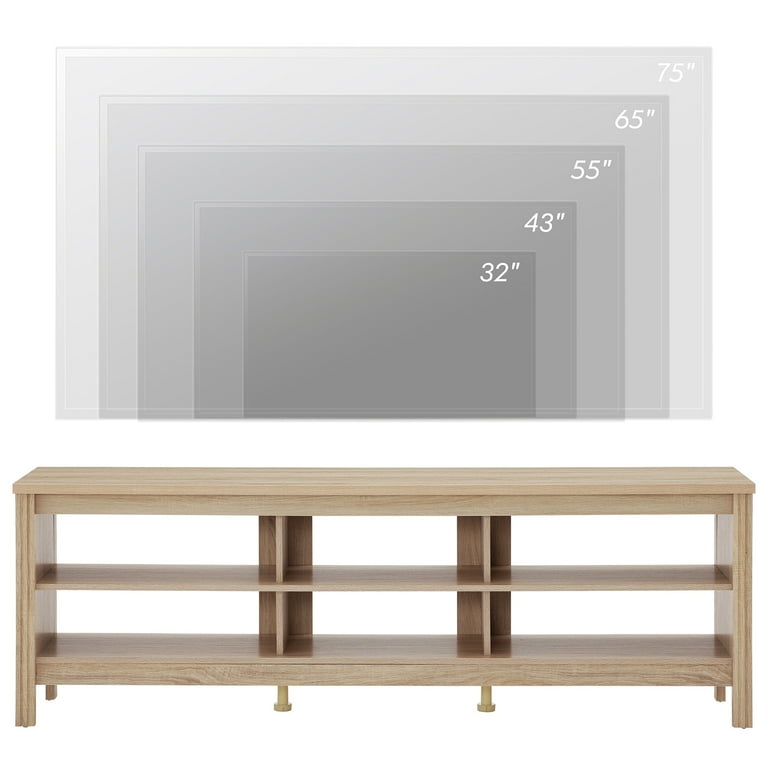
TV size is usually given by diagonal length in inches. This is the distance from one corner of the screen to the opposite corner. It does not show the actual width of the TV.
To find the width, measure the TV horizontally from one edge to the other. Include the frame or bezel in this measurement. This width is important for matching a stand.
Measuring Tv Stand Dimensions
Measure the TV stand width from one outer edge to the other. This is the total horizontal space the stand offers. Also, check the depth to ensure the TV base fits well without hanging off.
Some stands have additional space for devices or décor. Make sure your TV base fits comfortably on the stand surface.
Importance Of Accurate Measurement
Precise measurements prevent your TV from tipping or slipping off the stand. A TV wider than the stand can create safety risks. It also looks unbalanced and may cause cable management problems.
Accurate sizing helps select a stand that supports your TV properly. It improves room appearance and ensures stable placement. Measuring both TV width and stand dimensions is key for the right fit.
Credit: www.walmart.com
Size Compatibility Issues
Size compatibility is a key factor when placing a 65-inch TV on a 55-inch TV stand. The difference in size often creates several challenges. These challenges affect the safety, look, and functionality of your TV setup.
Understanding these size compatibility issues helps you avoid common problems. The following sections explain what risks and concerns arise from using a smaller stand for a larger TV.
Risks Of Using A Smaller Stand
A smaller stand may not hold the weight of a 65-inch TV properly. This can cause the stand to tip over or collapse. The TV might fall, leading to damage or injury. Overhanging edges increase the chance of accidental bumps and knocks. It is safer to use a stand that matches or exceeds the TV size.
Stability Concerns
The stand’s stability decreases when the TV is wider than its surface. The center of gravity shifts beyond the stand’s base. This makes the TV prone to wobbling or sliding. Uneven weight distribution also stresses the stand’s joints. Stability problems can cause long-term damage to both the TV and furniture.
Impact On Aesthetics
A smaller stand often looks awkward with a bigger TV on top. The TV edges will extend past the stand, creating an unbalanced look. This misfit draws attention and reduces the room’s visual harmony. A properly sized stand frames the TV nicely and complements the room décor. The right proportions give your setup a clean and polished appearance.
Cable Management Challenges
Cable organization becomes difficult when the TV overhangs the stand. Wires may hang loosely or get tangled behind the edges. This clutter makes cleaning harder and reduces safety. Proper cable management requires enough space to route cords neatly. A larger stand offers room for power strips, remotes, and accessories without mess.
Recommendations For Tv Stands
Choosing the right TV stand is crucial for safety and style. A good stand supports your TV’s size and weight. It also fits well in your room and matches your decor. This section offers clear recommendations for selecting a TV stand that works with different TV sizes.
Ideal Stand Width Guidelines
The TV stand should be wider than the TV. Measure the TV’s width, not the diagonal size. Add at least 4 inches on each side for balance. For example, a 65-inch TV usually needs a stand about 60 inches wide or more. A stand narrower than the TV can look awkward and may be unstable.
Weight Capacity Considerations
Check the stand’s weight limit before buying. The stand must hold the TV’s weight safely. A 65-inch TV is often heavier than a 55-inch model. Using a stand with lower weight capacity risks damage or accidents. Always pick a stand rated above your TV’s weight.
Choosing A Wider Stand
Selecting a wider stand adds safety and style. It prevents the TV from overhanging the edges. A wider stand also offers more space for devices and decorations. Consider stands with extra shelves or storage for better organization. This choice improves stability and enhances the overall look.
Alternative Solutions
Finding the right support for a 65-inch TV can be tricky if the current stand fits only a 55-inch model. Alternative solutions help manage space and stability issues without needing a brand-new stand. These options improve safety and keep your viewing area neat and stylish.
Tabletop Mount Options
Tabletop mounts attach directly to your TV’s base and sit on the stand. They reduce the TV’s footprint on the stand surface. These mounts often allow height adjustment and swivel features. Tabletop mounts are perfect for smaller stands that cannot fully support larger TVs. They provide extra stability and prevent the TV from tipping over.
Wall Mounting Benefits
Wall mounts free up all space on your TV stand. This keeps your furniture clear and creates a clean, modern look. Wall mounting offers better viewing angles and reduces glare. It also improves safety by securing the TV firmly to the wall. This solution works well in rooms with limited surface space for stands.
Using Tv Legs With Smaller Stands
Some TVs have wide legs that do not fit smaller stands. You can replace those legs with a center stand or a compatible mounting bracket. Center stands take up less width and fit on narrower furniture. This setup maintains stability while keeping the TV supported on a smaller surface. Check your TV’s manual for compatible leg options or mounts.
Practical Tips For Setup
Setting up a 65-inch TV on a 55-inch TV stand requires careful planning. The goal is to keep the TV safe, stable, and looking good. Small changes can make a big difference in your viewing area. Follow these practical tips for a smooth setup process.
Ensuring Safety And Stability
Check the weight limit of your 55-inch TV stand. Make sure it can hold the heavier 65-inch TV. Place the TV in the center of the stand to avoid tipping. Use anti-slip pads or mounting brackets for extra support. Avoid pushing the TV to the edges of the stand. Safety should come first to prevent accidents.
Maintaining Balanced Appearance
Balance the look by placing decorative items on each side of the TV. Keep the TV centered to reduce the overhang effect. Use a TV stand with a low profile to help the TV blend in. Keep the area neat to avoid drawing attention to the size mismatch. A balanced setup looks clean and pleasing to the eye.
Managing Cables Efficiently
Use cable ties or clips to gather loose wires neatly. Route cables behind the stand to keep them out of sight. Label each cable to make future changes easier. Avoid letting cables hang over the edges of the stand. Proper cable management improves the overall look and safety of your setup.
Credit: www.bestbuy.com
Conclusion
A 65-inch TV can physically fit on a 55-inch stand, but it is not ideal. The TV will overhang the edges, making it unstable and less safe. This setup can also look unbalanced and may cause cable management issues. It is better to choose a wider stand that fully supports the TV’s base.
Checking the stand’s weight capacity is important too. A properly sized stand keeps your TV secure and your room looking neat. Safety and style go hand in hand with the right TV stand choice.