
Yes, a 100-inch TV can be wall mounted, but it needs a heavy-duty mount that matches the TV’s VESA pattern and is rated far above the TV’s weight. The mount must be bolted into multiple wall studs or solid masonry—never drywall alone—because the screen size creates more leverage on the wall.
A low-profile or tilting mount is usually safest, and installation is best done with two or more people for secure alignment.
Weight And Size Considerations
Mounting a 100 inch TV on the wall requires careful thought about its weight and size. Large TVs are heavy and wide, so the wall and mount must support them safely. These factors affect the choice of wall mount and installation method.
Ignoring weight and size can cause damage to the wall or the TV. Proper preparation ensures a secure and lasting setup. This section covers how to check the TV weight and choose a mount with the right capacity.
Check Tv Weight Without Stand
TV weight is often listed with the stand attached. Remove the stand to get the accurate weight for wall mounting. The TV is lighter without the base, but still quite heavy for a 100 inch screen.
Look for the exact weight in the product manual or online specs. Knowing this weight helps avoid buying a mount that is too weak. Always round up a little to add a safety margin.
Assess Wall Mount Weight Capacity
Every wall mount has a weight limit. Choose one that can hold more than your TV’s weight without the stand. This prevents stress on the mount and wall.
Heavy-duty mounts designed for large TVs often support 150 pounds or more. Confirm the mount’s weight capacity before buying. Also, consider the mount type: fixed, tilting, or full-motion. Full-motion mounts need stronger support due to extra strain.
Vesa Pattern And Mount Compatibility
Understanding the VESA pattern and mount compatibility is essential for wall mounting a 100-inch TV. The VESA pattern refers to the standardized hole layout on the back of the TV. It determines which wall mounts will fit your TV securely. Choosing the right mount type also affects stability and viewing experience. Knowing these details helps ensure a safe and perfect installation.
Measure Tv’s Vesa Pattern
Find the VESA pattern by measuring the distance between the mounting holes on your TV’s back. Measure horizontally and vertically in millimeters. Common large TV patterns include 600×400 mm or larger. Check your TV manual or manufacturer’s website for exact specs. Matching the mount’s VESA pattern with your TV is critical for a proper fit.
Choose Fixed, Tilting, Or Full-motion Mount
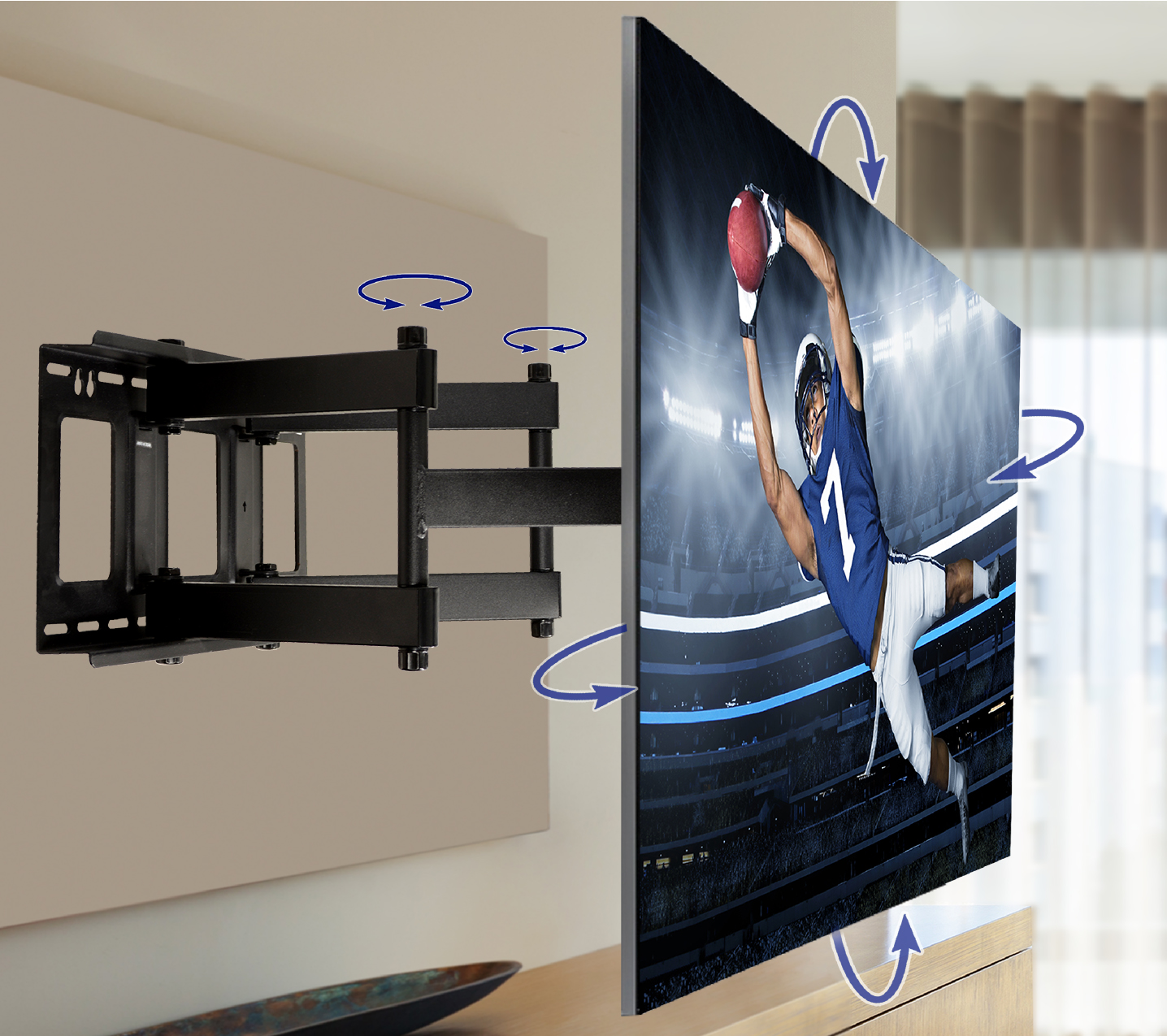
Choose a fixed mount to keep the TV flat against the wall. It is simple and holds the TV close to the wall. Tilting mounts allow slight up and down adjustment. This helps reduce glare and improve viewing angle. Full-motion mounts offer the most flexibility. They let you swivel, tilt, and extend the TV away from the wall. Full-motion mounts need strong wall support due to extra strain. Pick the mount style that suits your space and viewing needs.
Selecting The Right Wall Mount
Selecting the right wall mount for a 100 inch TV is essential for safety and viewing comfort. A large TV requires strong support that fits its size and weight. Choosing the correct mount helps avoid damage to the wall and the TV. It also ensures you enjoy the best viewing angle in your room.
Heavy-duty Mounts For Large Tvs
Heavy-duty mounts are designed to hold large and heavy TVs securely. They have strong metal construction and high weight capacity. These mounts attach firmly to wall studs, not just drywall. This prevents the TV from falling or tilting unexpectedly. Look for mounts with a weight limit above your TV’s weight. Full-motion heavy-duty mounts allow you to tilt and swivel the TV for better angles. Fixed heavy-duty mounts keep the TV flat against the wall for a clean look.
Pros And Cons Of Mount Types
Fixed mounts are simple and cost-effective. They hold the TV close to the wall, saving space. The downside is no flexibility in angle adjustment. Tilting mounts let you change the vertical angle. This reduces glare and improves viewing height. They are a good middle ground in price and function. Full-motion mounts offer the most flexibility. You can swivel, tilt, and extend the TV from the wall. These mounts are heavier and need strong wall anchors. They may require professional installation to ensure safety.

Credit: www.amazon.com
Preparing The Wall
Mounting a 100 inch TV requires a strong and stable wall surface. Proper preparation ensures the TV stays secure and safe. Walls must handle the TV’s heavy weight without damage.
Preparing the wall involves finding solid support and avoiding weak spots. This step is vital to prevent accidents and maintain the TV’s position over time.
Locate And Mark Wall Studs
Use a stud finder to locate the wooden studs behind the drywall. Studs provide the necessary support for heavy TVs. Mark the stud positions clearly with a pencil. Mounting directly on studs ensures the TV stays firmly attached to the wall.
Avoid Drywall Mounting
Drywall alone cannot support the weight of a 100 inch TV. Mounting on drywall risks the TV falling and damaging the wall. Always secure the mount to studs, never just the drywall. If studs are not in the right place, consider alternative wall options or reinforcement.
Consider Brick Or Concrete Walls
Brick and concrete walls offer strong support for large TVs. Use appropriate anchors and drill bits designed for masonry. These materials require different tools than drywall. Ensure you use heavy-duty hardware for a secure mount. This preparation prevents cracks and keeps the TV stable.
Installation Process
Mounting a 100 inch TV on the wall requires careful steps to ensure safety and stability. The installation process involves securing the wall plate, attaching the bracket to the TV, and hanging the TV safely. Proper adjustments for tilt and leveling help achieve the best viewing angle.
Attach Wall Plate Securely
First, locate the wall studs using a stud finder. Mark the spots where you will drill holes. Use lag bolts to fasten the wall plate firmly into the studs. Make sure the plate is level before tightening all screws. A secure wall plate supports the heavy weight of a 100 inch TV.
Mount Tv Bracket To Tv
Attach the mounting bracket to the back of your TV using the screws provided. Check your TV’s VESA pattern to match the bracket holes. Use spacers if needed to avoid pressure on the TV surface. Tighten screws carefully to prevent damage but keep the bracket stable.
Hang Tv With Assistance
Large TVs need two or more people for safe lifting. Lift the TV and hook the bracket onto the wall plate slowly. Ensure the locking mechanism clicks into place to secure the TV. Double-check the connection before letting go to avoid accidents.
Adjust Tilt And Leveling
Once the TV is hung, adjust the tilt to reduce glare. Use the mount’s knobs or screws to set the desired angle. Check the TV’s level with a spirit level. Make small adjustments until the screen is perfectly horizontal for comfortable viewing.
Credit: www.qualgear.com
Safety And Structural Concerns
Mounting a 100 inch TV on the wall requires careful attention to safety and structural concerns. Large TVs are heavy and create strong forces on the wall and mounting hardware. Incorrect installation can cause damage to walls or even result in the TV falling. It is essential to address these risks to protect both your property and personal safety.
Understanding how the mount affects the wall and ensuring secure anchoring are key steps. Knowing when to seek expert help can prevent costly mistakes and injuries. This section covers important safety tips for mounting a 100 inch TV safely and securely.
Manage Wall Strain From Full-motion Mounts
Full-motion mounts allow the TV to extend and swivel. This movement increases stress on the wall compared to fixed mounts. The further the TV extends, the more force pulls on the anchors and wall studs.
Choose a mount designed for heavy TVs with strong arms. Avoid extending the TV fully unless necessary. Limit the range of motion to reduce strain on the wall. Check the mount’s weight rating and never exceed it.
Importance Of Proper Anchoring
Anchoring the mount into wall studs is critical for safety. Drywall alone cannot support the weight of a 100 inch TV. Use a stud finder to locate solid framing behind the wall.
Use heavy-duty lag bolts or screws designed for TV mounts. Avoid using plastic anchors or drywall anchors for large TVs. Tighten all fasteners securely and verify the mount is level before hanging the TV.
When To Hire Professionals
Mounting a 100 inch TV is challenging and risky for beginners. Walls may have hidden wiring, plumbing, or uneven studs. Professionals have the tools and experience to assess these risks.
Hire an expert if you doubt your ability to locate studs or secure the mount. Professionals ensure the TV is safely mounted and properly aligned. Their work reduces the chance of damage or injury.
Optimizing Viewing Experience
Mounting a 100 inch TV on the wall is impressive, but the viewing experience matters most. Proper placement improves comfort and picture quality. Small adjustments make a big difference. Optimizing the viewing experience helps you enjoy every detail without strain or discomfort. Understanding the best height and placement ensures your TV becomes the room’s centerpiece.
Choose Optimal Viewing Height
Place the TV so the center is at eye level. Sitting height varies, but generally 42 to 48 inches from the floor works well. Mounting too high causes neck strain. Too low makes viewing uncomfortable over time. Keep the screen at a natural line of sight to reduce fatigue.
The viewing distance should be about 1.5 to 2.5 times the diagonal screen size. For a 100 inch TV, sit 12 to 20 feet away. This distance avoids pixelation and keeps the picture sharp. Adjust the height and distance to fit your room and seating layout.
Use Templates For Accurate Placement
Wall mounts often come with paper templates. Use these to mark drill holes precisely. Accurate placement ensures the TV hangs level and secure. Without a template, mounting errors can lead to crooked or unstable setups.
Measure twice before drilling. Align the template with wall studs for strong support. Mark all points clearly. A level tool helps check horizontal alignment. Taking time with this step saves effort and prevents costly mistakes later.
Additional Tips
Mounting a 100-inch TV on the wall requires more than just a strong bracket. Extra care ensures safety and a perfect fit. These additional tips help protect your TV and wall. They also make installation easier and more secure.
Use Spacers For Clearance
Spacers create space between the TV and the wall. This helps with airflow and prevents overheating. They also allow room for cables and connectors. Use the right size spacers to avoid pressure on the TV. Proper clearance keeps your setup neat and safe.
Secure Locking Mechanisms
Locking mechanisms keep the TV firmly attached to the mount. They prevent the TV from accidentally slipping or falling. Always check that the locks engage fully after mounting. Use mounts with strong, reliable locks designed for large TVs. This step adds extra security and peace of mind.
Conclusion
A 100 inch TV can definitely be wall mounted with the right tools. Choose a strong mount that fits your TV’s weight and size. Secure the mount into wall studs or a solid surface for safety. Proper planning helps you find the best viewing height and angle.
If unsure, hiring a professional is a smart choice. Wall mounting a big TV creates a clean look and saves space. With careful installation, your large TV will stay safe and look great on your wall.