
Reliable USB flash drives provide secure and convenient backup for important digital files.
Imagine you’re rushing to meet a deadline, and suddenly your computer crashes, putting hours of work at risk. In moments like these, having a reliable USB flash drive for backup can be a lifesaver, allowing you to quickly secure important files without any hassle.
This category solves the problem of data loss by providing a convenient and portable way to store and transfer your essential information. Next, I’ll share expert picks that combine speed, durability, and capacity to help you find the perfect solution.
Expert Picks For Best Usb Flash Drive For Backup
Amazon Basics 256gb Usb 3.1 Flash Drive
The best USB flash drive for backup that combines high capacity with fast data transfer speeds, making it ideal for securely storing your important files.
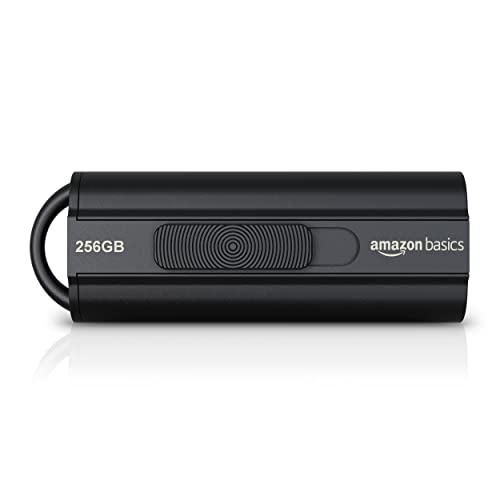
The Amazon Basics 256GB USB 3.1 Flash Drive offers a large storage capacity in a compact, retractable design. It supports fast USB 3.1 data transfer speeds with read speeds up to 130MB/s, making it suitable for backing up photos, videos, and other important files. Its stylish black exterior and telescopic keyhole design add convenience for everyday use.
In daily use, this flash drive performs reliably and consistently, providing quick access to your files without hassle. It’s easy to carry around thanks to its lightweight and compact dimensions, and it works smoothly with USB 3.0 and USB 2.0 ports, though optimal speeds require USB 3.1 or 3.0. Overall, it’s a dependable choice for anyone needing a practical backup solution.
Pros:
- High capacity of 256GB for large backups
- Fast USB 3.1 read speeds up to 130MB/s
- Compact, retractable design with key hole for portability
- Backward compatible with USB 2.0 devices
- Lightweight and easy to carry
Cons:
- Write speeds are slower, up to 30MB/s
- Speed depends on host device and file types
- Actual available capacity slightly less than labeled
My Practical Opinion
This flash drive is well suited for users who want a straightforward, no-frills backup device that offers large storage and fast read access. It’s easy to use right out of the box and fits nicely on a keyring or in a pocket without risk of damage. Beginners will appreciate the simplicity, while experienced users will find the speed and capacity reliable for everyday backups.
One tip: to maintain optimal performance, use it with USB 3.1 or USB 3.0 ports when possible, and safely eject before unplugging to protect your data. I’ve found it a solid companion for managing digital backups with peace of mind.
| Best for | Why |
|---|---|
| Photographers and videographers | Large capacity stores thousands of high-res photos and hours of HD video |
| Everyday users | Simple plug-and-play backup with fast data transfer speeds |
| Travelers | Compact, retractable design with key hole for easy portability and protection |
Myemuun 2-pack 128gb Usb C Flash Drive
The best USB flash drive for backup with dual USB-C and USB-A connectors, designed for seamless data storage and transfer across multiple devices.
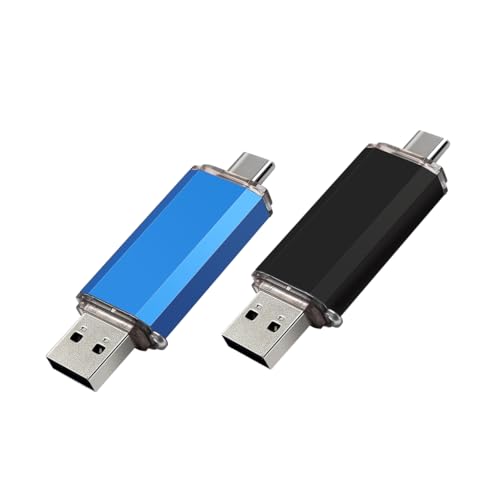
The myemuun 2-Pack 128GB USB C Flash Drive offers a convenient dual design with both USB-C and USB-A connectors, making it an ideal choice for users who need reliable storage options across different devices. Whether you’re backing up important documents, photos, or videos, this 2-in-1 thumb drive covers your needs without requiring any adapters.
In everyday use, the drives perform consistently well for quick and easy file transfers. The plug-and-play functionality means you just connect and go, without fussing over drivers or software. Its compact and lightweight design makes it easy to carry around, whether for school, work, or travel, providing dependable access to your backups whenever needed.
Pros:
- Dual USB-C and USB-A connectors for wide compatibility
- Ample 128GB storage per drive with two included
- Plug-and-play operation with no software required
- Compact and portable design for easy travel
- Works seamlessly across phones, tablets, Macs, and PCs
Cons:
- No detailed speed specifications provided
- Color options limited to Black and Blue only
My Practical Opinion
This dual flash drive set is well suited for anyone needing flexible backup solutions across various devices. It’s particularly helpful for users who switch between USB-C and USB-A ports regularly, eliminating the need for separate drives or adapters. Beginners will find it very straightforward, as there’s no setup required beyond plugging it in.
For peace of mind, keep one drive as a primary backup and the other as an emergency copy. Its durable design also adds a layer of reliability you can count on. From my experience, having two drives in one pack adds great value and convenience without overcomplicating storage needs.
| Best for | Why |
|---|---|
| Users with multiple device types | Dual connectors work with both USB-C and USB-A ports |
| Travelers and students | Compact size and lightweight for easy portability |
| Backup and storage enthusiasts | Generous storage capacity with two drives for redundancy |
Samsung Type-c Usb Flash Drive 256gb
The best USB flash drive for backup that combines fast transfer speeds with reliable storage in a compact design.

This Samsung Type-C USB Flash Drive offers a reliable and convenient way to back up your important files with 256GB of storage space. Its compact size fits easily in your pocket, making it ideal for on-the-go use. With USB 3.2 Gen 1 speeds up to 400MB/s, it transfers large files quickly, such as 4GB in just 11 seconds, and remains compatible with older USB 3.0 and 2.0 ports.
In daily use, this flash drive is dependable and user-friendly. The reversible USB-C connector makes plugging it in hassle-free, no matter the orientation. Its durable, waterproof design gives peace of mind that your data stays safe even in challenging environments. Overall, it’s a solid choice for anyone needing fast, secure, and portable backup storage.
Pros:
- Fast transfer speeds with up to 400MB/s read performance
- Compact and lightweight design for easy portability
- Reversible USB-C connector for effortless use
- Waterproof and shock-proof for enhanced durability
- Large 256GB capacity suitable for extensive backups
- Backward compatibility with USB 3.0 and 2.0 devices
- Backed by a 5-year limited warranty
Cons:
- Price might be higher compared to basic USB drives
- Does not include USB-A adapter for older devices
My Recommendation
This drive is well-suited for users who want a reliable, fast, and durable USB-C flash drive for backing up large files regularly. It’s easy to use for both beginners and experienced users, thanks to its plug-and-play nature and reversible connector. After buying, I recommend keeping it in a protective case or pouch to maintain its durability over time.
Its waterproof and shockproof features provide peace of mind when carrying important data. Personally, I find the combination of speed and sturdiness makes it a practical daily companion for backup needs without fuss.
| Best for | Why |
|---|---|
| Professionals backing up large files | Fast transfer speeds save time when handling big data |
| On-the-go users | Compact size fits easily in pockets and bags |
| Those needing durable storage | Waterproof and shock-proof design protects data in rough conditions |
| Users with USB-C devices | Reversible connector ensures hassle-free connections |
Lexar 32gb Jumpdrive V100 3-pack
The Best Usb Flash Drive for Backup, offering reliable storage expansion with fast USB 3.2 Gen 1 transfer speeds.

The Lexar 32GB JumpDrive V100 3-Pack is a set of USB flash drives designed for easy storage expansion and backup. With USB 3.2 Gen 1 technology, these drives provide faster file transfers compared to older USB versions. The package includes three drives in gray, pink, and blue colors, offering convenient options for organizing your data.
In everyday use, these flash drives perform reliably with consistent read speeds up to 100MB/s. They are compatible with both PC and Mac systems and work seamlessly with USB 3.1, 3.0, and 2.0 ports, ensuring broad device compatibility. Their compact size and lightweight design make them easy to carry for photo, music, video, or important file backups.
Pros:
- Three drives in different colors for easy organization
- Fast USB 3.2 Gen 1 transfer speeds up to 100MB/s
- Compatible with a wide range of devices and USB versions
- Compact and lightweight design for portability
- Works with both PC and Mac systems
Cons:
- No included software for backup automation
- 32GB capacity may be limiting for large backups
My Practical Opinion
This 3-pack of Lexar JumpDrive V100 flash drives is ideal for anyone looking to organize their backups with simple, reliable storage. It’s a great choice for beginners and casual users who want straightforward plug-and-play convenience without extra setup. Once you plug one in, it works smoothly and consistently for everyday file transfers.
My tip would be to assign each color a specific type of data—like photos, documents, or media—for quick access and better file management. It also provides peace of mind knowing you have multiple drives on hand, so you can keep backup copies separately.
Overall, these drives offer a balanced mix of speed, compatibility, and portability without overcomplicating the experience.
| Best for | Why |
|---|---|
| Casual users | Easy-to-use drives for everyday file backups |
| Students and professionals | Multiple drives to organize different data types |
| Mac and PC users | Wide compatibility across systems and USB standards |
Sandisk Ultra Flair 128gb Usb 3.0
The SanDisk Ultra Flair 128GB stands out as one of the best USB flash drives for backup, offering solid speed and reliable storage for everyday file transfers and safekeeping.

This USB flash drive from SanDisk offers 128GB of storage with USB 3.0 speeds, making it ideal for backing up important files, documents, and multimedia. Its metal casing provides durability, while password protection keeps your private files secure. It’s a straightforward option for anyone needing dependable external storage without fuss.
In daily use, the Ultra Flair performs smoothly, quickly transferring large files like movies or photo collections. I found it consistent and easy to plug in and use without any complicated setup. Its compact size and solid build give peace of mind when carrying it around or storing it safely at home.
Pros:
- High-speed USB 3.0 transfers up to 150MB/s
- Durable metal casing for protection
- Simple password protection with 128-bit AES encryption
- Compact and lightweight design
- Transfers large files quickly, saving time
- Compatible with multiple operating systems
Cons:
- Password protection software requires download and may be limited on some Mac versions
- No included warranty or recovery software mentioned
My Practical Opinion
This drive is a good fit for anyone looking for a reliable and easy-to-use backup option without extra bells and whistles. Beginners will appreciate its plug-and-play nature, while more experienced users can rely on its consistent transfer speeds. After purchase, just plug it in and back up files as needed—no complicated setup.
For added security, using the password protection feature helps keep sensitive data safe, which is a nice bonus for personal or professional use. I keep one handy for quick transfers and peace of mind that my backups are safe.
| Best for | Why |
|---|---|
| Everyday users | Reliable storage for documents and media backups |
| Students and professionals | Fast transfers and compact design for portability |
| Those needing data security | Password protection keeps private files safe |
Raoyi 5-pack 64gb Usb 3.0 Flash Drives
The RAOYI 5-Pack 64GB USB 3.0 Flash Drives stand out as an excellent option when looking for the best USB flash drive for backup. Offering high-speed data transfer and a convenient multicolor set, these drives deliver reliable storage for your important files and everyday backups.

This pack of five RAOYI USB flash drives offers 64GB capacity each with USB 3.0 connectivity, ensuring fast and efficient data transfer. The drives come in assorted colors, making it easy to organize backups or share drives among family members or colleagues. They support a wide range of file formats and systems, making them versatile tools for data storage and sharing.
In everyday use, these flash drives perform reliably with plug-and-play simplicity, requiring no extra software installation. The compact design with a keychain hole makes them easy to carry and keep track of. Their speed and compatibility mean you can quickly back up music, photos, documents, and more without hassle or delay.
Pros:
- Fast USB 3.0 data transfer speeds up to 75MB/s read
- Five drives in assorted colors for easy organization
- Wide compatibility across Windows, Mac, Linux, and other devices
- Compact, durable design with keychain attachment
- Supports many file formats for versatile use
- Plug and play—no software needed
Cons:
- Write speeds are moderate (20–30MB/s), not the fastest available
- No included carrying case or protective cover
My Honest Take
This set of RAOYI flash drives is ideal for anyone needing multiple reliable storage devices without fuss. Beginners will appreciate the straightforward plug-and-play use, while more experienced users can benefit from the multiple drives for different backup needs. After buying, organizing your files by color can simplify your workflow and reduce mix-ups.
One practical tip is to regularly back up your data to multiple drives to ensure peace of mind in case one is lost or damaged. Personally, I find having several colorful drives handy for separating work and personal files, which keeps things tidy and accessible.
| Best for | Why |
|---|---|
| Students and professionals | Multiple drives allow organized storage and easy sharing |
| Everyday backups | Reliable plug-and-play design for quick data saving |
| Users needing fast read speeds | USB 3.0 interface speeds up file access and transfer |
Sudeho Mfi Certified 128gb Flash Drive
The SUDEHO MFi Certified 128GB Flash Drive stands out as the Best Usb Flash Drive for Backup, especially for iPhone and iPad users seeking reliable external storage with broad device compatibility.

This flash drive is designed as a 4-in-1 external memory solution primarily for iPhone and iPad users but also compatible with Android and PC devices. It offers a large 128GB capacity (with options for 256GB and 512GB) to help back up photos, videos, and other files easily. The device includes a unique 3-in-1 adapter supporting Lightning, USB-C, and Micro USB connections, making it a versatile choice for multiple platforms.
In daily use, the SUDEHO flash drive performs efficiently with fast transfer speeds, allowing you to move large files quickly. The companion ROSPE app for iOS adds convenience with secure backups and password protection, which adds a layer of safety for private data. For Android and PC users, the plug-and-play feature requires no additional apps, providing straightforward and consistent performance.
Pros:
- Wide compatibility with iOS, Android, and PC devices
- Large storage options up to 512GB
- Fast transfer speeds up to 40MB/s read and 25MB/s write
- Includes 3-in-1 adapter for multiple port types
- Password protection and encryption via app
- Compact and stylish metal casing
- Easy to use with plug and play for Android and PC
Cons:
- Requires app installation for iOS backups
- Actual storage capacity may vary due to formatting
- Write speed is slower than read speed
My Honest Take
This flash drive is well suited for anyone looking for reliable backup options across different devices, especially iPhone and iPad owners who want a seamless way to free up storage. It’s straightforward to use once the ROSPE app is installed, and the added encryption gives peace of mind for sensitive files. Beginners will appreciate the plug-and-play functionality on Android and PC, while more experienced users will value the multiple adapters and solid build quality.
A practical tip: always keep the drive’s app updated to maintain smooth backup operations and security features. Personally, I find its balance of portability and capacity makes it a dependable companion for everyday data management.
| Best for | Why |
|---|---|
| iPhone/iPad users | Seamless backups with MFi certification and app support |
| Android and PC users | Plug and play with 3-in-1 adapter, no app needed |
| Users needing large storage | Options up to 512GB to store thousands of files |
| Travelers and professionals | Durable metal casing and password protection for security |
How To Choose Best Usb Flash Drive For Backup For Your Needs
Choosing the right USB flash drive for backup is essential to keep your data safe and accessible when you need it most.
- How much storage capacity do I need for my backups?
- Is the flash drive compatible with my devices?
- What level of data transfer speed is important to me?
- Does the drive offer any protection against physical damage or data loss?
- Is the design convenient for frequent use and transport?
- What is my budget for a reliable and durable backup solution?
If you still have questions, the FAQs help.
Faqs Of Best Usb Flash Drive For Backup
What is the safest USB flash drive for backup?
Look for drives with encryption and secure hardware. Brands like SanDisk and Kingston offer reliable options for safe data storage.
How do I choose the right size USB flash drive for backup?
Pick a drive with enough space for your files plus extra room for future backups. Common sizes range from 64GB to 256GB for daily use.
How often should I clean my USB flash drive?
Clean the USB connector gently every few months to avoid dust buildup. Use a soft, dry cloth to maintain good connection and performance.
Can I use a USB flash drive daily for backup?
Yes, daily use is fine if you choose a durable model. Regular backups help protect your data against loss or corruption.
What precautions should I take for USB flash drive safety?
Avoid dropping or exposing the drive to extreme temperatures. Use password protection and safely eject the drive to prevent data damage.
How do I keep my backup data organized on a USB flash drive?
Create folders for different file types and date your backups. This makes it easy to find and restore files when needed.
Final Verdict: Best Usb Flash Drive For Backup For Most People
When selecting a USB flash drive for backup, consider factors like storage capacity, transfer speed, and durability to ensure it meets your specific needs. Reliability and ease of use often make the difference in how consistently your backups are maintained over time.
It’s important to balance performance with budget while keeping in mind how and where the drive will be used. Taking a thoughtful approach will help you find a solution that feels secure without unnecessary complexity.
In the end, choose what fits comfortably into your backup routine.