
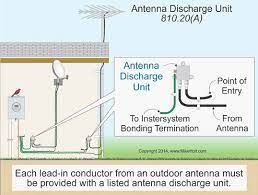
Grounding a TV antenna helps protect your home from lightning and static buildup, and it’s required by electrical code in many areas for outdoor antennas. You ground the antenna mast with a grounding wire to your home’s grounding system, and you ground the coax cable using a grounding block placed where the cable enters the house.
Use proper outdoor-rated wire, secure clamps, and keep the grounding run as short and straight as possible. If you’re not comfortable working near electrical grounding points, it’s safest to have an electrician do it.
Why Grounding Matters
Grounding a TV antenna is more than just a technical step. It plays a vital role in protecting your home, your equipment, and your viewing experience. Proper grounding helps avoid accidents and ensures your antenna works at its best.
Safety Benefits
Grounding prevents electric shocks caused by lightning strikes or power surges. It provides a safe path for electricity to flow into the earth. This reduces fire risks and protects everyone in the house.
Improved Signal Quality
A grounded antenna faces less interference from electrical noise. This helps deliver clearer and more stable TV signals. As a result, you get better picture and sound quality during your favorite shows.
Protecting Equipment
Electrical surges can damage your TV and antenna components. Grounding shields these devices from sudden voltage spikes. This extends the life of your equipment and saves repair costs.

Credit: diy.stackexchange.com
Tools And Materials Needed
Before grounding a TV antenna, gather the right tools and materials. These items help create a safe and effective grounding system. Safety is key to protecting your equipment and home from electrical surges.
Below is a list of essential tools and materials. Each plays a vital role in the grounding process.
Grounding Wire
Use a copper grounding wire for best results. It should be thick enough to handle electrical currents safely. This wire connects the antenna to the ground rod. Copper wires resist corrosion and last longer outdoors.
Ground Rod
A metal ground rod drives into the earth to carry electrical charges safely. Copper or galvanized steel rods work well. The rod must be long enough to reach deep soil where moisture helps conduct electricity. Usually, 6 to 8 feet is ideal.
Clamp And Connectors
Clamps and connectors join the grounding wire to the antenna and ground rod. Choose weather-resistant clamps made of metal. These keep connections tight and secure. Loose connections reduce grounding effectiveness.
Basic Tools
Have simple tools on hand for installation. A hammer or mallet helps drive the ground rod into the soil. Wire cutters and strippers prepare the grounding wire. A wrench tightens clamps. These tools make the job easier and faster.
Choosing The Right Grounding Location
Choosing the right grounding location for a TV antenna is very important. It helps protect your equipment from lightning and electrical surges. A good grounding spot also improves signal quality and safety. Picking the best place means understanding a few key points. These include where to put the ground rod, avoiding interference, and following local rules.
Ideal Ground Rod Placement
The ground rod should be close to the antenna mast base. This keeps the wire short and direct. Drive the rod at least 8 feet deep into moist soil. Moist soil helps electricity flow better into the ground. Avoid rocky or sandy areas where grounding is weak. Use a copper or galvanized rod for durability. Make sure the rod stands straight and firm.
Avoiding Interference
Place the grounding rod away from power lines and electrical boxes. Electrical noise can cause signal problems. Keep it at least 10 feet from other metal pipes or rods. This reduces the chance of interference. Avoid areas near large metal objects or antennas. Metal can reflect signals and cause poor reception. Choose a clear spot with good soil contact.
Local Code Requirements
Check your local building and electrical codes before installing. Many areas have rules on grounding methods and materials. Codes may specify rod depth, wire gauge, and connection types. Following codes ensures safety and legal compliance. Contact your local authority or electrician for guidance. Proper grounding protects your home and equipment.
Step-by-step Grounding Process
Grounding a TV antenna is important for safety and better signal quality. The process protects your equipment from lightning and electrical surges. Follow these clear steps to ground your antenna correctly. Each step is simple and easy to follow.
Installing The Ground Rod
Start by choosing a good spot outside near your antenna. Use a copper or galvanized steel rod, about 6 to 8 feet long. Drive the rod deep into the ground using a hammer or mallet. Make sure most of the rod is below the surface. This helps the rod connect well with the earth.
Attaching The Ground Wire To The Antenna
Find the grounding point on your antenna mast. Use a grounding clamp to attach one end of the ground wire here. Use a copper wire of at least 10-gauge thickness. Make sure the clamp is tight and the wire stays in place. This wire will carry any electrical charge safely to the ground.
Connecting The Wire To The Ground Rod
Run the ground wire from the antenna mast to the ground rod. Strip about an inch of insulation from the wire end. Use a grounding clamp to connect the wire securely to the rod. The connection must be tight to prevent any loose contact. This step completes the path to the earth.
Securing All Connections
Check all clamps and wires for tightness and security. Use a wrench to tighten any loose clamps. Wrap exposed wire ends with electrical tape to prevent rust. Make sure the wire runs straight and is not touching sharp edges. Secure the wire with cable ties or clips to keep it neat.
Testing Your Ground
Testing your TV antenna ground is important for safety and performance. Proper grounding prevents electrical shocks and signal problems. It also protects your equipment from lightning damage. Checking the ground connection ensures your antenna works well over time.
Using A Multimeter
Start by turning off power to the antenna system. Set your multimeter to the resistance or continuity mode. Touch one probe to the grounding rod or wire. Touch the other probe to the antenna metal frame or mast. A low resistance reading means the ground is connected well. High resistance or no reading shows a poor ground connection. Fix any loose or corroded wires and test again.
Checking Signal Stability
After confirming the ground, check your TV signal quality. Watch for clear picture and stable sound on different channels. Sudden drops or static may mean grounding issues. Try adjusting the antenna position slightly. If signal improves, grounding or connection problems might exist. A steady signal means your antenna grounding works correctly. Regular checks help keep your TV antenna safe and reliable.

Credit: www.youtube.com
Common Mistakes To Avoid
Grounding a TV antenna is important for safety and signal quality. Many people make simple mistakes that cause problems. Avoiding these errors helps your antenna work better and keeps your home safe.
Incorrect Wire Gauge
Using the wrong wire size can weaken the grounding system. Thin wires may not carry electricity safely during a lightning strike. Use a wire gauge that meets local electrical codes. Thicker wires provide better protection and last longer.
Loose Connections
Loose connections reduce the effectiveness of grounding. Wires must be tightly secured to grounding rods and antenna parts. Check all connections regularly for corrosion or wear. Tight connections ensure the electricity flows safely to the ground.
Ignoring Local Regulations
Local rules exist for a reason. Ignoring them can cause unsafe installations or legal problems. Always check your city or state codes before grounding your antenna. Following these rules helps protect your property and keeps your setup safe.
Maintaining Your Grounding System
Maintaining your TV antenna grounding system is key to keeping it safe and working well. A good grounding system protects your equipment from power surges and lightning strikes. It also helps prevent signal loss and interference. Checking and caring for your grounding system regularly stops small problems from becoming big ones.
Regular Inspections
Look at your grounding wires and connections every few months. Check for rust, loose parts, or broken wires. Make sure the grounding rod is still firmly in the ground. Tighten any loose screws or clamps. Fix or replace damaged parts right away. Early repairs save money and keep your system safe.
Weatherproofing Tips
Use weatherproof tape or sealant on all outdoor connections. This stops water from causing rust or shorts. Cover exposed wires with protective tubing. Keep the grounding rod area clean and free from dirt. Clear away leaves and debris that hold moisture. These steps help your grounding system last longer and work better.
Credit: www.ocalasatellite.com
Conclusion
Grounding your TV antenna protects your equipment and improves signal quality. It stops electrical surges from damaging your TV. Use a grounding rod and wire to connect the antenna safely to the earth. Check connections regularly to keep the setup secure.
Proper grounding helps avoid interference and ensures clearer channels. Simple steps make a big difference in your TV experience. Stay safe and enjoy better reception with a grounded antenna.