
No, TV mount screws aren’t all the same size. Most TVs use metric screws like M4, M6, or M8, but the exact size and length depend on the brand, screen size, and how deep the mounting holes are. Some TVs also need spacers because the back is curved or recessed, which changes the screw length you need.
The safest way is to check your TV manual for the screw size and depth, then use the mount’s hardware pack or buy the exact match—don’t force a screw that doesn’t thread smoothly.
Tv Mount Screw Types
TV mounts use different types of screws to fit various TV models. Screws secure the mount to the TV and the wall. Choosing the right screw type is essential for safety and stability. Using the wrong screw may damage the TV or cause it to fall.
Understanding the common screw sizes and thread types helps find the correct screws. This knowledge ensures a proper fit and strong hold for your TV mount.
Common Screw Sizes
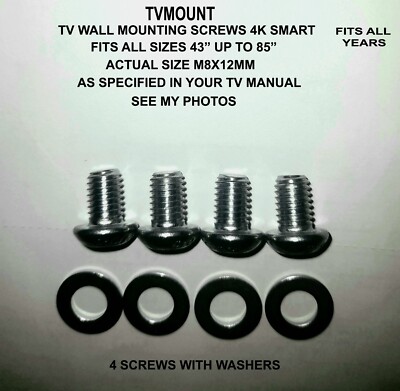
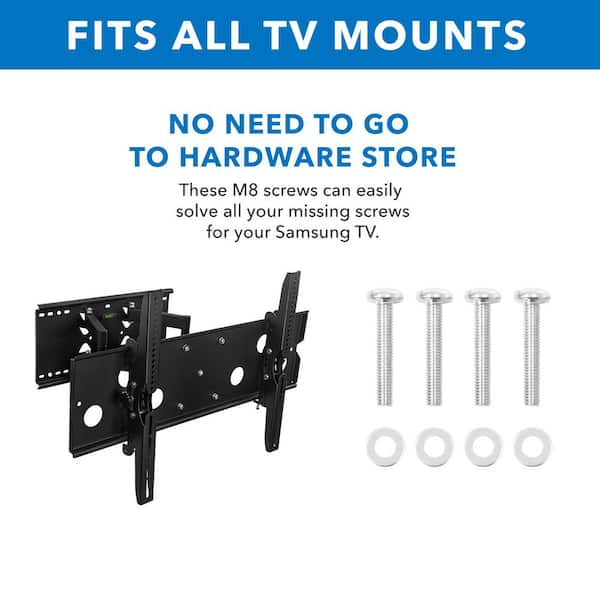
TV mounts often use screws sized M4, M6, or M8. The number after “M” shows the screw diameter in millimeters. Smaller TVs usually use M4 screws. Mid-sized TVs often need M6 screws. Larger TVs require M8 screws for extra strength.
Screw length also varies. Length depends on the TV’s thickness and the mount’s bracket depth. Check the TV manual for the recommended screw size and length. Using the right size avoids damage and ensures a secure fit.
Screw Thread Types
Most TV mount screws have a machine thread. This type matches the threaded holes in the TV. Coarse threads are common for quick installation. Fine threads offer better grip and reduce loosening over time.
Some mounts use wood screws or lag bolts to attach to walls. These screws have different threads designed for wood or drywall. Wall screws differ from TV screws, so use the correct type for each part of the installation.
Vesa Standards
The VESA standards set the rules for mounting TVs and monitors. These rules make sure mounts and screens fit well together. VESA defines the size and placement of screw holes on the back of the TV. This system helps users find the right mount and screws easily. It prevents confusion over different TV brands and models.
Knowing about VESA standards helps when choosing a TV mount. You can match your TV’s hole pattern with the mount’s pattern. This match ensures a secure and safe installation. VESA standards make mounting simple and universal for most TVs.
Vesa Hole Patterns
VESA hole patterns refer to the distance between mounting holes on the TV’s back. They are measured in millimeters, both horizontally and vertically. Common patterns include 100×100, 200×200, 400×400, and larger. Smaller TVs often use smaller patterns. Larger TVs use bigger patterns for better support.
Each pattern corresponds to a specific VESA size. The mount and TV must share the same hole pattern size. This match allows the screws to fit perfectly. Checking the hole pattern is the first step in picking the right mount.
Standard Screw Sizes By Vesa
VESA also sets standard screw sizes for mounting. Common screw sizes include M4, M6, and M8. Smaller hole patterns often use M4 screws. Medium patterns usually require M6 screws. Larger TVs and mounts use M8 screws for strength.
The screw length varies depending on TV thickness and mount design. It is important to use the correct screw size and length. Using the wrong screws can damage the TV or cause a weak mount. TV manuals or mount kits usually list the correct screw sizes.
Measuring For The Right Screw
Measuring for the right screw is essential for a safe TV mount. Different TVs use different screw sizes. Using the wrong screws can damage your TV or make the mount unstable. Follow these steps to find the correct screws for your TV.
Finding Vesa Pattern On Tv
The VESA pattern is the distance between mounting holes on the TV’s back. Most TVs follow VESA standards. Look for a square or rectangular pattern of holes. The pattern size is usually printed near the holes or in your TV manual.
Common VESA patterns include 100×100 mm, 200×200 mm, or larger. Knowing this pattern helps match your mount and screws correctly.
Measuring Hole Distances
Use a ruler or tape to measure the distance between the mounting holes. Measure horizontally and vertically from the center of one hole to the next. Write down the measurements in millimeters for accuracy.
This step confirms the VESA pattern and ensures you buy the right mounting hardware. Be precise to avoid misfitting screws or brackets.
Determining Screw Length
Screw length depends on your TV’s thickness and the mount bracket. Measure the depth of the mounting hole carefully. Check your mount’s instructions for recommended screw lengths.
Choose screws long enough to secure the TV but not too long to damage it. Using washers can help if screws are slightly longer than needed.
Matching Screws To Your Tv
Matching screws to your TV is crucial for a safe and secure mount. Screws come in different sizes and lengths. Choosing the wrong size can damage your TV or cause the mount to fail. Always check the specific requirements for your model before starting.
Checking Tv Manual
The TV manual usually lists the correct screw sizes. Look for a section about wall mounting or VESA patterns. It will show the diameter and length of screws needed. Follow these instructions closely to avoid mistakes. If you lost the manual, you can often find it online on the manufacturer’s website.
Consulting Mount Hardware Kit
Mount kits include screws designed for many TVs. Check the hardware kit to see if it matches your TV’s screw size. The kit may have multiple sizes and lengths. Test the screws gently in your TV’s mounting holes. Use only screws that fit snugly without forcing them in.
Wall Mount Screw Considerations
Choosing the right screws for your TV wall mount is crucial for a secure installation. Wall mount screw considerations include the type of wall anchors and the size and weight of your TV. These factors ensure your TV stays safely mounted without damage.
Types Of Wall Anchors
Wall anchors hold screws firmly in the wall. Drywall anchors are common for light to medium TVs. They spread weight over a larger area. For heavier TVs, use toggle bolts or molly bolts. These anchors expand behind the wall, providing strong support. Concrete or brick walls need special anchors like sleeve anchors or masonry screws. Choosing the right anchor depends on your wall type and TV weight.
Weight And Size Factors
The size of screws depends on your TV’s weight and size. Larger TVs need longer and thicker screws. These screws can hold more weight and keep the TV stable. Check the TV manual for recommended screw sizes. Also, consider the VESA pattern, which shows mounting hole spacing. Using screws that fit this pattern avoids damage and ensures a tight fit. Proper screw length is key; too short can cause instability, too long can damage the TV.

Credit: www.amazon.com
Common Mounting Issues
Mounting a TV might seem simple, but many face common problems. Using the wrong screws or sizes can cause trouble. These issues affect how secure and safe the TV is once mounted. Understanding these common mounting problems helps avoid damage and ensures a stable setup.
Screws Too Short Or Too Long
Screws that are too short will not hold the TV properly. They may slip out or fail to secure the mount. On the other hand, screws that are too long can damage the TV. They might poke inside the TV casing, harming internal parts. Always use screws with the correct length to avoid these risks.
Mismatched Thread Sizes
Thread size is the thickness and pitch of the screw’s thread. Using screws with the wrong thread size causes poor fitting. The screws might not tighten properly or could strip the holes. This makes the mount unstable and unsafe. Check your TV’s manual or mount instructions for the right thread size before buying screws.
Tips For Safe Installation
Installing a TV mount needs care and attention. Safe installation protects your TV and wall. It also ensures the TV stays firmly in place. Follow key tips to avoid damage and make the process smooth.
Use the right tools and handle the equipment gently. These steps help you secure your TV mount correctly and safely.
Using Proper Tools
Select tools that fit the screws and bolts perfectly. A screwdriver or drill with the correct bit size works best. Avoid using worn or damaged tools. These can strip screws or cause slips. Always have a level to check alignment. This keeps the TV straight and balanced. Use a stud finder to locate strong wall studs. Anchoring into studs offers the best support.
Avoiding Damage To Tv And Wall
Do not overtighten screws; this can crack the TV frame or wall. Handle the TV carefully to prevent scratches and dents. Place soft padding on the floor during installation. Mark drilling points clearly before making holes. Double-check measurements to avoid unnecessary holes. Use wall anchors suitable for your wall type. This prevents the mount from pulling out under weight.
Credit: www.ebay.com
Credit: www.homedepot.com
Conclusion
Not all TV mount screws share the same size or length. Different TVs and mounts require specific screws to fit properly. Always check your TV’s manual or the mount’s guide for the right size. Using the wrong screws can cause damage or unsafe mounting.
Measuring the VESA pattern helps find the correct screws. Taking time to choose the proper screws ensures a secure, stable TV installation. Simple steps prevent problems and keep your TV safely mounted on the wall.