
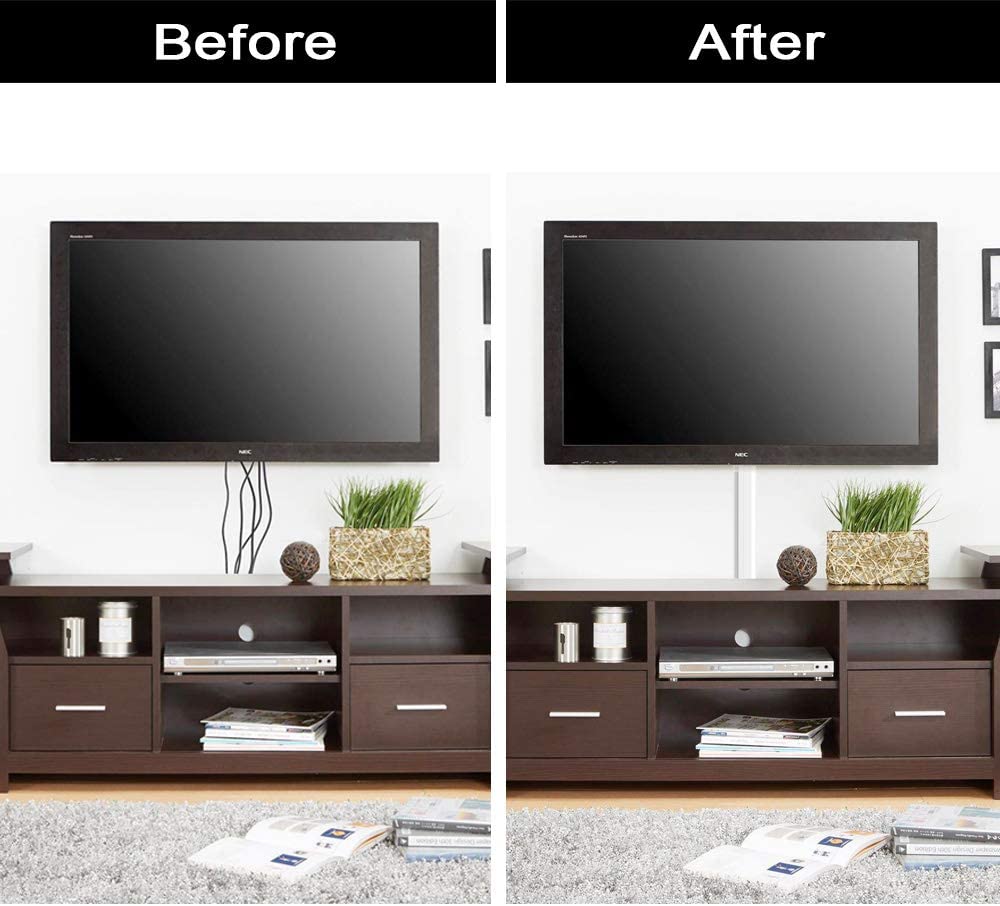
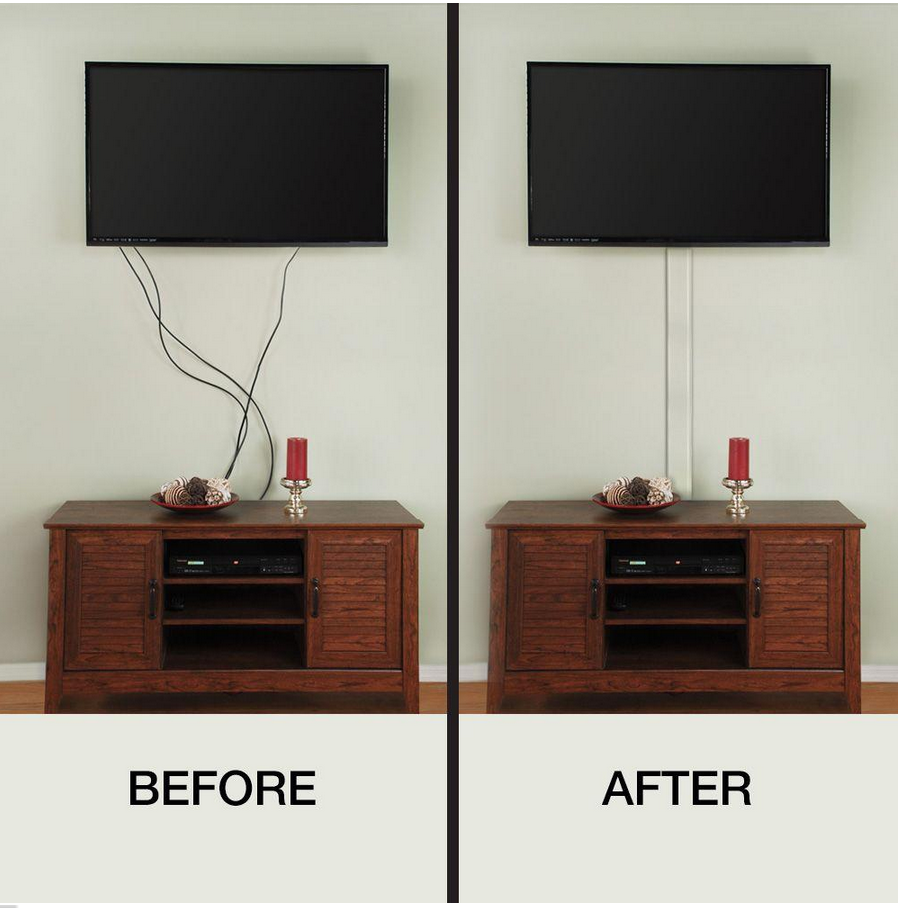
To hide cables from a wall mounted TV, the cleanest option is an in-wall cable kit that lets you run power and HDMI behind the drywall. If you can’t cut the wall, use a paintable surface raceway (cord cover) and route it straight down to a cabinet.
Bundle cords with Velcro, keep slack for swivel mounts, and avoid running power through the wall unless you’re using a code-rated kit.

Credit: inmyownstyle.com
Cable Management Basics
Managing cables behind a wall-mounted TV keeps your space neat and safe. Good cable management improves your room’s look and prevents tripping hazards. It also protects cables from damage and makes cleaning easier.
Understanding the basics of cable management starts with knowing the types of cables and common problems. This knowledge helps in choosing the right hiding methods. Let’s explore the essentials.
Types Of Tv Cables
TV cables come in various types. HDMI cables connect your TV to devices like game consoles and DVD players. They carry both video and audio signals.
Power cords supply electricity to your TV. These cables are thicker and need special attention for safety. Component and composite cables carry video signals but not audio. They often use red, blue, and green plugs.
Optical audio cables transmit sound in digital form. Ethernet cables connect your smart TV to the internet. Each cable type has different thickness and flexibility, affecting how you hide them.
Common Cable Problems
Cables behind a wall-mounted TV often get tangled. Tangled cables look messy and can cause connection issues. Dust buildup on cables may damage them over time. Loose cables can pull on connectors, leading to signal loss or damage.
Using the wrong cable length creates clutter or tension. Over time, cables may wear out from bending or pulling. Poor cable management also makes troubleshooting difficult. Identifying these problems helps in keeping cables safe and hidden effectively.
Credit: www.hellotech.com
In-wall Cable Concealment
In-wall cable concealment offers a clean and professional look for your wall-mounted TV. It involves running cables inside the wall, hiding them completely from view. This method enhances room aesthetics and reduces tripping hazards. The process needs careful planning and the right tools to avoid damage and meet safety standards.
Tools And Materials Needed
Gather a stud finder, drywall saw, fish tape, and voltage tester. You will also need electrical boxes, low voltage mounting brackets, and wall plates. Use cable clamps and cable ties for securing wires inside the wall. Safety gear like gloves and goggles is essential for protection.
Cutting And Patching Drywall
Start by locating studs and marking the cable route. Cut rectangular holes for the electrical boxes using a drywall saw. Use fish tape to pull cables through the wall cavity. Patch the drywall holes with joint compound and mesh tape. Sand the surface smooth and paint to match the wall color.
Safety And Code Considerations
Check local building codes before starting any in-wall wiring. Use only cables rated for in-wall use to prevent fire risks. Avoid running power and signal cables together to reduce interference. Turn off power at the circuit breaker before cutting drywall. Consider hiring a licensed electrician for complex installations.
Using Cord Covers And Raceways
Using cord covers and raceways offers a simple and clean way to hide cables from your wall-mounted TV. These tools keep wires organized and out of sight, improving your room’s look without major work. They come in different sizes and styles to fit various cable types and wall designs.
Choosing The Right Cord Covers
Select cord covers that match your wall color or texture for a seamless look. Measure the length of cables to pick covers that fit well without extra cutting. Consider covers with easy snap-on lids for quick access when needed. Check the material quality to ensure durability and a neat finish.
Installation Tips
Clean the wall surface before attaching cord covers for better adhesion. Use a level to keep covers straight along the wall. Secure the covers with the included adhesive strips or screws for stronger hold. Run cables inside the raceway carefully to avoid damage and allow easy removal later.
Painting And Camouflaging Options
Paint cord covers the same color as your wall to blend them in naturally. Use a paint type suitable for plastic or the cover material for best results. Apply primer before painting to help the paint stick better. For textured walls, add matching texture with paint techniques to hide covers completely.
Furniture And Decor Solutions
Furniture and decor offer smart ways to hide cables from a wall-mounted TV. These solutions keep your space tidy without major changes. They blend functionality with style, making cables nearly invisible.
Hiding Cables Behind Cabinets
Place a cabinet or console directly below the TV. Run cables behind it to keep them out of sight. Choose furniture with open backs for easier cable management. Use cable clips to secure wires along the back. This method hides cables and adds storage space.
Using Rugs And Baseboards
Rugs can conceal cables running across the floor. Choose thick rugs that cover cords completely. Baseboards also work well for hiding wires. Use adhesive cable channels painted to match baseboards. This keeps cables neat and blends them into the room’s design.
Incorporating Decorative Elements
Decorative items like plants, baskets, or art can hide cables cleverly. Place tall plants near TV corners to cover cords. Use baskets or boxes to store and hide power strips and adapters. Wall art with built-in shelves can also hide wires behind frames. These elements create a clean look while adding personality.
Wireless And Battery-powered Alternatives
Wireless and battery-powered options simplify hiding cables from your wall-mounted TV. They reduce clutter and improve room appearance. These alternatives eliminate the need for visible wires and complex installations. Enjoy a cleaner, safer space with less effort.
Wireless Hdmi And Audio Options
Wireless HDMI devices send video signals without cables. They connect your TV to media players or gaming consoles wirelessly. This setup removes long HDMI cables hanging on the wall. Wireless audio devices work similarly by sending sound to speakers or soundbars. These solutions keep your entertainment area neat and cable-free. Choose models that offer strong signals and low delay for the best experience.
Battery-operated Devices
Battery-powered remotes and sound systems reduce cable use too. Wireless speakers with built-in batteries connect to your TV without wires. They sit anywhere in the room for flexible sound placement. Battery-operated streaming sticks or smart remotes also cut down cable clutter. Regular charging keeps these devices ready to use. This approach helps maintain a clean look around your wall-mounted TV.
Credit: cleverlychanging.com
Organizing And Securing Cables
Organizing and securing cables is essential for a clean look around your wall-mounted TV. Neatly arranged wires prevent tangles and damage. It also makes maintenance easier and safer. Using simple tools and methods can keep cables tight and out of sight.
Cable Ties And Velcro Straps
Cable ties and Velcro straps bundle wires together. They keep cables from spreading out or hanging loosely. Velcro straps are reusable and easy to adjust. Cable ties offer a stronger hold but need cutting to remove. Group cables by type or length for better order.
Labeling And Shortening Cables
Label each cable to know its use quickly. Use small tags or tape with clear writing. Shorten long cables by coiling them carefully. Avoid tight loops that can damage wires. Secure coils with Velcro straps or ties to keep them tidy.
Mounting Power Strips
Mount power strips behind the TV or under furniture. Use screws or adhesive strips for secure fixing. This keeps plugs off the floor and reduces clutter. Position power strips near the TV for easy access. It helps manage plugs and reduces cable mess.
Professional Installation Insights
Professional installation offers a clean and safe way to hide cables from a wall mounted TV. Experts bring knowledge, tools, and experience to handle wiring neatly. This approach avoids damage to walls and ensures the setup meets safety standards.
Hiring professionals can also save time and reduce stress. They know the best methods to conceal cables using in-wall routing or cable management systems. This results in a polished and clutter-free look for your entertainment space.
Hiring Experts
Choose certified installers with positive reviews and proper licenses. They understand local building codes and wiring requirements. Professionals provide a warranty on their work for peace of mind. Ask about their experience with wall mounted TVs and cable hiding.
Cost Estimates
Costs vary depending on room size, wall type, and cable complexity. Basic cable hiding may start around $150 to $300. More complex jobs with in-wall wiring or power outlets can cost $400 or more. Request a detailed quote before hiring any service.
What To Expect
Installation begins with a site inspection and planning. Experts mark where cables will run inside walls or along baseboards. They use special tools to cut small openings and install cable channels or conduits. The process usually takes a few hours and leaves minimal mess.
After installation, your TV area will look tidy and professional. Cables stay hidden and protected from damage. You receive instructions on maintenance and safety tips for your new setup.
Conclusion
Hiding cables from a wall-mounted TV improves your room’s look instantly. Simple tools and methods keep wires neat and safe. Use cord covers, run cables behind walls, or tuck them along baseboards. These ideas keep cords out of sight without much effort.
A tidy setup makes watching TV more enjoyable and your space more inviting. Take your time choosing the best option for your home. Clean, hidden cables create a polished, clutter-free environment everyone will appreciate.