
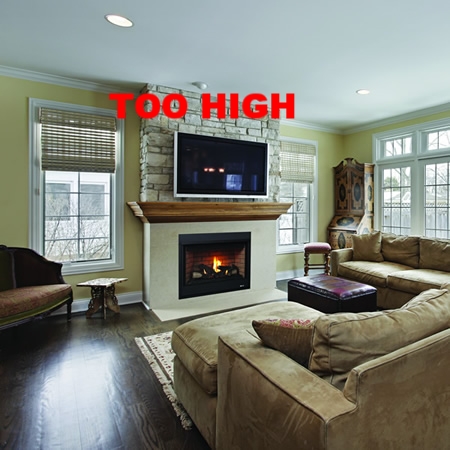
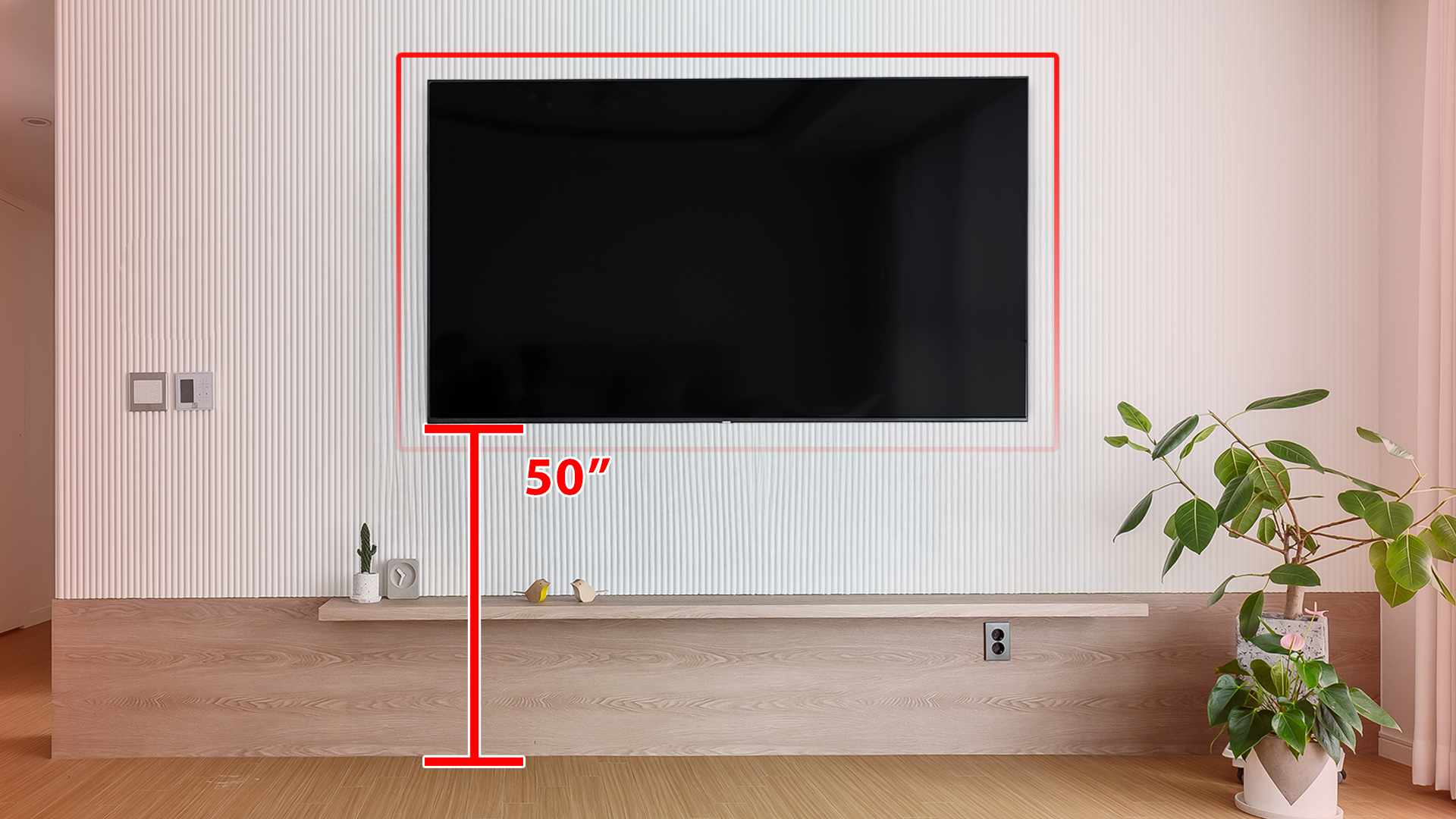
Yes, a TV can be mounted too high, and it usually leads to neck strain, eye fatigue, and an awkward viewing angle over time. A good rule is to keep the center of the screen at seated eye level (around 40–45 inches from the floor for most people).
If your TV must go higher—like above a fireplace—use a tilting or pull-down mount and angle the screen toward your seating position so you’re not looking up for long periods.
Ideal Tv Height
Finding the ideal TV height matters for comfort and a great viewing experience. Mounting a TV too high strains the neck and reduces picture quality. The key is placing the screen where your eyes naturally rest while seated. This section breaks down the main factors to consider for perfect TV height.
Eye Level Alignment
Align the TV center with your seated eye level. This helps avoid neck pain and eye strain. Watching straight ahead feels natural and keeps you engaged. The middle of the screen should be about 42 inches from the floor for most living rooms. Adjust based on your seating height for best results.
Viewing Distance Impact
Distance from the TV affects the ideal height. Sitting closer means the screen should be slightly lower to keep your eyes comfortable. Farther seats allow a bit higher mounting without discomfort. Consider your room size and seating layout to find the best balance.
Furniture Influence
Furniture height changes your viewing angle. Sofas, recliners, and beds all affect where the TV should go. For example, mounting above a low couch requires a different height than above a tall bed. Measure your furniture and test seating positions before mounting your TV.
Consequences Of Mounting Too High
Mounting a TV too high on the wall can cause several problems. It affects comfort, health, and the overall viewing experience. Many people do not realize these consequences until after installation. Below are the main issues caused by placing a TV too high.
Neck And Shoulder Strain
Looking up at a TV for long periods strains your neck. Your muscles must work harder to hold your head in an unnatural position. This tension can lead to pain in your neck and shoulders. Over time, it may cause chronic discomfort and stiffness.
Reduced Viewing Comfort
A TV mounted too high makes watching less enjoyable. You have to tilt your head up, which feels awkward. This position can reduce how long you want to watch TV. The ideal setup keeps the screen at eye level while seated.
Visual Distortion
Viewing a TV from too high an angle can distort the picture. Colors may look less vibrant and images less clear. The screen’s brightness and contrast can also appear uneven. This reduces overall picture quality and enjoyment.
Aesthetic Concerns
Mounting a TV too high can affect a room’s look. It may seem out of place or awkward on the wall. The space below the TV might feel empty or unbalanced. This setup can make the room feel less inviting and cozy.
Common Mounting Mistakes
Mounting a TV involves more than just picking a spot on the wall. Many people make common mistakes that affect comfort and viewing quality. These errors can cause neck pain, poor picture angles, and an untidy look. Understanding these pitfalls helps create a better TV setup.
Above Fireplace Pitfalls
Mounting a TV above a fireplace is popular but often problematic. The TV tends to sit too high, causing neck strain. Heat from the fireplace can damage the TV over time. Viewing angles become awkward, reducing picture clarity. This setup may look stylish but hurts comfort and TV lifespan.
Ignoring Seating Positions
Many forget to consider where people sit in the room. The TV should align with viewers’ eye level. Different seats might need different angles or heights. Placing the TV too high or low can force viewers to tilt their heads. This leads to discomfort and a poor viewing experience.
Overlooking Room Layout
Room shape and furniture arrangement impact TV placement. Walls, windows, and lighting affect glare and reflections. A TV placed without thinking about these factors can cause headaches. Furniture height and distance also matter for ideal viewing. A thoughtful layout creates a comfortable and enjoyable space.
Credit: www.learnergo.com
Adjusting For Different Rooms
Mounting a TV at the right height depends on the room’s use and layout. Each space calls for different adjustments. The goal is to enjoy clear viewing without neck strain. Seating position, room size, and furniture height all matter. Consider these factors carefully to place your TV comfortably.
Living Room Setup
In the living room, people usually sit on sofas or chairs. Place the TV so the center is at eye level while seated. This height reduces neck strain during long viewing sessions. Make sure the screen is not too high above the furniture. The distance between the seating and TV also affects height. Keep the TV at a comfortable angle for everyone in the room.
Bedroom Considerations
Bedrooms require a different approach. People often watch TV lying down or sitting up in bed. Mount the TV slightly higher than in the living room. This height matches the typical bed-viewing angle. Avoid placing the TV too high, which causes neck discomfort. Tilt mounts help adjust the viewing angle for better comfort. Consider the bed height and pillow position too.
Home Theater Tips
Home theaters focus on an immersive experience. Mount the TV at or just below eye level when seated. Use reclining theater seats or sofas to find the best height. Avoid mounting the TV too high, which breaks immersion. Also, control lighting and glare for clearer images. A proper mount with tilt and swivel functions allows fine-tuning of the angle. This setup helps create a cinema-like experience.
Practical Installation Tips
Proper TV installation goes beyond just choosing the right height. Practical tips help improve your viewing experience and keep your setup neat. These tips focus on how to manage cables, access your TV for cleaning, and mount it securely. Follow these guidelines to avoid common issues linked to mounting a TV too high.
Cable Management
Keep cables organized and hidden for a clean look. Use cable covers or raceways to hide wires along the wall. Secure cables with clips to prevent them from dangling. This prevents damage and keeps your space tidy. Well-managed cables reduce distractions and make the TV setup look professional.
Cleaning Accessibility
Mount the TV at a height that allows easy cleaning. Dust and fingerprints build up quickly on screens. Avoid placing the TV too high to prevent difficult reaching. Use a soft cloth to clean the screen gently. Regular cleaning keeps your picture clear and your TV in good condition.
Secure Mounting Practices
Use a strong wall mount rated for your TV’s size and weight. Find wall studs to anchor the mount securely. Avoid drywall-only installations, which can fail over time. Double-check all screws and bolts are tight before hanging the TV. A secure mount prevents accidents and protects your investment.
Tools And Techniques
Mounting a TV at the right height requires careful planning and the right tools. Using proper techniques ensures comfort and the best viewing experience. This section explores key tools and techniques to avoid mounting a TV too high. Follow these simple steps for a perfect setup.
Measuring Eye Level
Start by measuring your seated eye level. Sit in your usual viewing spot. Use a tape measure to find the height from the floor to your eyes. This height is the ideal center point for your TV screen. Mark this on the wall lightly with a pencil. Accurate eye-level measurement helps avoid neck strain and discomfort.
Using Mounting Templates
Most TV mounts come with paper templates. These templates show where to drill holes and place screws. Tape the template on the wall at the measured eye level. Check that it is level using a spirit level tool. The template guides you to position the mount perfectly. This prevents mounting errors and saves time.
Adjustable Mounts Benefits
Adjustable TV mounts allow tilting and swiveling after installation. They offer flexibility to change the viewing angle easily. This helps reduce glare and improves comfort. Adjustable mounts are ideal if multiple seating areas exist. They also make future adjustments simple without remounting the TV.
Credit: www.howtogeek.com
Conclusion
Mounting a TV too high can cause neck pain and discomfort. Your eyes should meet the center of the screen while sitting. This keeps viewing natural and relaxing. Consider your seating height and distance for the best angle. Avoid mounting above fireplaces or too close to the ceiling.
A well-placed TV enhances your room’s look and your viewing experience. Take time to measure and plan before installation. This simple step ensures comfort and enjoyment every time you watch.