
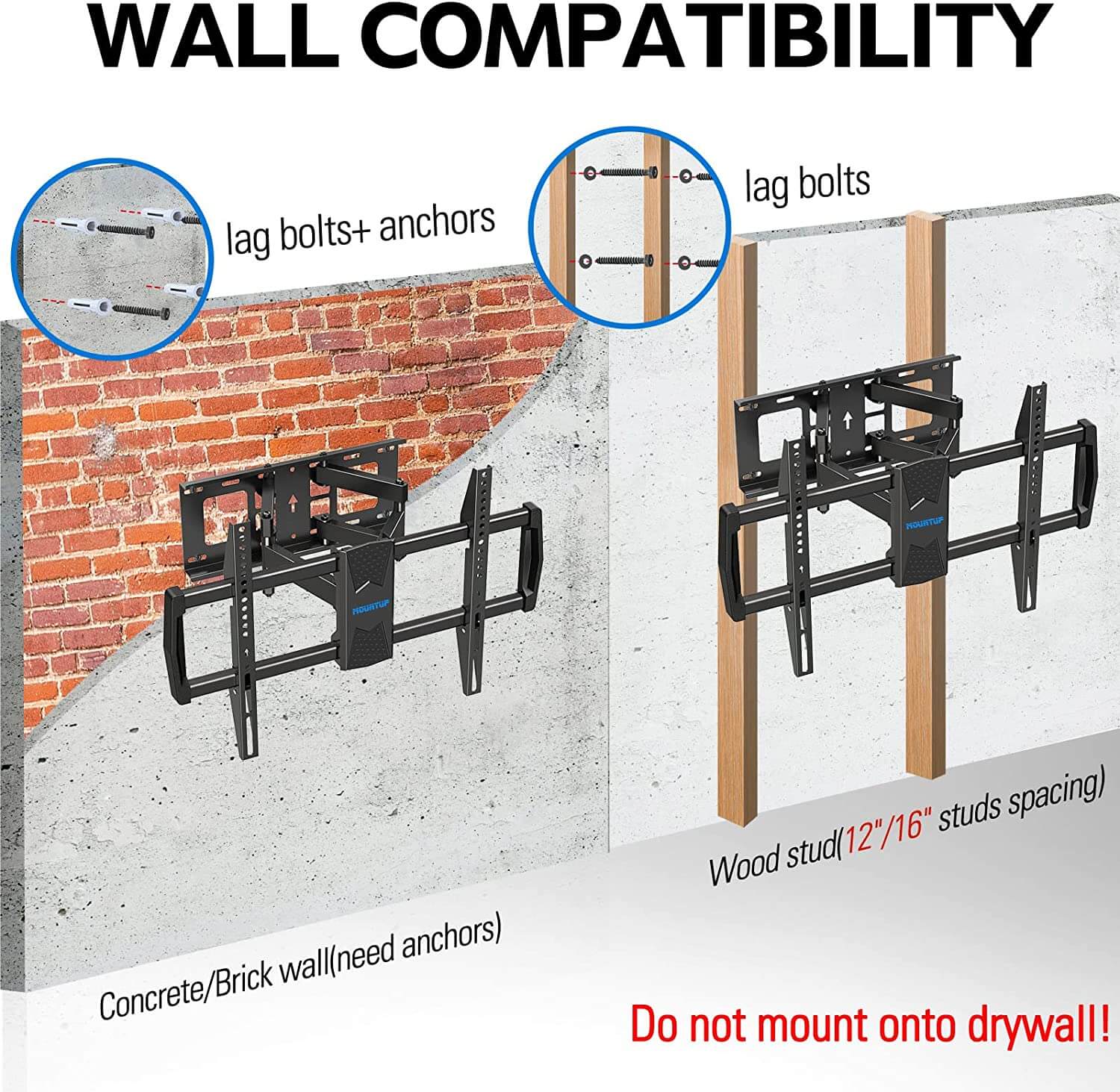
Yes, mounting a TV on a stud wall is the safest and most common setup. The mount’s wall plate is bolted directly into the studs with lag screws, which can handle the TV’s weight and the extra pull from tilting or full-motion mounts.
Just make sure you hit at least two studs (or follow the mount’s spacing rules), keep the bracket level, and use the correct screw length so the bolts bite deep into the wood without splitting it.
Stud Walls And Tv Mounting
Mounting a TV on a stud wall requires understanding the wall’s structure. Stud walls are common in many homes. They offer support and strength for heavy objects like TVs.
This section explains what stud walls are and why studs matter for mounting your TV safely.
What Are Stud Walls
Stud walls are framed walls made from vertical wooden or metal beams. These beams are called studs. They are usually spaced 16 or 24 inches apart. The space between studs is filled with insulation or left empty. The wall surface is covered with drywall or plasterboard. Studs give the wall strength and hold up the surface materials.
Stud walls do not carry the building’s main weight. They are called non-load-bearing walls. Their job is to divide rooms and support wall finishes. The studs provide strong points to attach heavy items, such as shelves, cabinets, and TVs.
Why Studs Matter For Mounting
Studs are crucial for TV mounting because they hold the weight. Drywall alone cannot support a heavy TV. Screws placed only in drywall will not hold well and may cause damage.
Mounting your TV bracket directly into studs ensures a safe and secure installation. Use a stud finder to locate these beams inside the wall. The mount should attach to at least one stud, preferably two for extra support.
Use strong screws or lag bolts designed for wood or metal studs. Avoid using drywall anchors or weak fasteners. Proper mounting prevents the TV from falling and damaging the wall or the device.
Credit: mountup.com
Weight Capacity Of Stud Walls
Stud walls provide the main support structure behind drywall in many homes. Understanding their weight capacity is key before mounting a TV. This ensures the TV stays secure and avoids damage to the wall or the screen. Weight capacity depends on several factors including the studs themselves, the type of mount, and how well it is installed.
Factors Affecting Weight Support
The size and spacing of the studs influence how much weight they can hold. Most studs are made from wood or metal, each with different strengths. The number of studs used matters too; mounting across two studs distributes the weight better. The type of screws and bolts also affect the hold. Lag bolts drilled directly into studs provide strong support. Drywall anchors cannot hold heavy TVs safely. Proper installation techniques like pre-drilling and using lock washers improve stability. The weight of the TV, including its frame, must be checked. Always consider the mount’s weight limit as well.
Typical Weight Limits By Mount Type
Fixed mounts usually support between 50 to 100 pounds. They hold the TV close to the wall and have fewer moving parts. Tilting mounts offer weight limits around 60 to 120 pounds. They allow slight angle adjustments but need strong attachment points. Full-motion mounts, which extend and swivel, support roughly 40 to 80 pounds. Their moving parts require extra strength and secure installation. Selecting a mount rated above your TV’s weight ensures safe use. Always check the product specifications before purchase.
Choosing The Right Mount
Choosing the right mount is essential for a safe and stable TV installation on a stud wall. The mount must fit your TV size and your room’s viewing needs. It also needs to match the wall’s strength and the TV’s weight. This choice affects how well your TV stays in place and how easily you can adjust its position.
Consider the mount type and weight ratings carefully. These factors ensure your TV stays secure without damaging the wall or the mount itself.
Fixed Vs Tilting Vs Full-motion Mounts
Fixed mounts hold the TV flat against the wall. They offer a clean look but no angle adjustments. Tilting mounts allow the screen to tilt up or down. This helps reduce glare and improve viewing angles from different seats. Full-motion mounts let you swivel, tilt, and extend the TV away from the wall. They give the most flexibility but require stronger wall support.
Choose a mount based on how you watch TV and your room setup. Fixed mounts suit simple needs. Tilting and full-motion mounts work well for large rooms or multiple seating areas.
Mount Ratings And Tv Weight
Every mount has a weight rating. This rating shows the maximum TV weight it can safely hold. Check your TV’s weight, including its stand, but remove the stand weight when mounting on the wall. Match the mount rating to your TV weight or choose one with a higher rating for safety.
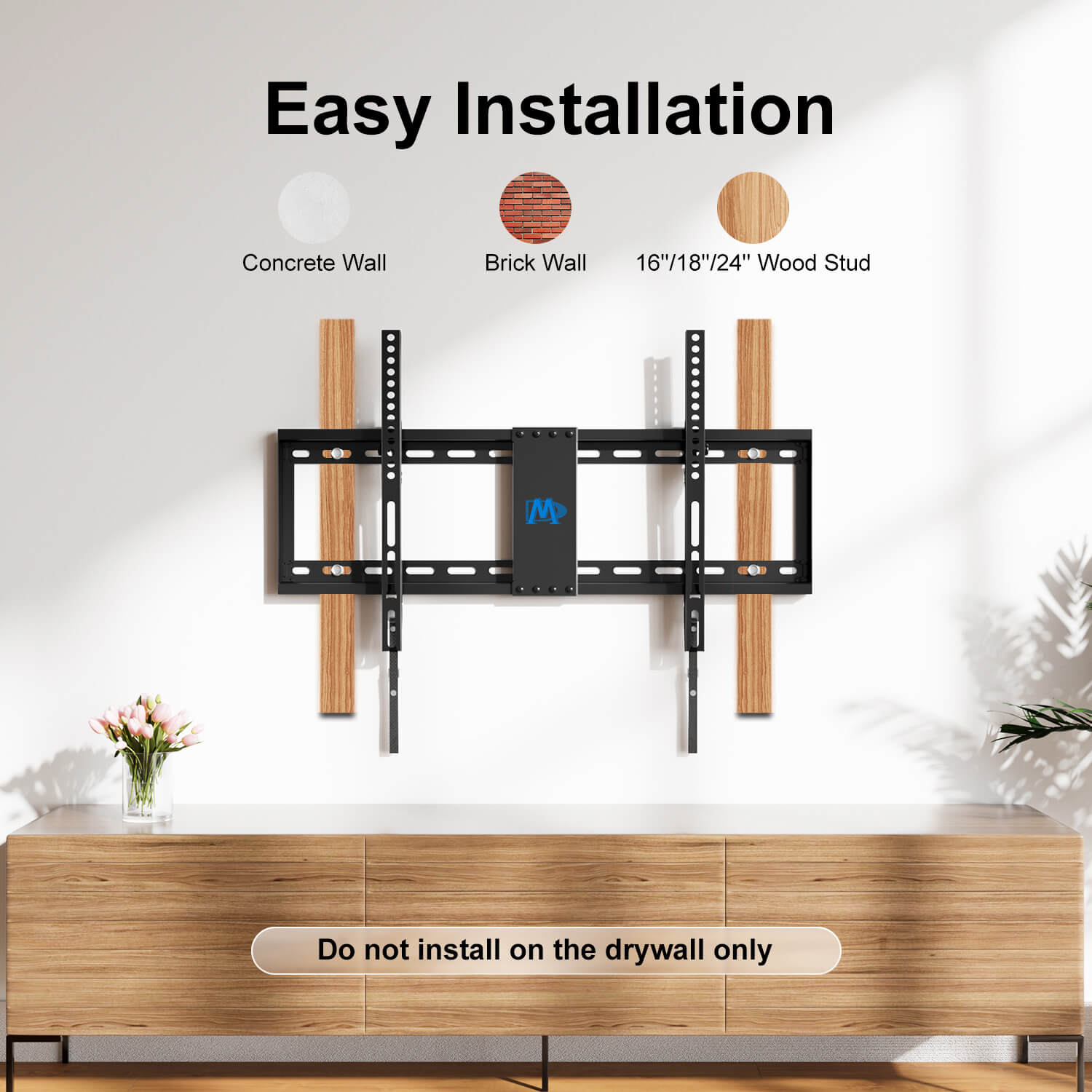
Stud walls can support heavy TVs if the mount is attached to the studs properly. Use lag bolts and pre-drill holes to secure the mount. Avoid using drywall anchors as they are not strong enough. Mounts connecting to two studs offer better support for heavier TVs.
Credit: mountingdreamonline.com
Finding And Using Studs
Mounting a TV on a stud wall requires finding the studs first. Studs provide strong support and keep the TV secure. Drywall alone cannot hold the weight of a TV. Using the studs helps avoid damage to the wall and ensures safety.
Knowing how to locate and use studs correctly makes the installation easier. It also prevents the TV from falling or pulling the wall apart. This section explains the steps to find studs and center the TV properly.
Locating Wall Studs
Start by tapping the wall lightly with your knuckles. A hollow sound means no stud behind the drywall. A solid sound means a stud is present.
Use a stud finder tool for more accuracy. Move it slowly across the wall surface. The tool will beep or light up when it detects a stud.
Studs are usually spaced 16 or 24 inches apart. Mark the edges of the stud to find its center. This is the best place to fix your TV mount.
Centering Tv On Off-center Studs
Studs may not always line up with your TV’s center. You can adjust the mount to one side. Use a wide mounting bracket that spans two studs if possible.
If only one stud is available, center the mount on that stud. Use heavy-duty lag bolts to secure it. Avoid placing screws only in drywall.
Measure the TV width and mount position carefully. This helps keep the TV balanced and stable on the wall. A little adjustment can make a big difference in safety.
Installation Tips
Mounting a TV on a stud wall requires careful preparation and the right tools. Proper installation ensures the TV stays secure and the wall remains undamaged. Follow these tips to mount your TV safely and effectively.
Using Lag Bolts And Avoiding Drywall Anchors
Lag bolts provide strong support for heavy TVs. They anchor directly into the wooden studs behind the drywall. Avoid drywall anchors because they cannot hold the TV’s weight. Drywall alone is too weak and may cause the TV to fall. Always aim to fasten the mount into the studs using lag bolts for a secure hold.
Pre-drilling And Preventing Wood Splitting
Pre-drilling holes in the studs helps prevent the wood from splitting. Use a drill bit slightly smaller than the lag bolts. This creates a guide hole for the bolts to fit snugly. Drilling first reduces pressure on the wood and makes it easier to screw in the bolts. This step protects the studs and ensures a tight fit.
Securing Bolts With Lock Washers
Lock washers help keep the bolts tight over time. They prevent the bolts from loosening due to vibrations or weight shifts. Place a lock washer between the bolt head and the mount bracket. This simple addition adds stability and safety. Secure bolts with lock washers to maintain a strong and lasting installation.
Mounting On Different Wall Types
Mounting a TV on a stud wall varies depending on the wall type. Different walls require different mounting methods for safety and stability. Understanding the wall construction helps ensure a secure installation. Below are key details on mounting TVs on metal studs and hollow walls.
Mounting On Metal Studs
Metal studs are common in modern buildings. They are lighter and thinner than wood studs. Mounting on metal studs needs special hardware. Use toggle bolts or metal stud anchors designed for heavy loads. Avoid using regular screws alone as they may not hold well. Find the studs using a metal stud detector or magnet. Drill holes carefully to avoid bending the studs. Secure the TV mount to multiple studs for better support. This method keeps the TV stable and safe on metal stud walls.
Mounting On Hollow Walls
Hollow walls include drywall or plaster with no solid backing. They cannot support heavy weight by themselves. Use wall anchors made for hollow walls to spread the load. Toggle bolts and molly bolts work well for mounting. Locate the studs nearby and try to attach the mount to them. If studs are not available, anchors must be strong enough for your TV’s weight. Always check the weight limits of anchors before mounting. Proper mounting ensures the TV stays secure and avoids damage to the wall.
Handling Challenging Stud Layouts
Mounting a TV on a stud wall can be tricky when the studs do not line up with the center of the TV. Stud walls often have uneven spacing or irregular layouts. These challenges require careful planning and the right mounting tools. Understanding how to handle these situations keeps your TV safe and secure on the wall.
Using the correct techniques helps you avoid damage to the wall or TV. It also ensures your setup looks clean and professional. Below are some practical solutions for tough stud layouts.
When Studs Don’t Align With Tv Center
Many stud walls have studs spaced 16 or 24 inches apart. Sometimes the TV’s center does not match a stud’s position. In this case, you cannot just screw the mount into drywall. Drywall alone cannot hold the TV’s weight safely.
You can move the mount slightly off-center to line up with the nearest studs. This may leave the TV not perfectly centered on the wall but keeps it secure. Another option is to use a wider mount that covers two studs. This spreads the TV’s weight evenly.
Using a mounting board that attaches to multiple studs can help. Then, attach the TV mount to the board. This method works well when studs are far apart or uneven.
Using Mounts Designed For Single Studs
Some mounts are made to secure a TV on just one stud. These mounts use strong lag bolts designed for deep penetration into wood. They provide enough support for many TVs.
These mounts often have a vertical design to distribute weight along the stud. Make sure to pre-drill holes to avoid splitting the wood. Use lock washers on bolts to keep them tight over time.
Choose mounts rated for your TV’s weight or higher. Single-stud mounts work best with smaller TVs or lightweight models. Always check the mount’s instructions and weight limits before buying.
Safety Considerations
Mounting a TV on a stud wall requires careful attention to safety. The studs provide the main support, but proper installation is key. Incorrect mounting can cause the TV to fall, damaging the wall or injuring someone. Understanding safety steps helps ensure your TV stays secure and stable on the wall.
Ensuring Secure Attachment
Always locate the studs before mounting your TV. Use a stud finder to find the center of each stud. Attach the mounting bracket directly into the studs, not just the drywall. Drywall anchors do not hold the weight of a TV well. Pre-drill holes in the studs to avoid splitting the wood. Use lag bolts with lock washers for a tight fit. Tighten bolts firmly, but do not over-tighten and strip the holes.
Choosing A Mount With Higher Weight Rating
Select a TV mount rated for more weight than your TV’s actual weight. This provides a safety margin and prevents strain on the mount. Check the mount’s specifications for weight limits and compatibility. Mounts designed to attach to two studs offer better support. Avoid mounts made for light loads if your TV is heavy. A strong, reliable mount ensures your TV stays safely on the wall over time.
Conclusion
Mounting a TV on a stud wall is both safe and strong. Always find the studs before drilling. Use proper lag bolts, not drywall anchors. Choose a mount that fits your TV’s size and weight. Secure installation prevents damage and keeps your TV stable.
Stud walls can support most TVs if done right. Take your time, follow steps carefully, and enjoy your mounted TV.