
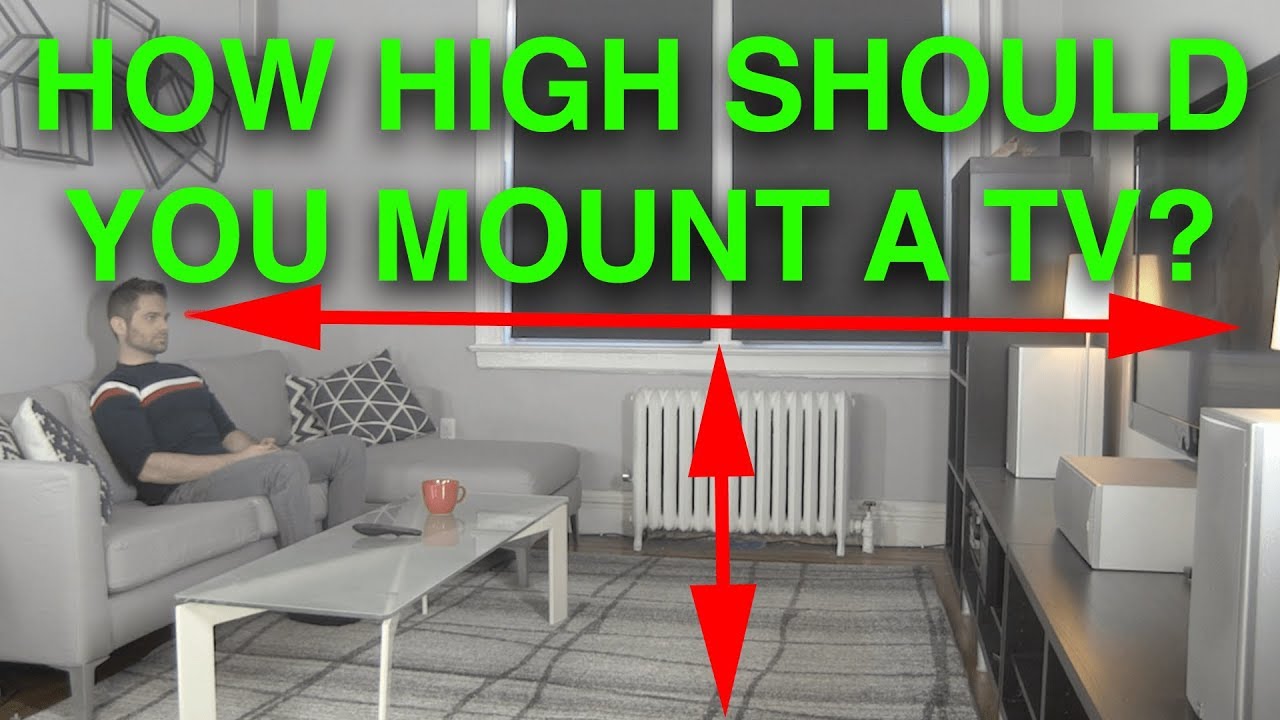
Mount your TV so the center of the screen is at your eye level when you’re seated, which is usually about 40–45 inches from the floor. This keeps your neck in a neutral position and makes long viewing comfortable.
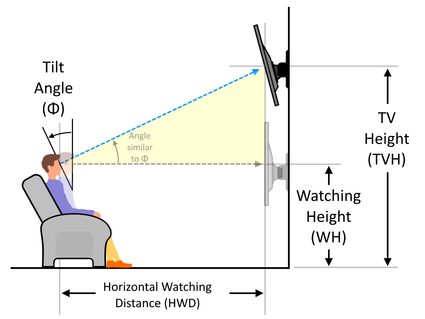
If the TV has to go higher (like above a fireplace), use a tilting mount and angle it down toward your seating spot, and try to keep the center no more than about 10–15 degrees above your line of sight.
Ideal Eye Level
Mounting your TV at the ideal eye level improves comfort and viewing quality. Watching a screen placed too high or too low can cause neck pain. The goal is to keep your eyes aligned with the center of the TV screen. This setup reduces strain during long viewing sessions.
Understanding the ideal eye level helps you find the perfect height for your TV. Follow simple steps to measure and place your TV correctly. This will create a better and more enjoyable watching experience.
Measure Your Eye Height
Sit in your usual viewing spot. Use a tape measure to find the height from the floor to your eyes. This is your natural eye level while seated. Write down this number. It will guide where to place the TV center.
Center Screen Placement
The center of the TV screen should match your eye height. This keeps your neck relaxed and your posture natural. If the TV must go higher, use a tilting mount. Tilt it downward to reduce neck strain. Always aim for the screen center to be close to eye level.
Viewing Distance
Viewing distance plays a key role in deciding the best height to mount your TV. It affects comfort and image clarity. Sitting too close or too far can tire your eyes or reduce picture quality. Finding the right distance helps you enjoy every detail without strain.
Calculate Distance From Seating
Measure the distance from where you sit to the TV wall. Use a tape measure for accuracy. This distance guides the ideal screen size and mounting height. For example, a 50-inch TV suits a viewing distance of about 6.5 feet. Keep your eyes level with the center of the screen for comfort. Adjust your seating or TV height to match this level.
Adjust Screen Size Accordingly
Choose a TV size that fits your viewing distance. Bigger screens require you to sit farther back. Smaller screens work well closer up. This balance prevents eye strain and enhances detail visibility. Use the formula: viewing distance divided by 1.5 gives a good screen size in inches. This method helps you pick the right TV and mount height for a perfect setup.
Avoiding Obstructions
Choosing the right height to mount your TV means avoiding objects that block your view. Obstructions can ruin your watching experience. Clear space around your TV helps keep your screen fully visible. This section covers key points to keep your TV unobstructed.
Consider Furniture Height
Furniture under your TV can block part of the screen. Measure the height of TV stands, cabinets, or shelves. Mount the TV above the tallest furniture for a clear line of sight. Leave extra space so the TV does not feel cramped. This approach keeps your viewing area neat and open.
Account For Fireplace Mantels
Fireplace mantels often raise the TV placement. Check the mantel height before mounting. The TV bottom should sit above the mantel to prevent blockage. Use a tilting mount if the TV must go higher. This adjustment reduces neck strain and improves comfort.
Comfort And Posture
Comfort and posture play a key role in choosing the right height to mount your TV. Watching TV for long hours can cause discomfort if the screen is too high or too low. Proper TV height reduces strain on your neck and back. It helps you enjoy shows without pain or fatigue.
Prevent Neck Strain
Mount the TV so your eyes align with the center of the screen. This position keeps your neck relaxed and avoids bending. Looking up or down for a long time can cause neck pain. A correct height helps your neck stay in a natural, comfortable position. This prevents stiffness and soreness after watching TV.
Maintain Proper Spinal Alignment
Good posture supports your spine’s natural curve. Sitting with the TV at eye level keeps your head balanced over your shoulders. This alignment reduces pressure on your spine and muscles. Poor TV height makes you slouch or lean forward. This leads to back pain and poor posture over time. Proper mounting height helps maintain a healthy spine while you watch.
Use Of Tilting Mounts
Tilting mounts offer a flexible solution for mounting your TV at different heights. They allow the screen to angle downward or upward. This helps improve comfort and viewing experience without lowering the TV physically. Tilting mounts are especially helpful when placing the TV above eye level. They reduce neck strain by adjusting the screen angle. These mounts also help manage glare and improve the viewing angle in bright rooms.
Mounting Above Fireplace
Mounting a TV above a fireplace often places it higher than the ideal eye level. A tilting mount solves this problem. It allows you to angle the TV downward. This change makes watching easier and more comfortable. It prevents you from constantly looking up. Tilting mounts keep your posture better and reduce neck pain. This setup is common in living rooms where space is limited.
Reducing Glare And Viewing Angle
Glare from windows or lights can spoil your TV watching. Tilting mounts help reduce glare by changing the screen angle. You can tilt the TV to avoid reflections. This makes the picture clearer and colors more vivid. Tilting mounts also improve the viewing angle for people sitting in different spots. Everyone gets a better view, no matter where they sit. This increases the overall enjoyment of your TV time.
Credit: www.youtube.com
Special Room Considerations
Special room features can affect the best height to mount your TV. Each space has unique needs. Taking these into account helps improve your viewing comfort and safety.
Consider the furniture, who uses the room, and how the space is shared. These details guide the right TV placement for your home.
Tall Seating Arrangements
Tall chairs or sofas raise viewers’ eye level. Mount the TV higher than usual to match this height. This prevents neck strain and keeps the picture clear. Measure the seated eye height before mounting. Adjust the TV so the center of the screen aligns with this level.
Multiple Viewing Positions
Rooms with many seats need a balanced TV height. Place the screen where most viewers can see it comfortably. Consider a height that works for both sitting and standing viewers. A slight tilt mount can help adjust the angle for better sightlines. This setup avoids discomfort and keeps everyone happy.
Child And Pet Safety
Mount the TV out of reach of children and pets. Higher placement reduces the risk of accidents and damage. Use secure wall mounts and consider locking cables. This keeps the TV stable and safe. Always check the weight limits of mounts and follow installation instructions closely.
Common Mistakes
Choosing the right height to mount your TV can be tricky. Many people make common mistakes that hurt their viewing experience. These errors can cause discomfort and strain. Knowing what to avoid helps you enjoy your TV better. Here are two common mistakes to watch out for.
Mounting Too High
Mounting a TV too high is a frequent error. It causes neck pain from looking up for long periods. Your eyes should align with the TV’s center when seated. Placing the TV above eye level forces your head to tilt back. This posture is tiring and uncomfortable. A TV mounted too high can spoil your viewing pleasure.
Ignoring Viewing Angles
Ignoring viewing angles reduces picture quality and comfort. Sitting too far to the side or at a steep angle makes the image look distorted. Colors may fade, and the screen might appear dim. The best spot is where you face the TV straight on. Adjust the mount to allow tilting or swiveling for better angles. Proper viewing angles create a clear and enjoyable picture.
Enhancing Viewing Experience
Mounting your TV at the right height improves comfort and picture quality. It lets you enjoy shows and movies without straining your neck or eyes. The goal is to create a natural and relaxed viewing position. This helps you stay focused and enjoy every detail on screen. Proper height also reduces glare and reflections, making the picture clear and vivid.
Consider your seating arrangement and room size to find the perfect spot. A well-placed TV blends with your room and enhances the overall look. Thoughtful mounting transforms your space into a cozy entertainment area. Small changes in height can make a big difference in how you feel while watching TV.
Creating Immersive Setup
Place the TV so the screen center matches your eye level while seated. This angle creates a natural line of sight and reduces neck strain. Keep the screen close enough to fill your view but not so close it feels overwhelming. A good rule is to sit about 1.5 to 2.5 times the diagonal screen size away.
Use a tilting or swiveling mount to adjust the angle easily. This helps direct the screen towards your main seating spot. Avoid mounting the TV too high or too low to keep the image comfortable to watch. Position speakers and lighting to complement the TV placement. This setup immerses you fully in the content.
Balancing Height And Room Layout
Check the furniture height and seating positions before mounting the TV. The screen should clear any obstacles like cabinets or mantels. Make sure it does not block windows or pathways. Consider the room’s shape and how you arrange furniture around the TV.
Measure eye level from your usual sitting spot and mark the wall accordingly. Adjust mounting height to fit your room’s design and comfort needs. A balanced layout ensures everyone in the room has a good view. It also keeps the space looking neat and inviting.
Credit: www.omnicalculator.com
Conclusion
Mount your TV with the center at eye level for comfort. Sitting straight or slightly looking down helps reduce neck strain. Avoid placing the TV too high to keep good posture. Measure your eye height while seated before mounting. Use a tilting mount if you must place the TV above a fireplace.
Proper height improves your viewing experience and comfort. Take time to find the right spot for your TV. Enjoy watching without pain or discomfort every time.