
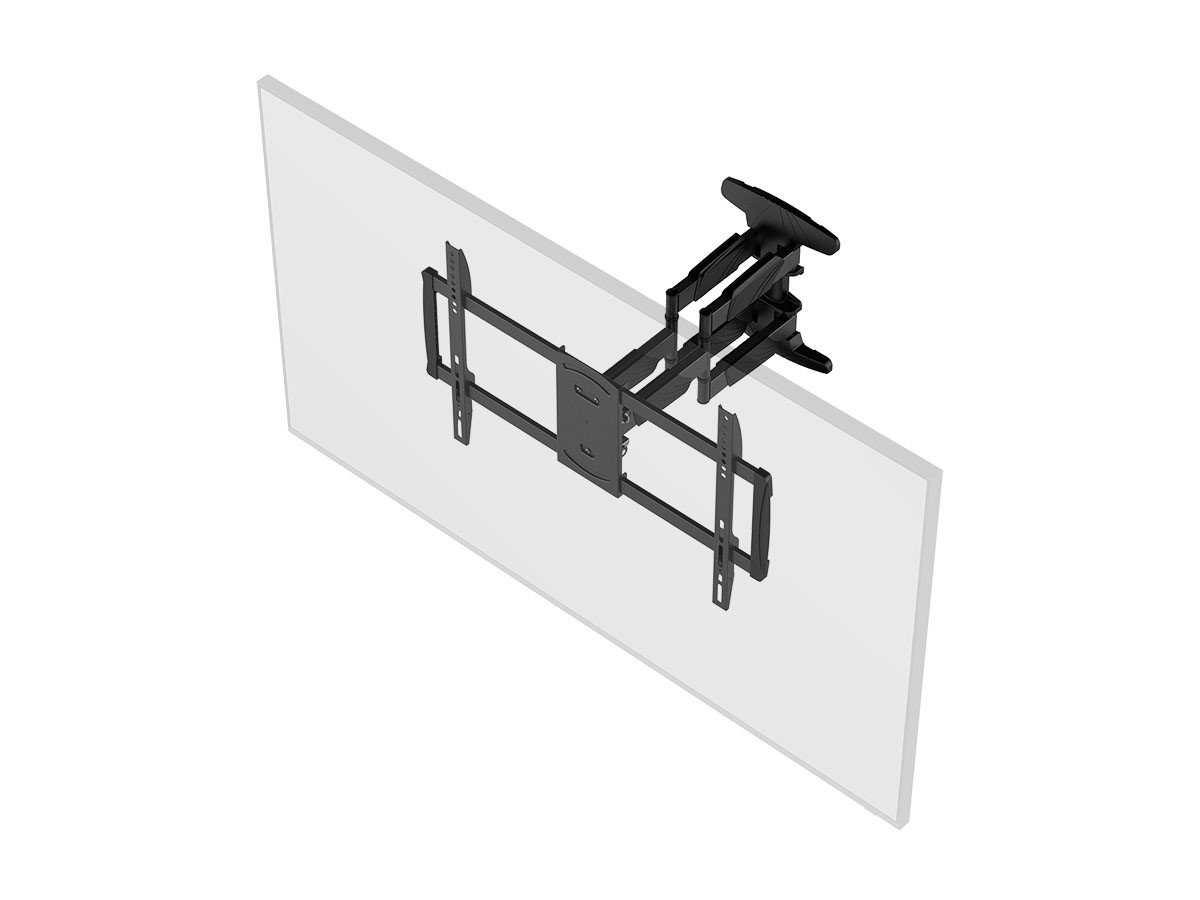
Full motion TV mounts work like a hinged arm: a wall plate bolts into studs, an extendable arm swings out, and a TV plate attaches to the back of your TV. The arm lets you pull the TV away from the wall, swivel it left or right, and usually tilt it up or down to reduce glare. When you’re done, you push it back to sit close to the wall. Because the TV moves, the mount uses locking joints and strong hardware to hold position without sagging.
Full Motion Tv Mount Basics
Understanding the basics of full motion TV mounts helps you choose the right one. These mounts offer flexibility to position your TV at the perfect angle. They allow movement in multiple directions for an improved viewing experience.
Full motion mounts are ideal for rooms with various seating areas. They also help reduce glare and make accessing ports easier. Let’s explore how these mounts work and their key parts.
Core Components
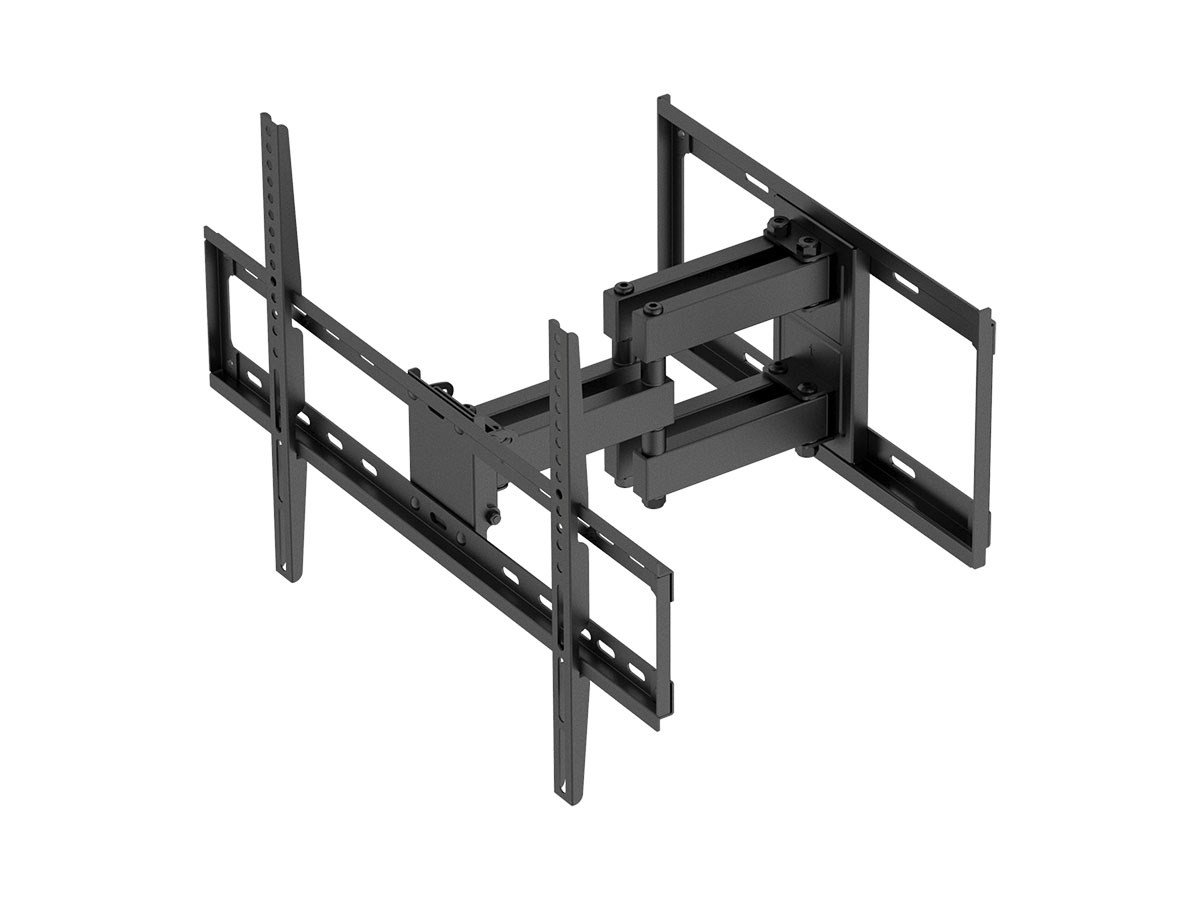
A full motion TV mount has several main parts. The wall plate attaches firmly to the wall. Arms extend from the plate to hold the TV securely.
Joints connect the arms and allow movement. They usually have hinges and swivels. Screws and bolts keep everything tight and stable. The mounting plate connects directly to your TV.
How Movement Works
The mount moves in three ways. It can tilt up and down to adjust the viewing angle. Swiveling lets you turn the TV left or right easily.
The arms extend outward from the wall. This lets you pull the TV closer or push it back. These movements combine to give you many ways to position your TV.
Adjusting is simple. Just hold the TV and move it gently. The mount holds the TV firmly in place once set.
Credit: www.monoprice.com
Movement Types Explained
Full motion TV mounts offer flexible movement to improve your viewing experience. Understanding the types of movements helps you choose the right mount. These mounts allow you to adjust your TV position easily. Three main movement types define their functionality.
Each movement type serves a different purpose. Together, they provide complete control over your TV’s angle and placement. Let’s explore how swivel, tilt, and extension work.
Swivel Function
The swivel function lets you turn your TV side to side. This movement helps you watch from different spots in the room. It usually rotates up to 90 degrees in either direction. Swiveling prevents glare and provides better viewing angles.
Tilt Adjustment
Tilt adjustment moves the TV screen up or down. This feature is useful when the mount is placed higher or lower than eye level. Tilting reduces neck strain and improves picture clarity. Typically, the tilt range is between 10 to 15 degrees.
Extension And Retraction
Extension allows the TV to pull away from the wall. Retraction pushes the TV back flat against the wall. This movement gives access to TV ports and cables easily. It also lets you position the TV closer or farther for comfort.
Installation Insights
Installing a full motion TV mount requires careful planning. The process involves securing the mount safely to support the TV’s weight and movement. Understanding the mounting surface and the TV’s size helps ensure a stable setup. This section explains key installation tips for different wall types and important weight considerations.
Mounting On Studs
Studs offer the strongest support for full motion TV mounts. Use a stud finder to locate the wooden beams behind the drywall. Align the mount’s bracket holes with the studs for maximum stability. Use long screws designed for wood to secure the mount firmly. Drilling into studs prevents the mount from pulling away from the wall. This method is the safest for heavier TVs and dynamic movement.
Mounting Without Studs
Sometimes studs are not in the right place for mounting. In these cases, use heavy-duty drywall anchors rated for the TV’s weight. Choose toggle bolts or molly bolts for better grip inside the wall. Avoid just using regular screws in drywall as they can fail. Spread the mount’s weight evenly with multiple anchors. This method works for lighter TVs or short-term setups but requires careful weight management.
Weight And Size Considerations
Always check the mount’s weight limit before installation. The TV’s size affects how much force the mount must handle. Larger TVs put more stress on the mount and wall. Full motion mounts add extra leverage, increasing the load on screws and anchors. Select a mount designed for your TV’s size and weight. Overloading the mount risks damage and unsafe conditions.
Credit: www.reddit.com
Benefits Of Full Motion Mounts
Full motion TV mounts bring several advantages to your home entertainment setup. They allow you to adjust your TV to fit different viewing needs and room layouts. These mounts improve comfort and enhance your watching experience. Plus, they help keep your space organized and functional.
Flexible Viewing Angles
Full motion mounts let you tilt, swivel, and extend your TV. This flexibility means you can watch from many spots in the room. Adjust the screen angle to avoid neck strain and get the best picture. It works well in rooms with multiple seating areas or open layouts.
Glare Reduction
Glare can spoil your TV viewing. Full motion mounts let you change the TV’s angle to reduce reflections. Move the screen away from windows or bright lights easily. This way, you enjoy clear images without annoying glare on the screen.
Easy Access To Ports
These mounts extend the TV away from the wall. This makes it simple to reach the ports on the back or sides. Connect or disconnect cables without hassle. It saves time and avoids damage to cables or the TV.
Comparing Mount Types
Choosing the right TV mount affects how you enjoy your viewing experience. Different mounts offer various ways to position your TV. Understanding these types helps pick the best fit for your space and needs. Comparing fixed, tilted, and full motion mounts reveals their unique features and uses.
Fixed Vs Full Motion
Fixed mounts hold your TV flat against the wall. They offer a clean look and save space. The TV cannot move once mounted. Full motion mounts let you pull the TV away from the wall. You can swivel, tilt, and extend the screen. This flexibility helps change your viewing angle easily. Ideal for rooms with multiple seating areas, full motion mounts enhance comfort. Fixed mounts suit simple setups and tight spaces.
Tilted Vs Full Motion
Tilted mounts allow the TV to lean up or down. This reduces glare and improves the viewing angle. You can adjust the screen’s vertical position slightly. Full motion mounts do this and more. They also swivel side to side and extend outward. Tilted mounts work well when your TV is mounted higher than eye level. Full motion mounts provide full range movement for better control. Both help protect your neck and eyes by adjusting the angle.
Choosing The Right Mount
Choosing the right full motion TV mount is important for a great viewing experience. The mount must fit your room, TV size, and budget. Picking the best one helps you enjoy your TV from different angles easily.
Room Layout Factors
Think about where you want to place your TV. Walls with enough space and no obstacles are best. Make sure the mount can reach your desired viewing spots. Check for nearby power outlets and cable connections. The mount should allow movement without hitting furniture or walls.
Tv Size Compatibility
Check the size and weight of your TV before buying a mount. Full motion mounts have limits on how big and heavy your TV can be. The mount must support your TV’s weight safely. Also, look for mounts with VESA patterns that match your TV’s back holes. This ensures a proper fit.
Budget Considerations
Full motion mounts come in different price ranges. Decide how much you want to spend. Higher-priced mounts often have better build quality and more features. Cheaper mounts may work but might lack smooth movement or durability. Balance cost with your needs for the best value.
Maintenance And Safety Tips
Maintaining your full motion TV mount ensures long-lasting use and safety. Regular care prevents damage and keeps the mount working smoothly. Follow simple tips to keep your setup secure and efficient.
Regular Checks
Inspect the mount every few months for loose screws or bolts. Tighten any parts that feel loose to avoid accidents. Check the wall brackets for cracks or rust. Make sure the mount moves freely without resistance. Clean dust and dirt from joints and arms to prevent wear. Look for signs of metal fatigue or bending. Early detection helps prevent bigger problems.
Safe Adjustments
Always support the TV with both hands during adjustments. Avoid forcing the mount beyond its movement limits. Use gentle, steady pressure when tilting or swiveling. Adjust the TV slowly to prevent sudden movements. Keep children away during adjustments to avoid injury. Use the recommended tools for tightening screws. Follow the mount manufacturer’s instructions for safe use.
Credit: www.monoprice.com
Conclusion
Full motion TV mounts let you adjust your screen easily. They swivel, tilt, and extend from the wall. This flexibility helps reduce glare and improve viewing angles. You can watch comfortably from different spots in the room. Installing one gives your space a neat, organized look.
Always check the mount’s weight limit before buying. Proper installation ensures your TV stays secure and stable. Overall, full motion mounts add convenience and comfort to your entertainment setup.