
Are you struggling to get a clear picture on your TV? One simple fix might be right above you—your TV antenna direction.
Pointing your antenna the right way can make a huge difference in the channels you receive and the quality of your signal. But how do you know which way to point it? You’ll discover easy tips and tricks to find the perfect direction for your antenna.
Say goodbye to fuzzy screens and endless adjustments. Keep reading, and you’ll have your TV working perfectly in no time.
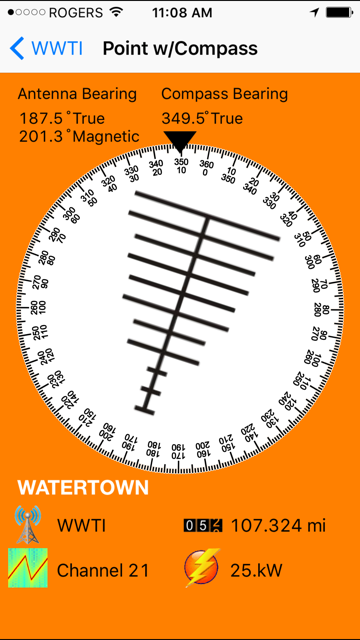
Credit: otacanada.weebly.com
Choosing The Right Direction
Pointing your TV antenna in the right direction is key to getting clear channels. The direction affects the signal strength and picture quality. A small change can make a big difference in your viewing experience.
To find the best direction, use tools and simple steps. This helps avoid guesswork and saves time. Two main ways can guide you: using signal maps and identifying local broadcast towers.
Using Signal Maps
Signal maps show where TV signals come from. They display the direction and strength of signals in your area. You can find these maps online for free. Enter your address to see the best antenna direction.
These maps help you avoid pointing your antenna toward weak signals. They also show obstacles like mountains or tall buildings. This info helps you choose the clearest path for your antenna.
Identifying Local Broadcast Towers
Local broadcast towers send TV signals to your area. Knowing their location helps aim your antenna correctly. Use a compass or smartphone app to find the tower’s direction from your home.
Pointing your antenna toward the nearest tower often gives the strongest signal. Some towers may be closer but blocked by obstacles. Check for the tallest, clearest path to the tower.
Combine this with the signal map to confirm the best direction. This ensures your antenna picks up strong, clear signals for better TV reception.

Credit: www.youtube.com
Tools For Precise Alignment
Pointing your TV antenna in the right direction is key to getting clear channels. Tools for precise alignment help find the best signal quickly. They make the process simple and reduce guesswork. Using the right tools saves time and improves your viewing experience.
Signal Meter Devices
Signal meter devices measure the strength of broadcast signals. They show how strong a signal reaches your antenna. You can adjust the antenna position while watching the meter. This helps find the best direction for clear reception. Some meters work with many antenna types. They are small, portable, and easy to use.
Smartphone Apps For Signal Strength
Smartphone apps offer a handy way to check signal strength. Many apps use your phone’s GPS to find nearby towers. They guide you on where to point your antenna. These apps show signal levels in real time. You can move the antenna and watch the signal change. Most apps are free or cost very little.
Antenna Types And Their Orientation
Choosing the right direction for your TV antenna depends on the antenna type. Different antennas need different orientations for the best signal. Knowing your antenna type helps you aim it correctly. This section explains common antenna types and how to point them.
Directional Antennas
Directional antennas focus on signals from one direction. They work best when pointed directly at the broadcast tower. Aim the antenna straight toward the strongest signal source. This helps reduce interference and improves picture quality. Small adjustments can make a big difference. Use a compass or a signal meter to find the best angle.
Omnidirectional Antennas
Omnidirectional antennas receive signals from all around. They do not need precise aiming. You can place them in a central spot with a clear view. These antennas pick up signals from multiple towers at once. They work well in areas with many broadcast sources. Keep them high and away from large objects for better reception.
Adjusting Antenna Height And Placement
Adjusting the height and placement of your TV antenna greatly affects the signal quality. Small changes can lead to clearer pictures and fewer interruptions. Finding the right spot takes some testing and patience.
Elevating Antenna For Better Reception
Raising your antenna often improves signal strength. The higher it is, the fewer obstacles the signal faces. Try placing it on a roof, attic, or tall pole. Even moving it a few feet higher can make a big difference.
Keep in mind that very tall placements may need extra support. Safety is important when installing antennas at height. Use sturdy mounts and avoid power lines.
Avoiding Obstructions
Obstructions block or weaken TV signals. Trees, buildings, and walls reduce signal quality. Place your antenna where it has a clear line of sight to broadcast towers.
Try to keep the antenna away from metal objects and electronic devices. These cause interference. Move your antenna around to find the spot with the fewest obstacles.
Troubleshooting Common Issues
Troubleshooting common issues with your TV antenna helps improve signal quality. Understanding problems can save time and effort. It also ensures you get clear channels without interruptions.
Interference Sources
Interference can block your TV signal. Common sources include electronic devices like routers, microwaves, and cordless phones. These create noise that weakens your antenna’s reception. Move your antenna away from these devices. Also, large metal objects or walls can reduce signal strength. Try changing your antenna’s position to avoid such obstacles.
Weather Impact On Signal
Weather affects TV signals more than many realize. Rain, snow, and strong winds can disrupt the signal path. Heavy clouds sometimes block signals from reaching your antenna. Storms may cause temporary signal loss or pixelation. If the weather is bad, wait for it to clear. After that, check your antenna’s position again to restore good reception.
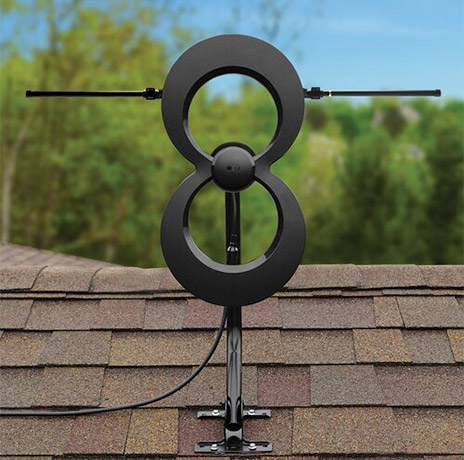
Credit: www.thefreetvproject.org
Fine-tuning For Optimal Signal
Fine-tuning your TV antenna is key to getting the best signal. Small changes in direction can improve picture quality and reduce interruptions. It takes patience and careful adjustments to find the perfect spot.
Testing Multiple Directions
Start by turning your antenna slowly from one side to the other. Check the TV screen for signal strength and picture clarity as you move. Try pointing it at different broadcast towers if you know their locations. Note which direction gives the best reception. Repeat this process several times. Signal strength can change with small shifts in angle. Testing multiple directions helps you find the strongest signal.
Locking The Antenna Position
Once you find the best direction, secure the antenna in place. Use screws, clamps, or brackets to keep it steady. A moving antenna can cause signal loss or flickering pictures. Double-check the signal after locking it. Make small tweaks if needed, then tighten everything firmly. Keeping the antenna stable ensures consistent reception and fewer interruptions. A locked position saves you from constant adjustments later.
Conclusion
Pointing your TV antenna correctly ensures the best signal and clear picture. Start by finding the nearest broadcast towers using online tools. Adjust the antenna slowly while checking the channel list. Small changes can make a big difference. Remember, obstacles like trees or buildings may affect reception.
Keep trying different angles until you get the strongest signal. A well-placed antenna saves you frustration and improves your viewing experience. Stay patient and enjoy watching your favorite shows without interruptions.