
Are you ready to get the best TV signal without any hassle? Connecting your coaxial cable to your TV antenna might seem tricky, but it doesn’t have to be.
With just a few simple steps, you can improve your picture quality and enjoy your favorite shows without interruptions. This guide will walk you through the process clearly and quickly, so you can get everything set up right the first time.
Keep reading, and you’ll be watching in no time!
Credit: www.aerialsandtv.com
Choosing The Right Coaxial Cable
Choosing the right coaxial cable is important for a clear TV signal. The cable connects your antenna to the TV. It carries the signal without losing quality. Picking the wrong cable can cause a weak or fuzzy picture. Understanding the types, quality, and length helps you get the best connection.
Types Of Coaxial Cables
There are different coaxial cables. The most common types are RG6 and RG59. RG6 cables have thicker insulation and better shielding. They work well for TV antennas. RG59 cables are thinner and suit short distances. For most TV setups, RG6 is the best choice.
Cable Quality And Signal Strength
Cable quality affects signal strength. Look for cables with solid copper cores. Copper provides better conductivity. Avoid cables with copper-clad aluminum cores. They can reduce signal quality. Good shielding also blocks interference from other devices. This keeps the TV picture clear and stable.
Length Considerations
The cable length can affect the signal. Longer cables may weaken the signal. Keep the cable as short as possible. If a long cable is needed, choose a high-quality one. Using signal amplifiers can help with very long runs. Plan your cable path before buying to avoid signal loss.
Credit: www.youtube.com
Preparing The Coaxial Cable
Preparing the coaxial cable is a key step before connecting it to your TV antenna. This process ensures a strong signal and clear picture quality. Careful preparation reduces signal loss and interference. Follow simple steps to get your cable ready for installation.
Stripping The Cable
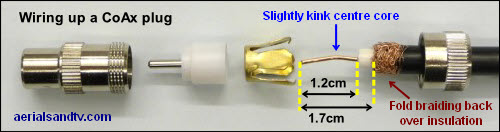
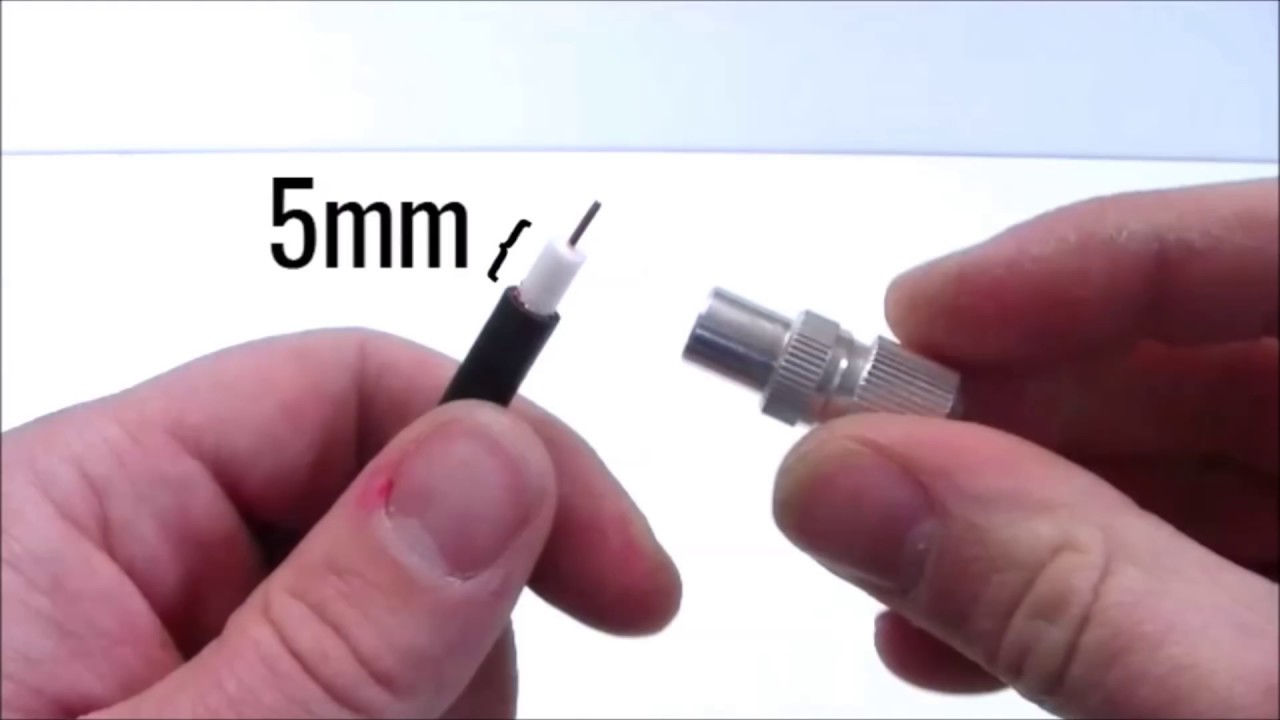
Start by cutting the cable to the right length. Use a coaxial cable stripper tool for best results. Strip about half an inch of the outer jacket. This exposes the metal shielding underneath. Be gentle to avoid cutting too deep. Keep the cable straight during this step.
Exposing The Inner Conductor
Next, peel back the braided shielding carefully. Remove the foil shield without damaging the inner conductor. Strip about a quarter inch of the inner insulation. This reveals the copper wire inside. The copper wire should be clean and straight. It will carry the signal to your TV.
Avoiding Common Mistakes
Do not nick or cut the copper wire. Damaged wire can cause poor signal quality. Avoid leaving too much or too little insulation. Incorrect stripping leads to loose connections. Keep the shielding intact but pulled back neatly. These small steps improve your antenna’s performance.
Connecting To The Tv Antenna
Connecting a coaxial cable to your TV antenna is a simple process. It ensures you get a clear signal and enjoy your favorite channels. This section guides you step-by-step on connecting the cable to the antenna correctly.
Knowing how to connect the cable properly prevents signal loss and interference. Follow these easy steps to make sure the connection is tight and secure.
Identifying The Antenna Connector
The antenna usually has a round metal connector. This is where the coaxial cable plugs in. It looks like a small, threaded hole. Check the back or bottom of the antenna for this part.
Some antennas use an F-type connector. This type has a small pin in the center. Make sure your coaxial cable matches this connector type before attaching.
Attaching The Cable Connector
Take the coaxial cable and align its connector with the antenna’s connector. The cable end should have a threaded metal ring. Place it over the antenna’s connector carefully.
Turn the cable connector clockwise to screw it onto the antenna. Turn until it feels snug but not too tight. Hand-tightening is enough to avoid damage.
Ensuring A Secure Fit
After attaching, gently pull the cable to check if it stays connected. A loose cable can cause poor signal quality. Tighten slightly if the cable feels loose.
Inspect the connection for any gaps or bends in the cable near the connector. Avoid sharp bends as they reduce signal strength. Keep the cable straight and secure for the best performance.
Connecting To The Tv
Connecting your coaxial cable to the TV is a simple step that brings your antenna signals to life. It lets you watch free TV channels with clear pictures and sound. Follow these easy steps to connect your coaxial cable correctly.
Locating The Tv Input
First, find the coaxial input on your TV. It is usually labeled “ANT IN” or “Cable In.” This port is round and has a threaded outer ring. Look on the back or side of your TV for this connection point.
Securing The Cable To The Tv
Take the end of the coaxial cable and align it with the TV input. Push the cable’s center pin into the hole gently. Then, twist the outer threaded ring clockwise to tighten it. Make sure the cable is snug but do not force it too hard.
Testing The Connection
Turn on your TV and select the antenna or TV input source. Run a channel scan to find available channels. If the scan finds channels, your connection works well. If not, check the cable for loose or damaged ends and try again.
Troubleshooting Signal Issues
Signal problems can spoil your TV watching experience. Fixing these issues is simple with basic checks and adjustments. This section helps you find and solve common signal problems fast.
Checking Cable Damage
Look at the coaxial cable closely. Find cuts, bends, or worn-out spots. Damaged cables cause weak or no signal. Replace any damaged cable part. Ensure all connectors fit tightly and cleanly.
Adjusting The Antenna Position
Move the antenna slowly while watching signal strength. Small changes can improve reception a lot. Place the antenna near a window or higher spot. Avoid metal objects that block signals. Test different directions to find the best spot.
Using Signal Amplifiers
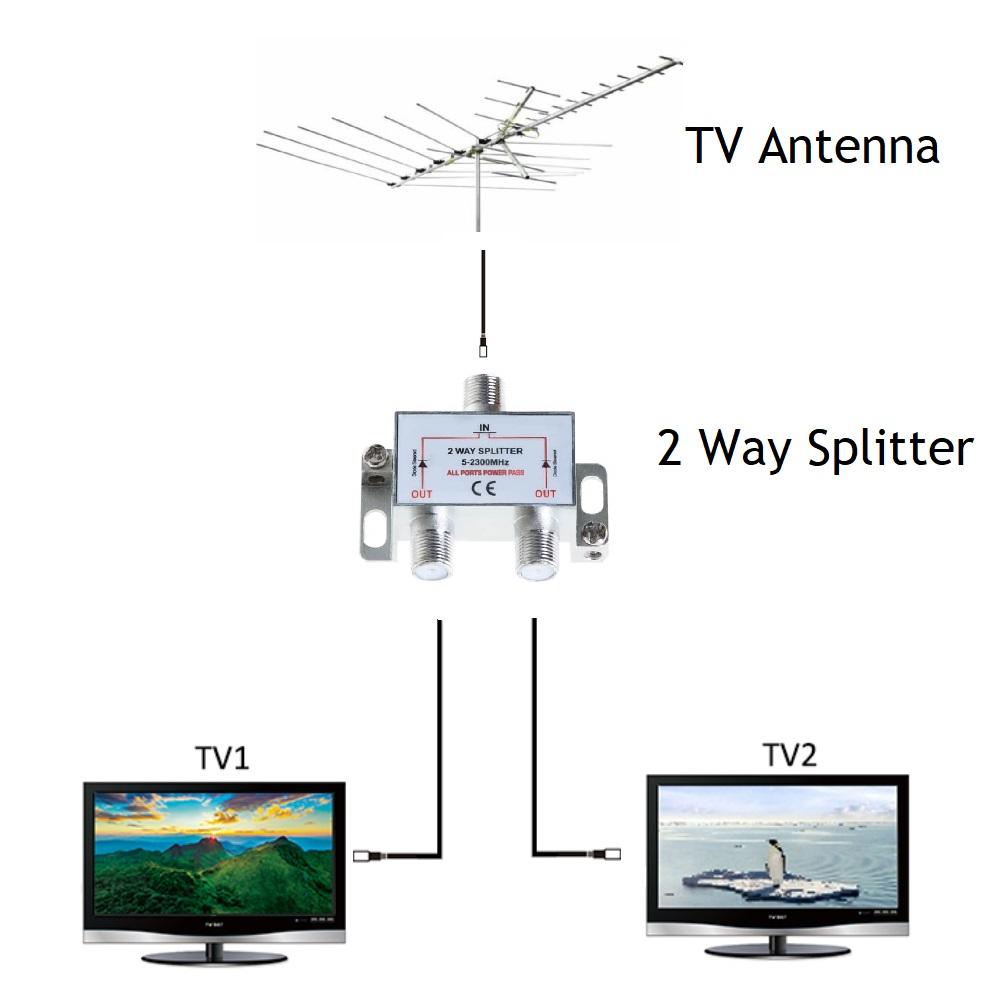
Signal amplifiers boost weak antenna signals. Use one if the signal stays weak after moving the antenna. Connect the amplifier between the antenna and TV. Check for power supply and proper installation. Amplifiers can improve picture and sound quality.
Credit: satmaximum.com
Maintaining Your Connection
Maintaining your coaxial cable connection to the TV antenna helps ensure clear signal and long cable life. Regular care prevents signal loss and interruptions. Simple steps keep your setup working well for years.
Regular Cable Inspection
Check the coaxial cable for any signs of wear or damage. Look for cracks, cuts, or bends in the cable. Make sure connectors are tight and free of rust. Inspect both ends of the cable, especially near the antenna and TV. Replace any damaged parts immediately to avoid signal problems.
Protecting From Weather Elements
Outdoor cables face sun, rain, and wind daily. Use weatherproof covers on connectors to block moisture. Secure the cable so it does not move in strong winds. Avoid placing cables where water can pool or drip. Keeping cables dry and stable prevents corrosion and signal loss.
Upgrading Components When Needed
Old cables and connectors can reduce signal quality. Swap out worn parts for new, high-quality ones. Consider upgrading to cables with better shielding to reduce interference. New connectors ensure a solid fit and good contact. Upgrading parts improves reception and keeps your system reliable.
Conclusion
Connecting a coaxial cable to a TV antenna is simple and quick. Make sure the cable is secure and fits well. Check the connection to avoid signal problems. A good connection improves your TV’s picture and sound quality. Follow the steps carefully, and you will enjoy clear channels.
This small task can boost your viewing experience at home. Try it yourself and see the difference. Easy and effective!